
Session Management
How Go Bananas! maintains editing context without coupling application state to MCP transport state.
MCP 2026-07-28 requests are stateless. The
session_iddescribed here is a Go Bananas application handle stored with image records in D1; it is not an MCP transport session. Legacy Streamable HTTP and SSE clients remain supported through the Durable Object lane.
Session Architecture
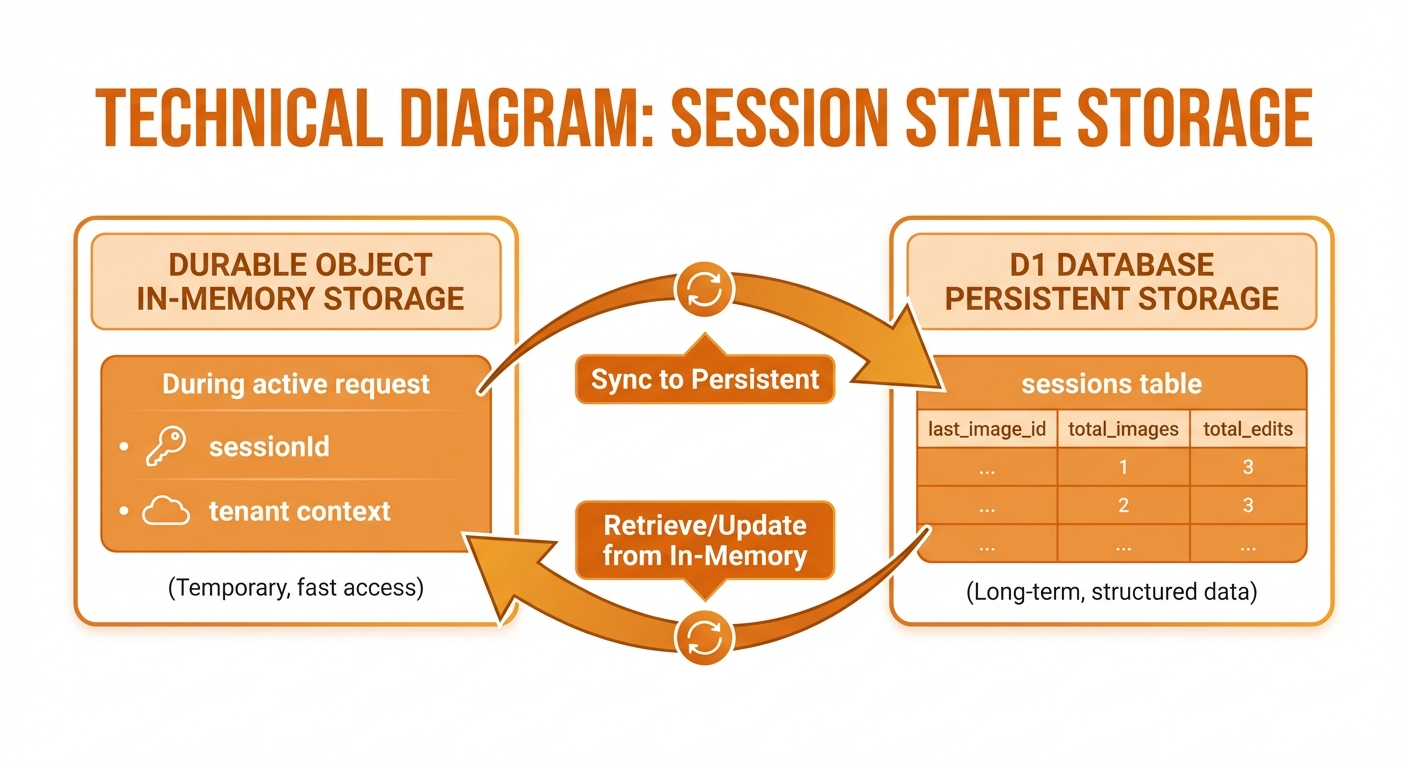
D1 is the durable application-state source; Durable Objects support legacy MCP transports
Session Model
Session Record
interface Session {
  session_id: string;      // Unique identifier
  tenant_id: string;       // Owner tenant
  last_image_id: number;   // For continue_editing
  total_images: number;    // Generation count
  total_edits: number;     // Edit count
  is_active: boolean;      // Active flag
  created_at: string;      // Creation time
  last_activity_at: string; // Last operation
}Session Lifecycle
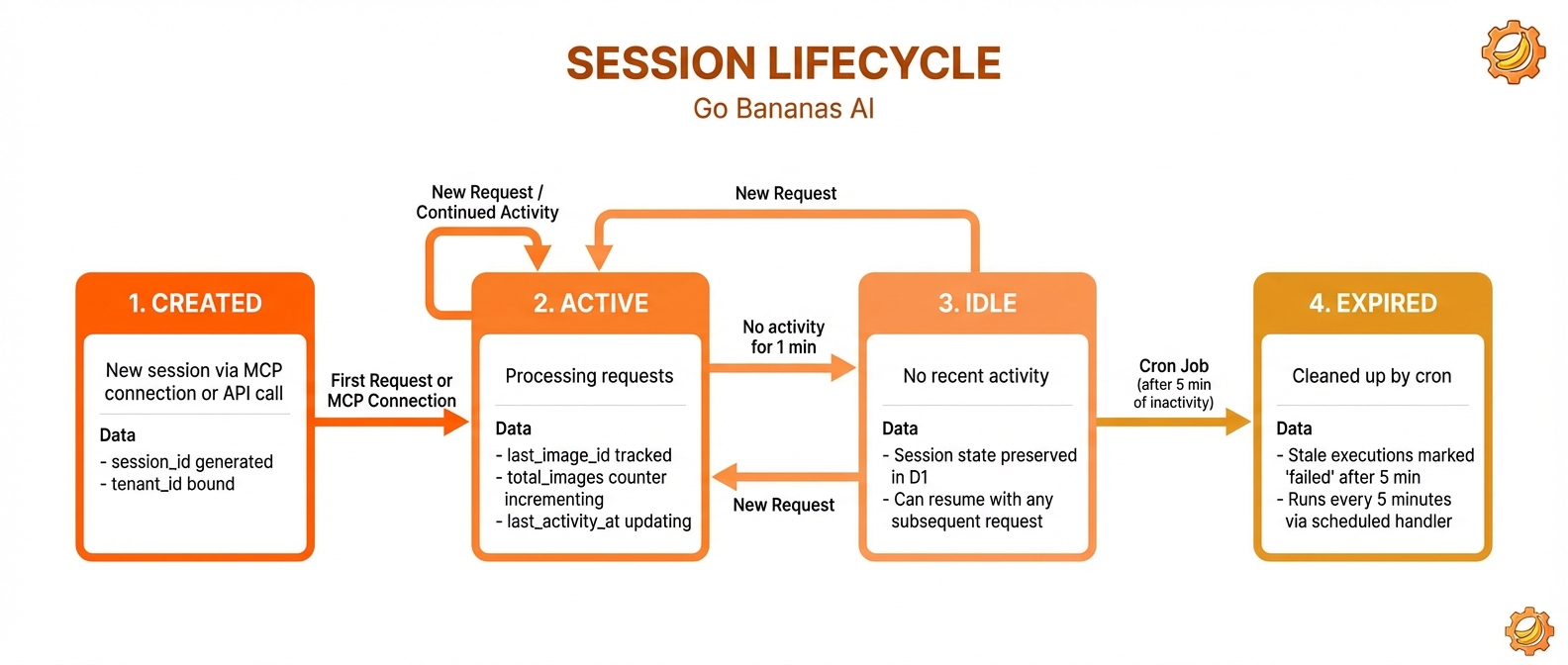
States: Created → Active → Idle → Expired with 24-hour timeout
Session Identification
CLI and Proxy Session ID
The Go Bananas CLI creates and persists a random application session ID. Its MCP client adds that value to session-aware tool calls:
const sessionId = getOrCreateSessionId();

await client.callTool({
  name: 'generate_image',
  arguments: {
    prompt: 'a sunset',
    session_id: sessionId,
  },
});Custom Session ID
Custom clients should generate one unguessable ID and reuse it for related operations:
await client.callTool({
  name: 'generate_image',
  arguments: {
    "prompt": "a sunset",
    "session_id": "sess_550e8400-e29b-41d4-a716-446655440000"
  },
});Use cases:
- Project organization
- Cross-client continuity
- API integration tracking
State Management
Modern Stateless Requests
For MCP 2026-07-28, the server resolves the application handle on every tool call, loads the matching D1 state, and builds an isolated request-scoped tool server:
const server = await createGoBananasStatelessServer({
  env,
  tenant,
  mcpContext,
  requestBody, // contains tools/call arguments.session_id
});There is no transport session to create, resume, or delete in this path.
Legacy Durable Object Lane
Legacy MCP clients still use Durable Object routing for transport compatibility. Tool results and editing history continue to persist in D1, so the Durable Object is not the sole copy of application state.
Persistent State (D1)
After operations:
async function updateSessionState(
  db: D1Database,
  sessionId: string,
  tenantId: string,
  newImageId: number,
  isEdit: boolean
) {
  await db.prepare(`
    INSERT INTO sessions (session_id, tenant_id, last_image_id, total_images, total_edits)
    VALUES (?, ?, ?, 1, ?)
    ON CONFLICT(session_id, tenant_id)
    DO UPDATE SET
      last_image_id = excluded.last_image_id,
      total_images = total_images + 1,
      total_edits = total_edits + ?,
      last_activity_at = datetime('now')
  `).bind(
    sessionId,
    tenantId,
    newImageId,
    isEdit ? 1 : 0,
    isEdit ? 1 : 0
  ).run();
}Conversational Editing Flow
The continue_editing Pattern
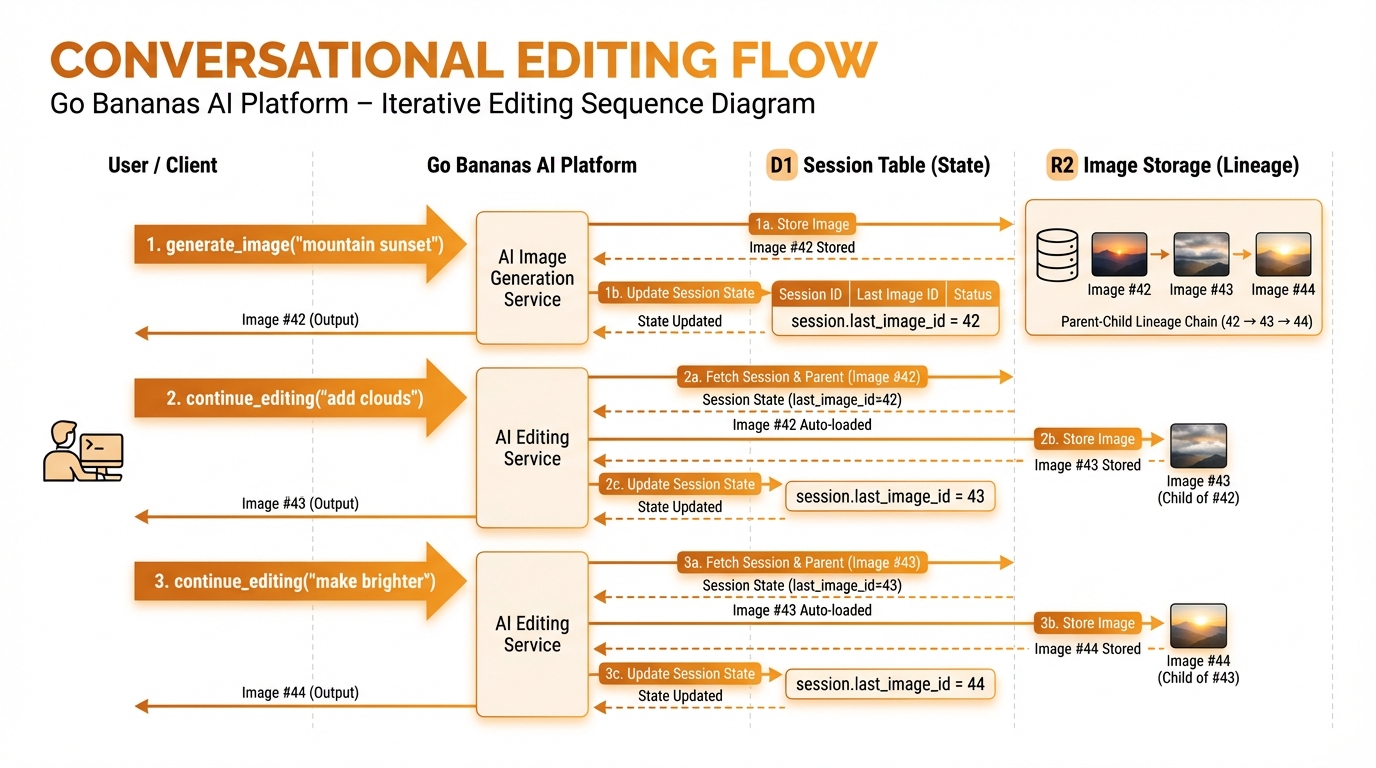
Auto-select last image: generate → edit → edit chain
Implementation
async function continueEditing(
  env: Env,
  tenantId: string,
  sessionId: string,
  geminiApiKey: string,
  input: ContinueEditingInput
) {
  // 1. Get current session state
  const session = await env.DB.prepare(
    'SELECT last_image_id FROM sessions WHERE session_id = ? AND tenant_id = ?'
  ).bind(sessionId, tenantId).first();

  if (!session?.last_image_id) {
    throw new Error('No image to edit. Generate an image first.');
  }

  // 2. Load the image to edit
  const image = await env.DB.prepare(
    'SELECT r2_key, width, height FROM images WHERE id = ? AND tenant_id = ?'
  ).bind(session.last_image_id, tenantId).first();

  // 3. Download from R2
  const imageBuffer = await env.R2_IMAGES.get(image.r2_key);

  // 4. Edit with Gemini
  const editedImage = await editWithGemini(geminiApiKey, imageBuffer, input.prompt);

  // 5. Upload new image
  const result = await uploadImage(env, tenantId, editedImage);

  // 6. Update session state
  await updateSessionState(env.DB, sessionId, tenantId, result.id, true);

  return result;
}Session Queries
Get Session Info
SELECT
    session_id,
    last_image_id,
    total_images,
    total_edits,
    created_at,
    last_activity_at
FROM sessions
WHERE session_id = ? AND tenant_id = ?;List Session Images
SELECT
    id, prompt, operation_type, edit_depth,
    parent_image_id, thumbnail_url, created_at
FROM images
WHERE session_id = ? AND tenant_id = ?
ORDER BY created_at DESC
LIMIT ?;Session Statistics
SELECT
    s.session_id,
    s.total_images,
    s.total_edits,
    COALESCE(SUM(i.size_bytes), 0) as storage_bytes,
    s.created_at,
    s.last_activity_at
FROM sessions s
LEFT JOIN images i ON i.session_id = s.session_id AND i.tenant_id = s.tenant_id
WHERE s.tenant_id = ?
GROUP BY s.session_id
ORDER BY s.last_activity_at DESC;Edit Lineage Tracking
Parent-Child Relationships
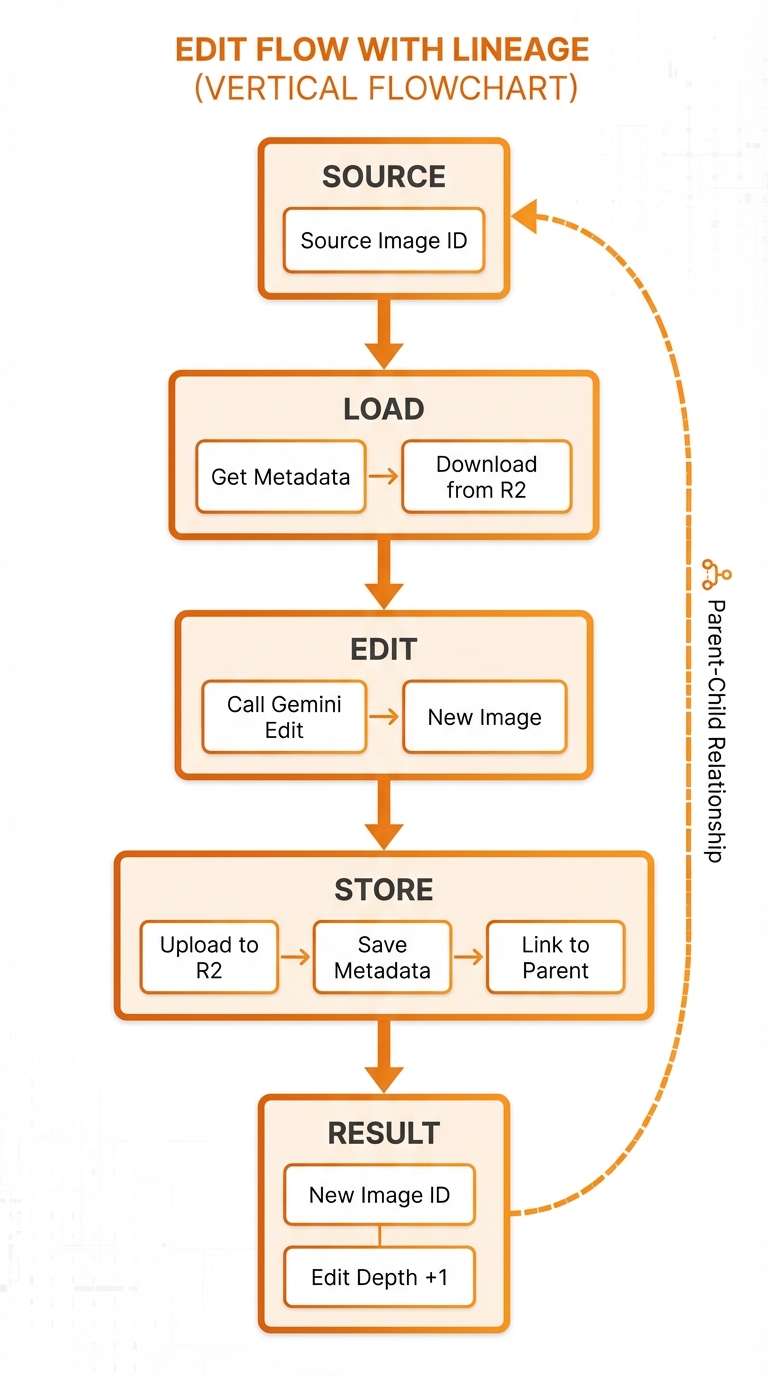
Parent-child relationships with edit depth tracking
Schema Support
-- images table includes:
parent_image_id INTEGER,  -- Reference to source image
edit_depth INTEGER DEFAULT 0,  -- 0=original, 1+=edits
edit_prompt TEXT, -- The edit instruction usedQuerying Edit History
-- Get full edit lineage for an image
WITH RECURSIVE edit_chain AS (
    -- Base case: the target image
    SELECT id, parent_image_id, edit_depth, prompt, edit_prompt
    FROM images
    WHERE id = ? AND tenant_id = ?

    UNION ALL

    -- Recursive: find parent
    SELECT i.id, i.parent_image_id, i.edit_depth, i.prompt, i.edit_prompt
    FROM images i
    JOIN edit_chain ec ON i.id = ec.parent_image_id
)
SELECT * FROM edit_chain
ORDER BY edit_depth ASC;Session Expiration
Timeout Policy
Sessions expire after 24 hours of inactivity:
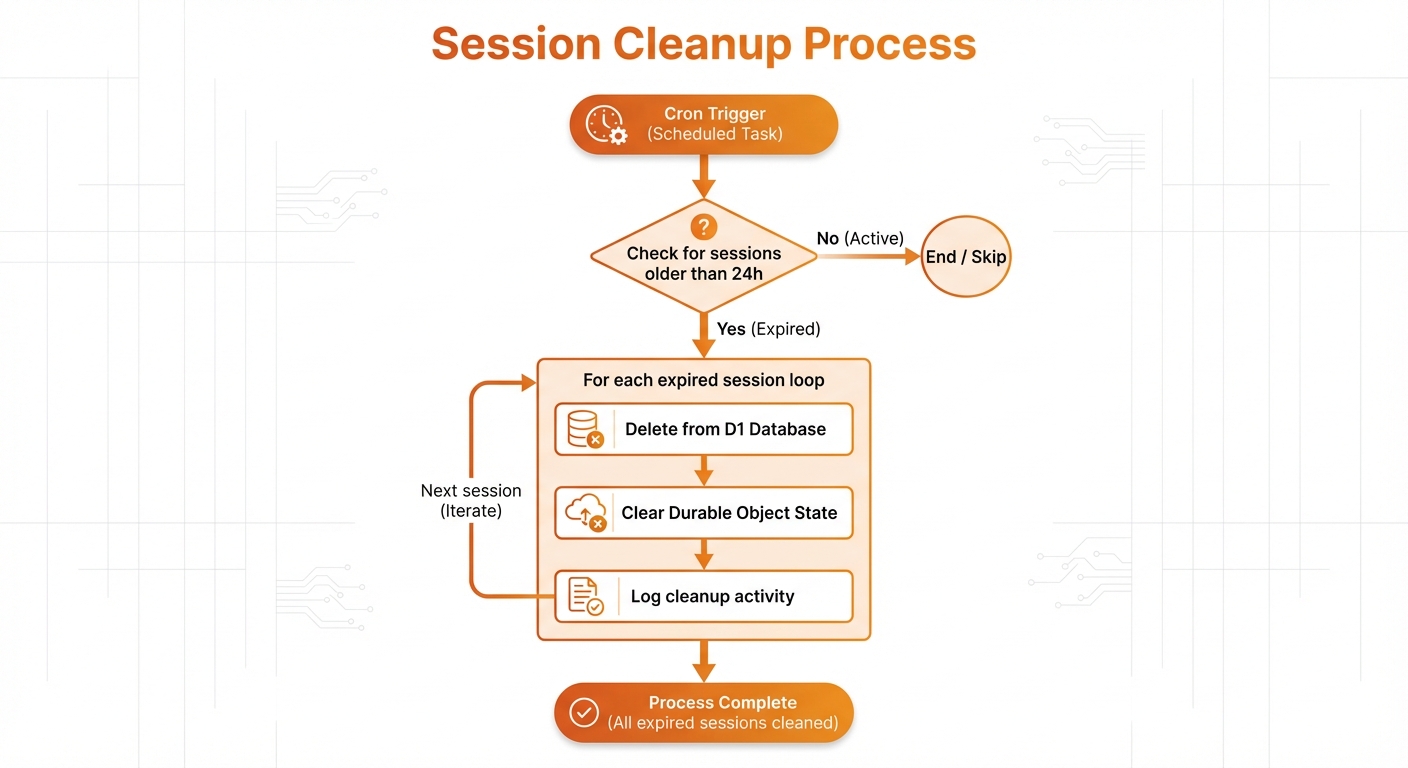
Cron-triggered cleanup: check timeout → delete → log
Expiration Query
-- Mark inactive sessions
UPDATE sessions
SET is_active = 0
WHERE last_activity_at < datetime('now', '-24 hours')
AND is_active = 1;Recovery
Expired sessions can be "revived":
// Explicitly continue from an image
{
  "tool": "edit_image",
  "params": {
    "image_id": 42,  // Explicit ID
    "prompt": "add clouds"
  }
}This creates a new session context around the specified image.
Multi-Tenant Session Isolation
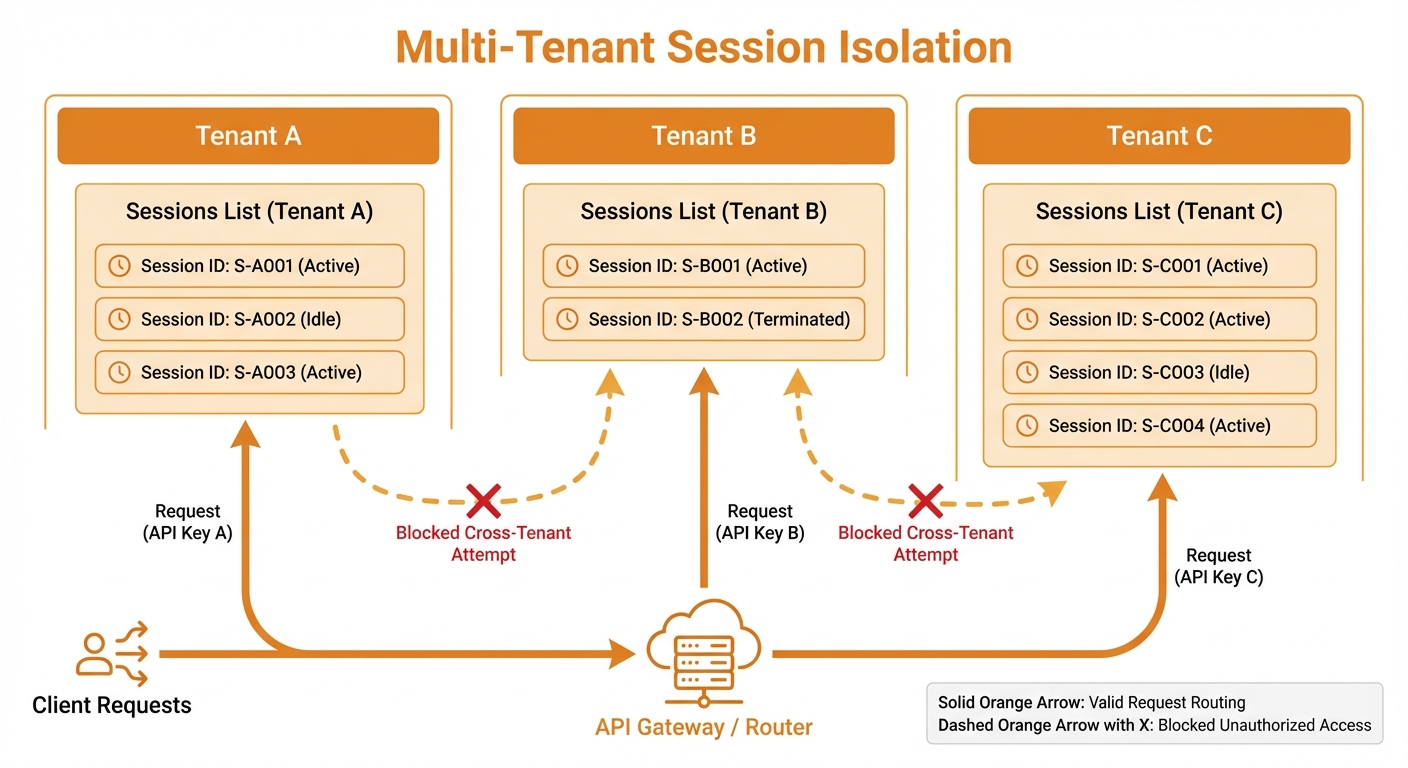
Complete isolation: each tenant has separate sessions
Multi-Session Patterns
One Session Per Project
Session: "book-cover-2024"
├── Image #1: Initial concept
├── Image #2: Color adjustment
├── Image #3: Text placement
└── Image #4: Final versionParallel Exploration
Session A: "cover-option-1"
├── Dark, mysterious theme
└── Multiple iterations

Session B: "cover-option-2"
├── Bright, cheerful theme
└── Multiple iterationsAPI Integration
Session: "api-{user_id}-{timestamp}"
├── Programmatic generations
└── Automated workflowsBest Practices
1. Use Meaningful Session IDs
✅ "marketing-campaign-2024-q1"
✅ "character-luna-development"
✅ "user-123-session-456"

❌ "test"
❌ "abc123"2. Check Session State Before Editing
// Get current context before operations
const session = await getSessionHistory({ limit: 1 });
console.log(`Current image: #${session.last_image_id}`);3. Use edit_image for Specific Images
// When you know exactly which image to edit
await editImage({ image_id: 42, prompt: "..." });

// vs continue_editing for conversational flow
await continueEditing({ prompt: "..." });4. Clean Up Old Sessions
Monitor storage usage:
SELECT
    s.session_id,
    COALESCE(SUM(i.size_bytes), 0) as storage_mb
FROM sessions s
LEFT JOIN images i ON i.session_id = s.session_id
WHERE s.tenant_id = ?
GROUP BY s.session_id
ORDER BY storage_mb DESC;