
Features Overview
Go Bananas! provides a comprehensive set of features for AI-powered image generation and management.
Feature Categories
Models & Best Practices
| Feature | Description |
|---|---|
| Pro Model Best Practices | Google's 10 tips for professional generation |
| OpenAI gpt-image-2 | OpenAI's flagship image model — text rendering, prompt adherence, quality tiers |
| OpenAI GPT Image 2.5 | Flare and Sunburst — xhigh/max quality and transparent backgrounds |
Golden Rules of Prompting
- Edit, Don't Re-roll - Use
continue_editingfor 80%+ correct images - Natural Language - Full sentences, not tag soups
- Materiality - Describe textures: "brushed steel", "soft velvet"
- Context - Add "for whom": changes everything
- Identity Locking - "Keep facial features exactly the same as Image 1"
Image Creation & Editing
| Feature | Description |
|---|---|
| Image Generation | Create images from text with style control |
| Image Editing | Conversational editing without re-uploading |
Library Management
| Feature | Description |
|---|---|
| Characters | Consistent characters across scenes |
| Products | Marketing images with product consistency |
| Workflow Diagrams | Mermaid → professional visual diagrams & infographics |
| Style Presets | Reusable style templates |
Session & Analytics
| Feature | Description |
|---|---|
| Sessions | Conversation context for workflows |
| Analytics | Usage tracking and quota management |
Feature Comparison
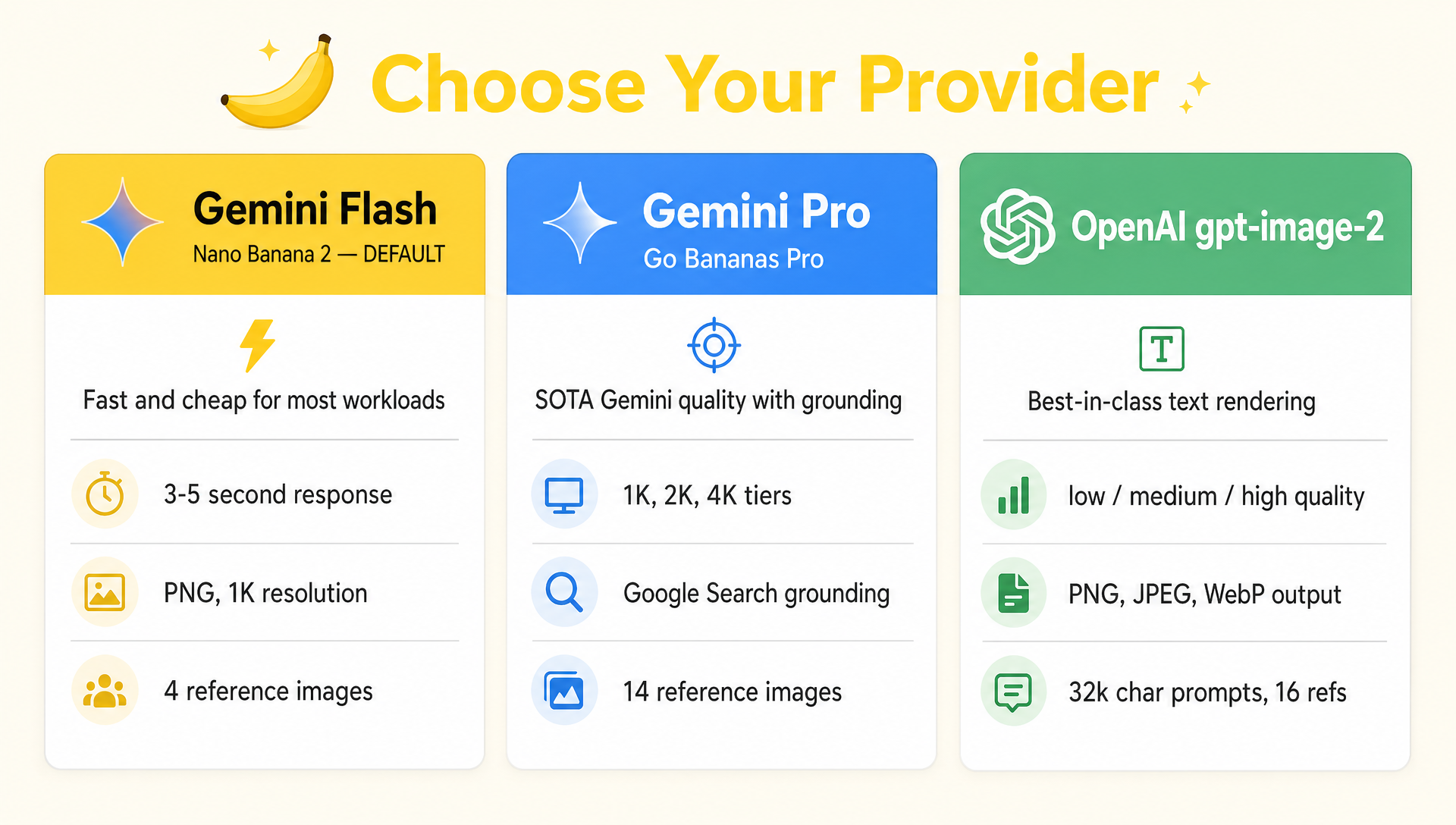
Six models from two providers, one API. Pick per request via `model_id`.
Provider Comparison
| Capability | Lite (Nano Banana 2 Lite) | Flash (Nano Banana 2) | Pro (Go Bananas! Pro) | OpenAI gpt-image-2 | OpenAI GPT Image 2.5 (Flare, Sunburst) |
|---|---|---|---|---|---|
| Default | ✅ | — | — | — | — |
| Provider | Gemini 3.1 Flash Lite | Gemini 3.1 Flash | Gemini 3 Pro | OpenAI | OpenAI |
| Generation speed | Fastest | Fast | Quality | Quality | Flare: fast; Sunburst: precise |
| Max prompt length | 16,384 chars | 16,384 chars | 16,384 chars | 32,000 chars | 32,000 chars |
| Max reference images | 14 | 14 | 14 | 16 | 16 |
| Resolution options | 1K | 0.5K / 1K / 2K / 4K tiers | 1K / 2K / 4K tiers | Any size meeting constraints (≤3,840px edge, multiples of 16, ≤3:1) | Same as GPT Image 2 |
| Aspect ratios | 13 standard/cinematic | 14 API ratios, including 1:4–8:1 extremes | 10 API ratios, including 21:9 and social formats | 13 (incl. 21:9 cinematic, 4:5/5:4 social) | 13 (same as GPT Image 2) |
| Output formats | PNG | PNG | PNG | PNG, JPEG, WebP + output_compression | PNG, JPEG, WebP + output_compression |
| Quality levels | auto | auto | auto | low / medium / high / auto | low / medium / high / xhigh / max / auto |
| Google Search grounding | No | Yes | Yes | No | No |
| Thinking mode | Yes | Yes | Yes | Not exposed | Not exposed |
| Transparent background | No | No | No | Not supported by model | Yes (PNG or WebP) |
| Text rendering | Basic | Good | Advanced (multilingual) | Best-in-class — small text, dense layouts | Best-in-class |
| Identity locking | Limited | Strong | Full (up to 5 people) | Strong via reference edits | Strong via reference edits |
| Default request timeout | 30s | 60s | 120s | 240s | 240s |
| Cost | Lowest | Low | Mid | Token-priced by input and output | Token-priced by input and output |
Pro Model Exclusive Features
| Feature | Description |
|---|---|
| Text & Infographics | SOTA text rendering for posters, menus, data visualizations |
| Viral Thumbnails | Identity + text + graphics in one pass |
| Storyboarding | Multi-scene sequential art with consistent characters |
| Structural Control | Sketch-to-final, wireframe-to-UI workflows |
| 2D↔3D Translation | Floor plans to renders, 2D art to 3D |
| High-Fidelity Upscaling | Input images as small as 150x150 enhanced to 4K |
| Photo Restoration | Repair tears, scratches, fading in old photographs |
| 360 Turnaround | Generate multiple angles from a single reference image |
| Thinking Mode | Enhanced reasoning for complex prompt interpretation |
| Google Search Grounding | Real-time data and factual accuracy via web search |
| Person Generation Safety | Configurable safety modes: dont_allow, allow_adult, allow_all |
See Pro Model Best Practices for complete guide.
When to Use Each Model
Use Lite (default) for:
- Quick iterations and drafts
- Simple prompts
- High-volume generation
- Cost-sensitive workflows
Use Flash for:
- Broader aspect ratios
- 2K/4K output
- Stronger multi-reference workflows
- Search-grounded generation
Use Pro for:
- Final production assets
- Print materials (4K resolution)
- Text-heavy content (infographics, posters)
- Multi-person character consistency
- Complex multi-image compositions
Feature Matrix
| Feature | MCP Tool | REST API | Web Console |
|---|---|---|---|
| Generate images | ✅ | ✅ | ✅ |
| Edit images | ✅ | ✅ | ✅ |
| Continue editing | ✅ | ✅ | ✅ |
| Characters | ✅ | ✅ | ✅ |
| Multi-character | ✅ | ✅ | ✅ |
| Products | ✅ | ✅ | ✅ |
| Style presets | ✅ | ✅ | ✅ |
| Search images | ✅ | ✅ | ✅ |
| Usage stats | ✅ | ✅ | ✅ |
| Bulk operations | ❌ | ✅ | ✅ |
| Download ZIP | ❌ | ✅ | ✅ |
| Admin functions | ❌ | ✅ | ✅ |
Quick Examples
Generate an Image
Generate a cozy cabin in snowy mountains at sunsetEdit Conversationally
Add smoke coming from the chimney
Make the sky more dramatic
Add some deer in the foregroundCreate and Use a Character
Create a character "Forest Guardian" - an ancient tree spirit
with glowing green eyes and bark-like skin covered in moss

Generate Forest Guardian protecting a hidden waterfall
Generate Forest Guardian teaching woodland creaturesUse a Style Preset
Create style preset "Anime" with prompt prefix:
"anime style, vibrant colors, detailed shading"

Generate a warrior princess using the Anime styleIntegration Patterns
MCP Client (Recommended)
Best for conversational AI workflows:
- Claude.ai / Claude Desktop remote connector
- Claude Code
- Codex
- Claude Desktop
- Cursor IDE
- Custom MCP clients
Use remote HTTP OAuth when your client supports it. Use the gobananas-mcp STDIO proxy for command-based or headless clients.
REST API
Best for programmatic access:
- Custom applications
- Batch processing
- Webhooks and integrations
Web Console
Best for visual management:
- Browse and search images
- Manage characters and presets
- View analytics
- Admin operations
Next Steps
Dive into each feature: