
Getting Started
New to the hosted app? Create your first image, connect your provider, and understand provider billing versus workspace storage.
Welcome to Go Bananas! - a production-ready, multi-tenant MCP (Model Context Protocol) server for AI image generation. This guide will help you get started quickly.
What is Go Bananas!?
Go Bananas! is an edge-deployed image generation service that provides:
- 53 MCP Tools for subscription, image, and video-handoff workflows
- 4 Access Methods - Claude Code Skills, REST API, MCP Protocol, CLI
- Multi-tenant SaaS architecture with complete data isolation
- Sub-10ms latency across 300+ Cloudflare edge locations worldwide
- Multi-provider image models — Nano Banana 2 Lite (Gemini Flash Lite, default), Nano Banana 2 (Gemini Flash), Go Bananas! Pro (Gemini Pro), OpenAI GPT Image 2, and OpenAI GPT Image 2.5 Flare and Sunburst — six models, picked per request via
model_id - Conversational editing - natural language image modifications
- Character consistency - reuse character designs across scenes
- Product marketing - generate consistent product images at scale
How It Works
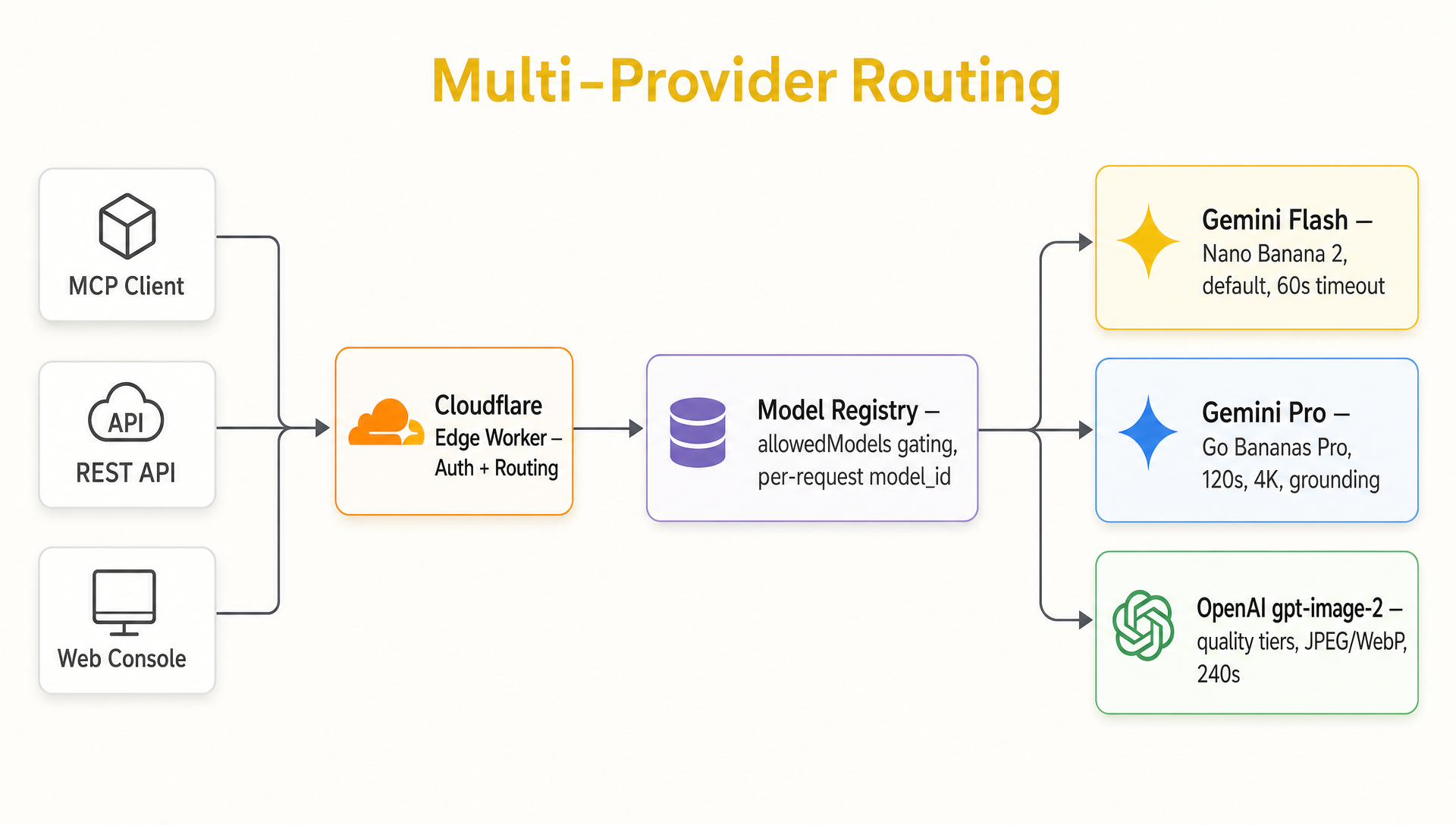
Clients → Cloudflare Edge → Model Registry → Gemini Flash Lite, Gemini Flash, Gemini Pro, OpenAI GPT Image 2, or GPT Image 2.5 Flare/Sunburst — picked per request via model_id.
Not sure which model to pick?
See the decision tree on the OpenAI gpt-image-2 page, or jump straight to the provider comparison.
Quick Start Options
Option 1: Use Hosted Service
If you have access to a hosted Go Bananas! instance, configure your client with the auth mode it supports:
- Use remote HTTP OAuth for Claude.ai connectors, Claude Code, Codex, and compatible editors.
- Use the local
gobananas-mcpSTDIO proxy withgobananas-cli auth loginor an API key for older/headless clients. - Connect a provider to the selected workspace, then generate an image.
Option 2: Self-Host on Cloudflare
Deploy your own instance with full control:
- Clone the repository
- Create Cloudflare resources (D1, R2, KV)
- Deploy with
npm run deploy - Create your first tenant
Key Concepts
Before diving in, familiarize yourself with these concepts:
| Concept | Description |
|---|---|
| MCP | Model Context Protocol - the standard for AI tool integrations |
| Tenant | An isolated account with its own API keys, quotas, and data |
| Session | A conversation context that tracks your recent images |
| Character | A reusable character definition for consistent multi-scene generation |
| Style Preset | Saved prompt templates for consistent styling |
| Reference Group | A saved set of reference images you can reuse in generation |
What You Can Do
Generate Images
Create images from text descriptions with fine control over style, aspect ratio, and quality.
"A photorealistic sunset over mountains with purple clouds"Edit Conversationally
Modify images with natural language without re-uploading or specifying IDs.
"Add some birds flying in the sky"
"Make the colors more vibrant"
"Remove the clouds"Create Consistent Characters
Define a character once, use it in unlimited scenes.
"Create a character named Luna - a young girl with silver hair"
"Generate Luna playing in a meadow"
"Generate Luna reading by a fireplace"Product Marketing
Save product images and generate marketing materials across contexts.
"Save this water bottle image"
"Generate the bottle on a mountain trail"
"Generate the bottle at a beach sunset"Next Steps
Recommended Path
- Install and configure your environment
- Follow the Quick Start tutorial
- Set up authentication
- Explore features in depth
Need Help?
- Documentation: You're in the right place!
- GitHub Issues: Report bugs or request features
- Discussions: Ask questions and share ideas