
Storage Architecture
How Go Bananas! stores and retrieves data across R2, D1, and KV.
Storage Layers
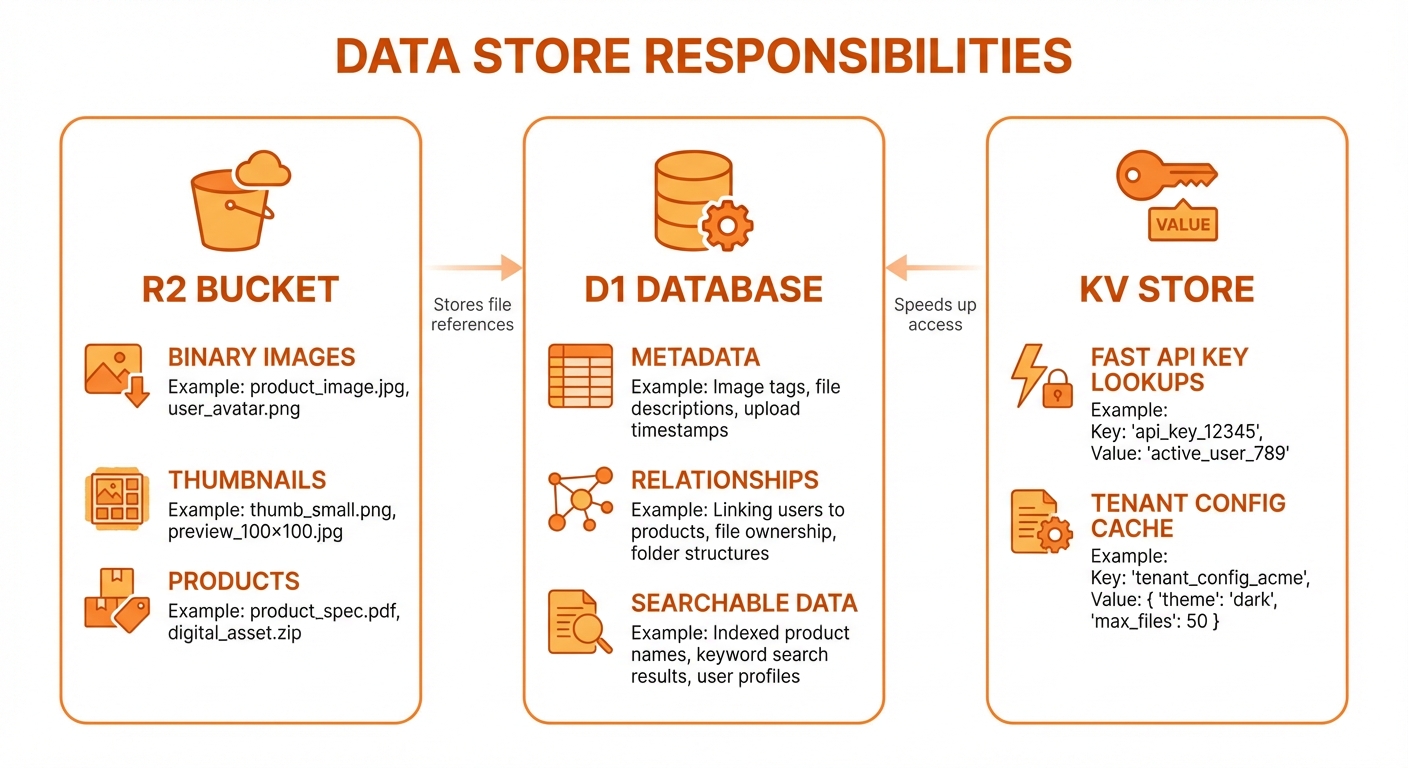
R2 for binary images, D1 for metadata, KV for fast lookups
R2 Object Storage
Purpose
Store binary image data with CDN delivery:
- Full-resolution generated images
- Compressed thumbnails
- Product reference images
Key Structure
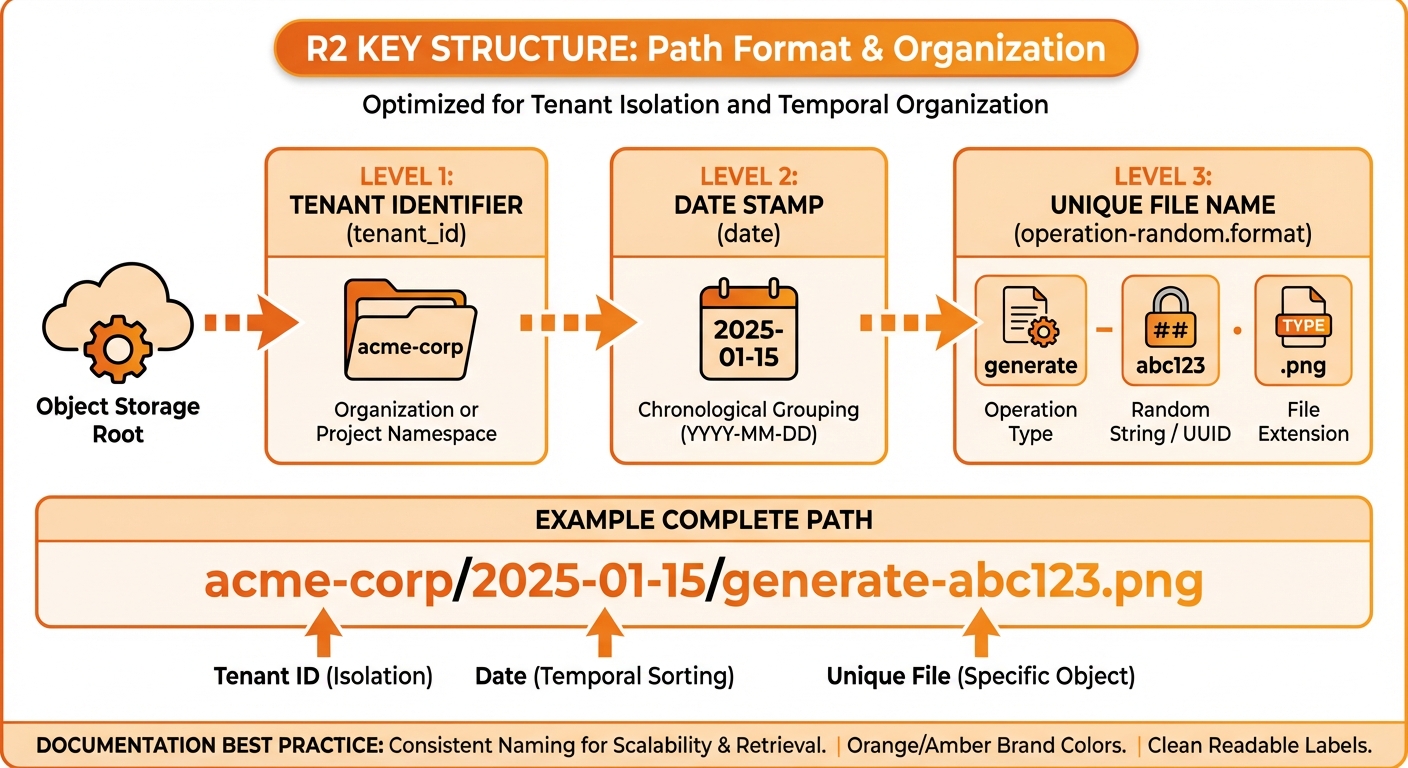
Path format: tenant_id/date/operation-random.format
{tenant_id}/{date}/{operation}-{random}.{format}Examples:
acme-corp/2024-01-15/generate-a1b2c3d4.png
acme-corp/2024-01-15/generate-a1b2c3d4-thumb.jpg
acme-corp/2024-01-15/edit-e5f6g7h8.png
acme-corp/2024-01-10/product-i9j0k1l2.jpgUpload Pattern
typescript
interface ImageUpload {
  tenantId: string;
  operation: 'generate' | 'edit' | 'product';
  imageBuffer: ArrayBuffer;
  format: 'png' | 'jpeg' | 'webp';
}

async function uploadImage(env: Env, upload: ImageUpload) {
  const date = new Date().toISOString().split('T')[0];
  const randomId = crypto.randomUUID().slice(0, 8);
  const key = `${upload.tenantId}/${date}/${upload.operation}-${randomId}.${upload.format}`;

  await env.R2_IMAGES.put(key, upload.imageBuffer, {
    httpMetadata: {
      contentType: `image/${upload.format}`,
    },
    customMetadata: {
      tenantId: upload.tenantId,
      operation: upload.operation,
    },
  });

  return {
    r2Key: key,
    publicUrl: `${env.R2_PUBLIC_URL}/${key}`,
  };
}Retrieval Pattern
typescript
async function downloadImage(env: Env, r2Key: string): Promise<ArrayBuffer> {
  const object = await env.R2_IMAGES.get(r2Key);

  if (!object) {
    throw new Error('Image not found');
  }

  return object.arrayBuffer();
}Public URL Configuration
R2 buckets expose public URLs via:
- Custom domain:
https://images.yourdomain.com/{key} - R2 public URL:
https://pub-{id}.r2.dev/{key}
Set in wrangler.jsonc:
json
{
  "vars": {
    "R2_PUBLIC_URL": "https://pub-xxx.r2.dev"
  }
}D1 Database
Purpose
Store relational metadata with fast queries:
- Image metadata and relationships
- Tenant and user data
- Session state
- Character and product references
- Usage analytics
Schema Overview
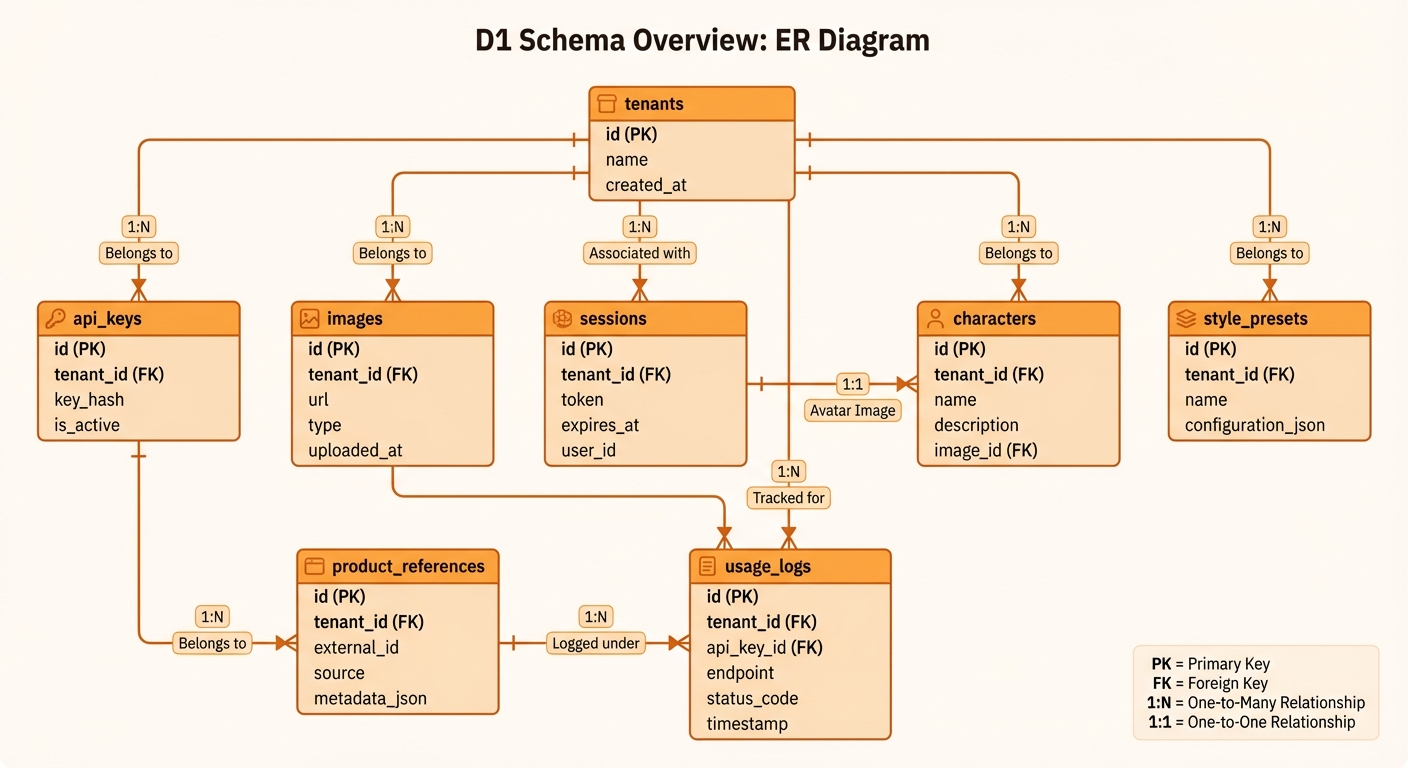
ER diagram: tenants, images, sessions, characters, and more
Key Tables
tenants
sql
CREATE TABLE tenants (
    tenant_id TEXT PRIMARY KEY,
    name TEXT NOT NULL,
    encrypted_gemini_key BLOB,           -- legacy column, kept for back-compat
    iv BLOB,                              -- legacy IV
    allowed_models TEXT,                  -- JSON array, e.g. ["gemini-flash-lite-image","openai-gpt-image-2"]
    default_model_id TEXT DEFAULT 'gemini-flash-lite-image',
    monthly_quota_mb INTEGER DEFAULT 1024,
    rate_limit_per_minute INTEGER DEFAULT 60,
    is_active BOOLEAN DEFAULT 1,
    created_at TEXT DEFAULT CURRENT_TIMESTAMP
);tenant_provider_credentials (migration 0034)
Per-provider keys, encrypted independently. A tenant can have a Gemini key, an OpenAI key, both, or neither — allowed_models only includes providers whose key is present and active.
sql
CREATE TABLE tenant_provider_credentials (
    tenant_id TEXT NOT NULL,
    provider TEXT NOT NULL,               -- 'gemini' or 'openai'
    encrypted_key BLOB NOT NULL,
    iv BLOB NOT NULL,
    is_active BOOLEAN DEFAULT 1,
    created_at TEXT DEFAULT CURRENT_TIMESTAMP,
    updated_at TEXT DEFAULT CURRENT_TIMESTAMP,
    PRIMARY KEY (tenant_id, provider),
    FOREIGN KEY (tenant_id) REFERENCES tenants(tenant_id) ON DELETE CASCADE
);images
sql
CREATE TABLE images (
    id INTEGER PRIMARY KEY AUTOINCREMENT,
    tenant_id TEXT NOT NULL,
    session_id TEXT,
    r2_key TEXT NOT NULL,
    r2_thumbnail_key TEXT,
    public_url TEXT NOT NULL,
    thumbnail_url TEXT,
    width INTEGER,
    height INTEGER,
    size_bytes INTEGER,
    format TEXT,
    prompt TEXT,
    negative_prompt TEXT,
    operation_type TEXT DEFAULT 'generate',
    parent_image_id INTEGER,
    edit_depth INTEGER DEFAULT 0,
    edit_prompt TEXT,
    model_id TEXT,
    aspect_ratio_hint TEXT,
    has_synthid BOOLEAN DEFAULT 0,
    gemini_file_id TEXT,
    gemini_file_expires_at TEXT,
    style_preset_id INTEGER,
    character_id INTEGER,
    product_reference_id INTEGER,
    created_at TEXT DEFAULT CURRENT_TIMESTAMP,

    FOREIGN KEY (tenant_id) REFERENCES tenants(tenant_id) ON DELETE CASCADE,
    FOREIGN KEY (parent_image_id) REFERENCES images(id),
    FOREIGN KEY (style_preset_id) REFERENCES style_presets(id),
    FOREIGN KEY (character_id) REFERENCES characters(id),
    FOREIGN KEY (product_reference_id) REFERENCES product_references(id)
);sessions
sql
CREATE TABLE sessions (
    session_id TEXT NOT NULL,
    tenant_id TEXT NOT NULL,
    last_image_id INTEGER,
    total_images INTEGER DEFAULT 0,
    total_edits INTEGER DEFAULT 0,
    is_active BOOLEAN DEFAULT 1,
    created_at TEXT DEFAULT CURRENT_TIMESTAMP,
    last_activity_at TEXT DEFAULT CURRENT_TIMESTAMP,

    PRIMARY KEY (session_id, tenant_id),
    FOREIGN KEY (tenant_id) REFERENCES tenants(tenant_id) ON DELETE CASCADE,
    FOREIGN KEY (last_image_id) REFERENCES images(id)
);Index Strategy
sql
-- Primary access patterns
CREATE INDEX idx_images_tenant ON images(tenant_id);
CREATE INDEX idx_images_session ON images(session_id);
CREATE INDEX idx_images_created ON images(created_at DESC);
CREATE INDEX idx_images_parent ON images(parent_image_id);

-- Search patterns
CREATE INDEX idx_images_prompt ON images(prompt);
CREATE INDEX idx_images_operation ON images(operation_type);

-- Reference lookups
CREATE INDEX idx_images_character ON images(character_id);
CREATE INDEX idx_images_product ON images(product_reference_id);
CREATE INDEX idx_images_preset ON images(style_preset_id);

-- Usage analytics
CREATE INDEX idx_usage_tenant_time ON usage_logs(tenant_id, timestamp);
CREATE INDEX idx_usage_operation ON usage_logs(operation);Query Patterns
List Images with Filters
sql
SELECT
    id, r2_key, public_url, thumbnail_url,
    width, height, prompt, operation_type,
    created_at
FROM images
WHERE tenant_id = ?
  AND (? IS NULL OR prompt LIKE '%' || ? || '%')
  AND (? IS NULL OR operation_type = ?)
  AND (? IS NULL OR created_at >= ?)
ORDER BY created_at DESC
LIMIT ? OFFSET ?;Session History
sql
SELECT
    id, prompt, operation_type, edit_depth,
    parent_image_id, created_at
FROM images
WHERE tenant_id = ? AND session_id = ?
ORDER BY created_at DESC
LIMIT ?;Usage Aggregation
sql
SELECT
    strftime('%Y-%m-%d', timestamp) as bucket,
    COUNT(*) as operations,
    SUM(images_generated) as images,
    SUM(total_size_bytes) as bytes
FROM usage_logs
WHERE tenant_id = ?
  AND timestamp >= datetime('now', '-30 days')
GROUP BY bucket
ORDER BY bucket DESC;KV Store
Purpose
Fast key-value lookups for:
- API key to tenant mappings
- Tenant configuration cache
- Rate limit counters
Namespaces
| Namespace | Purpose | TTL |
|---|---|---|
| API_KEYS | sha256:<hex> of the key → key metadata (tenant, active flag, usage) | — |
| TENANT_CONFIG | Tenant config cache | 5 min |
Access Patterns
API Key Lookup
typescript
// Keys are stored only as SHA-256 hashes (src/auth/api-key-storage.ts)
async function lookupApiKey(apiKey: string, env: Env): Promise<string | null> {
  // KV is keyed by "sha256:<hex>", never by the key itself
  const metadata = await env.API_KEYS.get(await apiKeyKvName(apiKey), 'json');
  if (metadata) return metadata.isActive ? metadata.tenantId : null;

  // D1 stores "sha256:<hex>:<preview>"; the plain value only matches pre-hashing keys
  const record = await env.DB.prepare(
    'SELECT tenant_id FROM api_keys WHERE api_key IN (?, ?) AND is_active = 1'
  ).bind(...(await apiKeyLookupValues(apiKey))).first();

  return record?.tenant_id ?? null;
}Tenant Config Cache
typescript
async function getTenantConfig(tenantId: string, env: Env): Promise<Tenant> {
  const cacheKey = `tenant:${tenantId}`;

  // Check cache
  const cached = await env.TENANT_CONFIG.get(cacheKey, 'json');
  if (cached) return cached as Tenant;

  // Load from D1
  const tenant = await env.DB.prepare(
    'SELECT * FROM tenants WHERE tenant_id = ?'
  ).bind(tenantId).first();

  // Cache (excluding encrypted key)
  const cacheable = {
    tenantId: tenant.tenant_id,
    name: tenant.name,
    monthlyQuotaMb: tenant.monthly_quota_mb,
    rateLimitPerMinute: tenant.rate_limit_per_minute,
  };

  await env.TENANT_CONFIG.put(cacheKey, JSON.stringify(cacheable), {
    expirationTtl: 300
  });

  return tenant;
}Storage Cost Optimization
R2 Strategies
- Thumbnail compression: 85% quality JPEG
- Format optimization: Use WebP where supported
- Deduplication: Hash-based duplicate detection (future)
D1 Strategies
- Selective columns: Only fetch needed fields
- Pagination: Always use LIMIT/OFFSET
- Index usage: Query by indexed columns
KV Strategies
- Short TTL: 5 minutes for most caches
- Lazy invalidation: Update on write
- Selective caching: Only hot data
Data Lifecycle
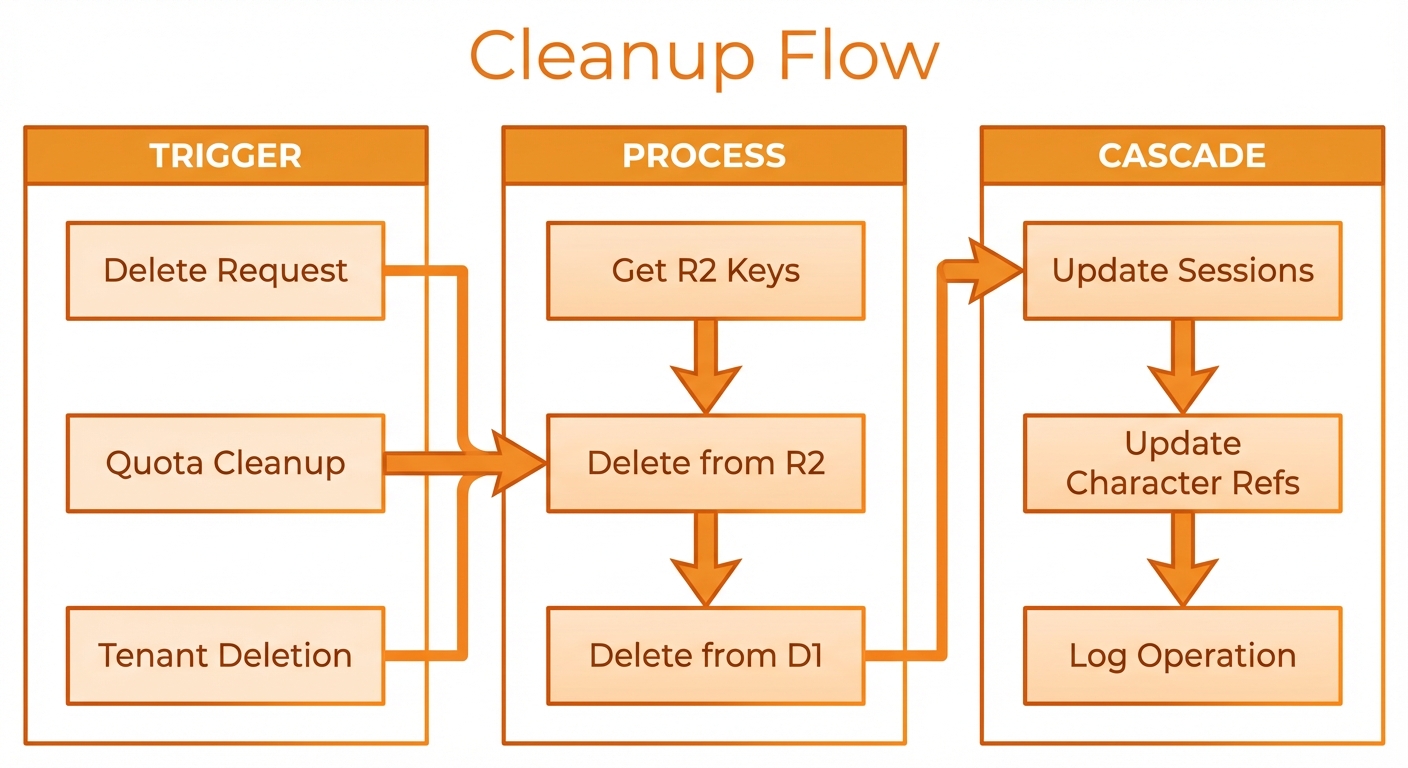
Created → Active → Archived → Deleted cleanup flow
Backup and Recovery
D1 Backup
bash
# Export database
wrangler d1 export DB --output backup.sql

# Import to restore
wrangler d1 execute DB --file backup.sqlR2 Considerations
- R2 provides 99.999999999% durability
- Consider cross-region replication for critical data
- Use lifecycle rules for automatic cleanup