
Character System Architecture
How the character reference system enables consistent multi-scene generation.
Problem Statement
Without character persistence:
Without persistence: token bloat, context limits, inconsistency
Issues:
- Repeating character descriptions wastes tokens
- After 4-6 scenes, context limits are reached
- Starting new sessions loses character consistency
Solution Architecture
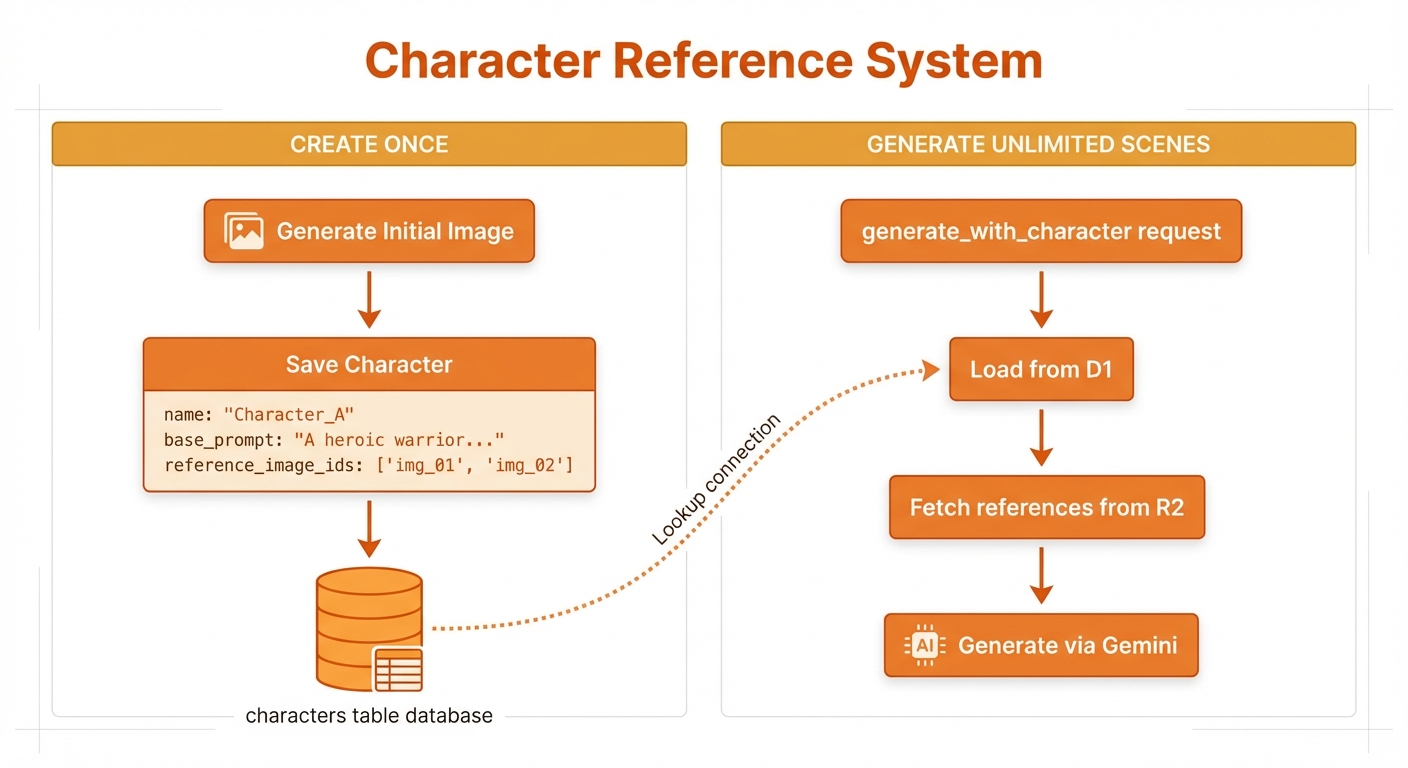
Save character once, generate unlimited consistent scenes
Character Model
Database Schema
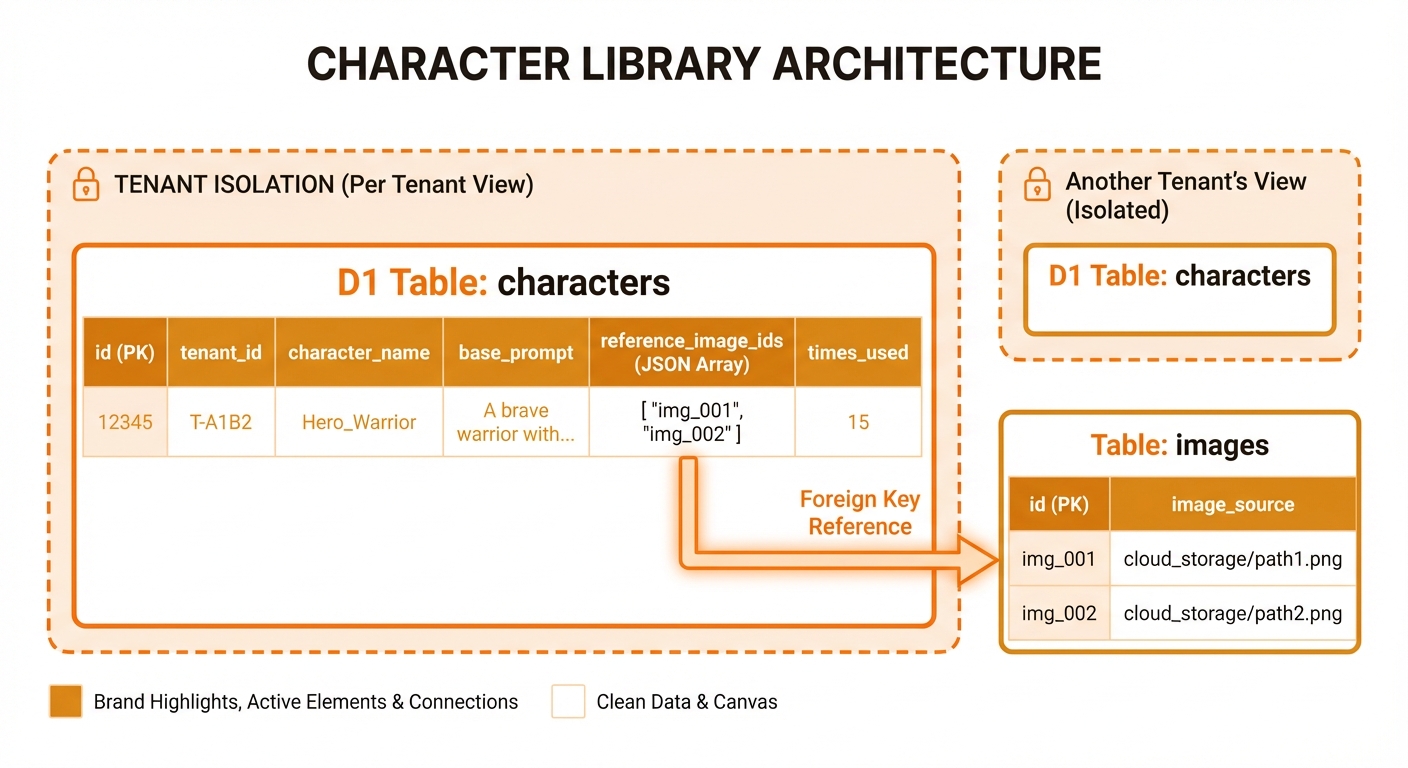
CREATE TABLE characters (
    id INTEGER PRIMARY KEY AUTOINCREMENT,
    tenant_id TEXT NOT NULL,
    character_name TEXT NOT NULL,
    base_prompt TEXT NOT NULL,
    description TEXT,
    negative_prompt TEXT,
    system_instruction TEXT,
    preferred_aspect_ratio TEXT,
    reference_image_ids TEXT,  -- JSON array of image IDs
    tags TEXT,  -- JSON array of tags
    times_used INTEGER DEFAULT 0,
    last_used_at TEXT,
    created_at TEXT DEFAULT CURRENT_TIMESTAMP,
    updated_at TEXT DEFAULT CURRENT_TIMESTAMP,

    UNIQUE(tenant_id, character_name),
    FOREIGN KEY (tenant_id) REFERENCES tenants(tenant_id) ON DELETE CASCADE
);

CREATE INDEX idx_characters_tenant ON characters(tenant_id);
CREATE INDEX idx_characters_name ON characters(character_name);
CREATE INDEX idx_characters_usage ON characters(times_used DESC);Character Record
interface Character {
  id: number;
  tenant_id: string;
  character_name: string;
  base_prompt: string;           // Appearance description
  description?: string;          // Notes for user
  negative_prompt?: string;      // What to avoid
  system_instruction?: string;   // Style guidance
  preferred_aspect_ratio?: string;
  reference_image_ids?: number[]; // Links to images table
  tags?: string[];               // Organization
  times_used: number;            // Usage tracking
  last_used_at?: string;
  created_at: string;
  updated_at: string;
}Reference Image System
Why Reference Images?
Text-only prompts can vary in interpretation:
Text: "young woman with red hair"
→ Could be: short/long hair, light/dark red, any styleWith reference images:
Image + Text: "The character in Image 1 — keep face, hair, outfit EXACTLY the same"
→ Consistent visual featuresReference Storage Flow
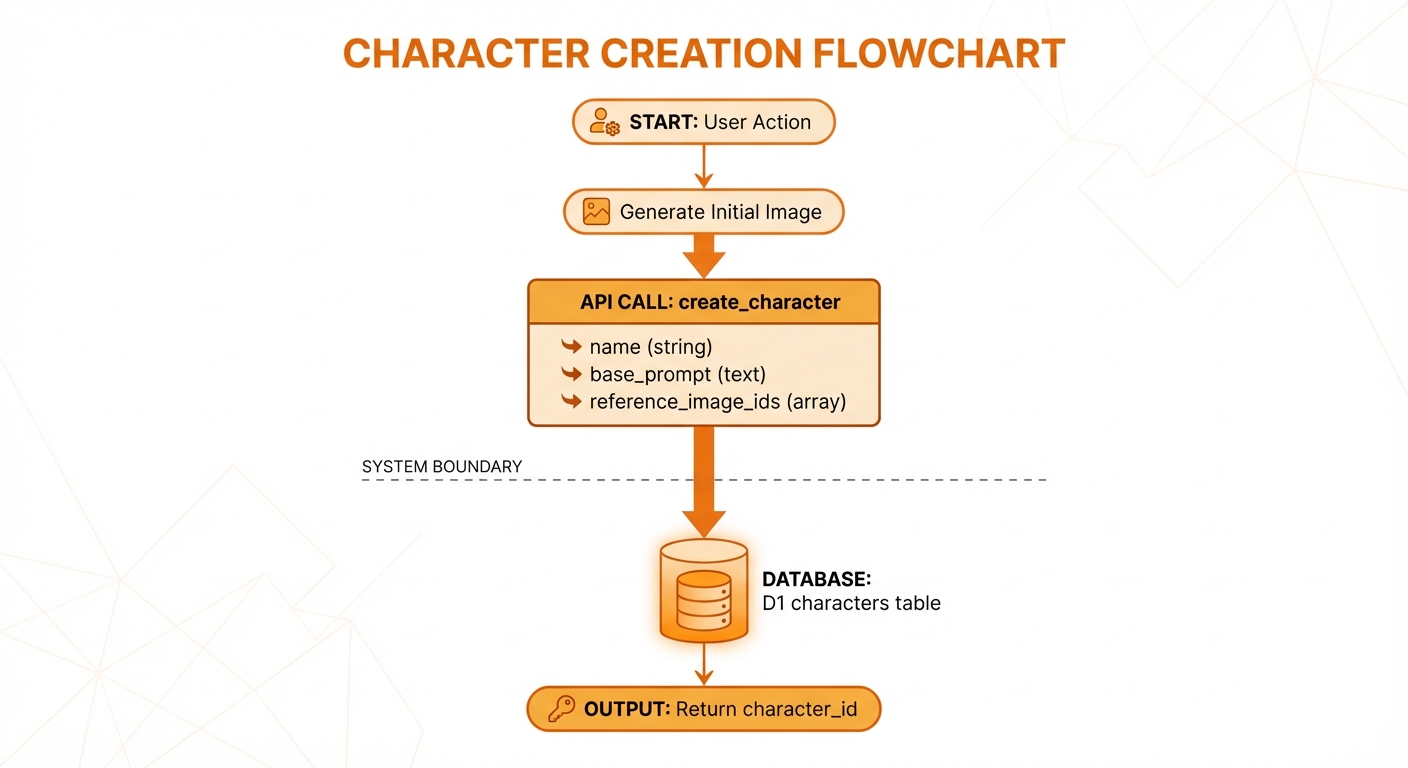
Generate image, store, then create character with reference
Loading References
async function loadCharacterReferences(
  env: Env,
  tenantId: string,
  referenceImageIds: number[]
): Promise<ReferenceImage[]> {
  // 1. Get image metadata from D1
  const placeholders = referenceImageIds.map(() => '?').join(',');
  const images = await env.DB.prepare(`
    SELECT id, r2_key, mime_type
    FROM images
    WHERE id IN (${placeholders}) AND tenant_id = ?
  `).bind(...referenceImageIds, tenantId).all();

  // 2. Download from R2 and convert to base64
  const references: ReferenceImage[] = [];

  for (const img of images.results) {
    const r2Object = await env.R2_IMAGES.get(img.r2_key);
    if (!r2Object) continue;

    const arrayBuffer = await r2Object.arrayBuffer();
    const base64 = btoa(String.fromCharCode(...new Uint8Array(arrayBuffer)));

    references.push({
      data: base64,
      mimeType: img.mime_type,
    });
  }

  return references;
}Generation Strategies
Strategy 1: With Reference Images
When character has reference images:
const prompt = `The character in Image 1 — keep the face, hair, and outfit EXACTLY the same. Character details: ${basePrompt}. Scene: ${scenePrompt}`;

await gemini.generateImage({
  prompt,
  referenceImages: loadedReferences,
  systemInstruction: character.system_instruction,
  negativePrompt: character.negative_prompt,
});Why this works:
- Gemini sees the visual reference
- "The character in Image 1 — keep face, hair, outfit EXACTLY the same" is the identity-lock phrase
- Scene description adds the new context
Strategy 2: Text-Only
When no reference images:
const prompt = `${character.base_prompt}, ${scenePrompt}`;

await gemini.generateImage({
  prompt,
  systemInstruction: character.system_instruction,
  negativePrompt: character.negative_prompt,
});Trade-offs:
- Less consistent than visual references
- More token usage
- Still better than repeating full description each time
Multi-Character Scenes
The Challenge
Multiple characters in one scene requires:
- Loading multiple reference sets
- Combining prompts without confusion
- Positioning characters clearly
Implementation
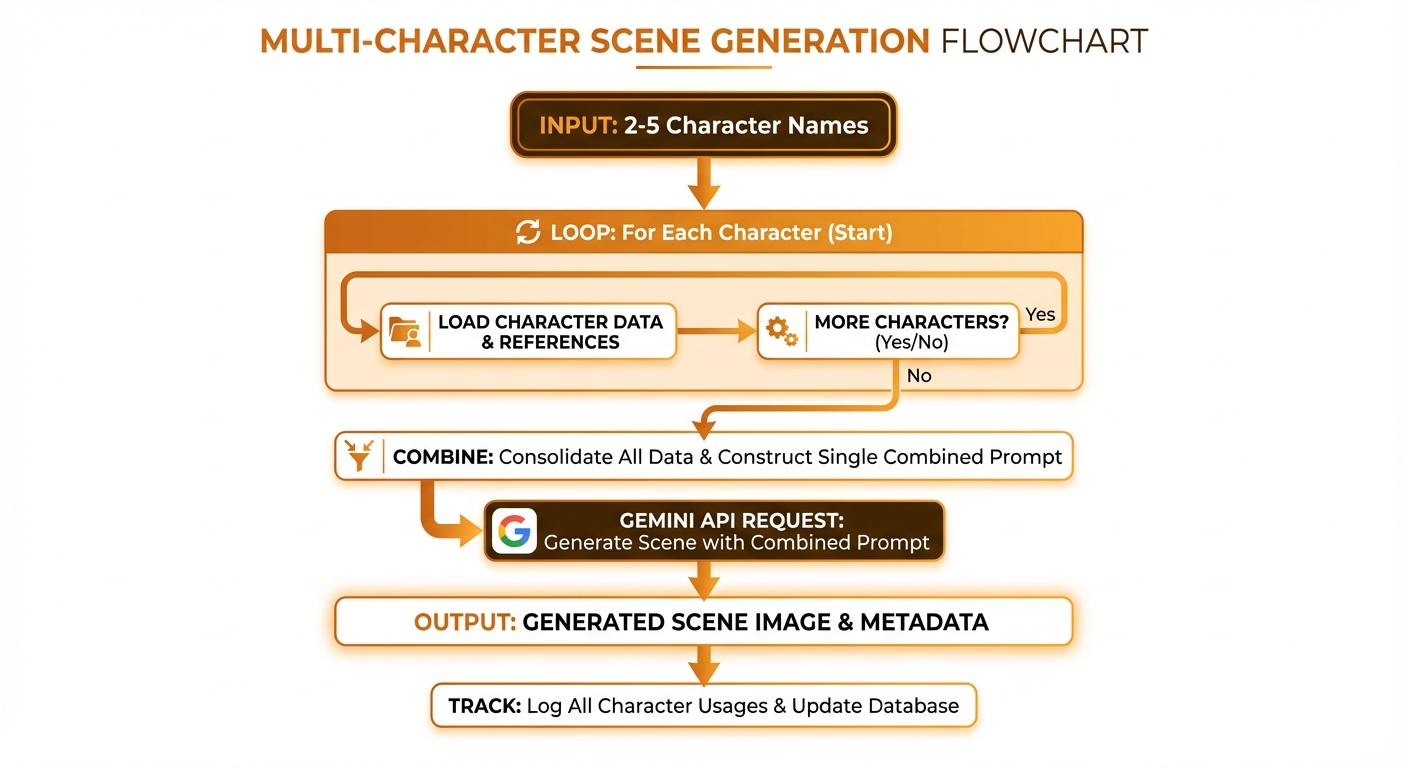
Load characters, combine references, build prompt, generate
Multi-Character Prompt
function buildMultiCharacterPrompt(
  characters: Character[],
  scenePrompt: string
): string {
  const characterDescriptions = characters
    .map((c, i) => `Character ${i + 1}: ${c.character_name}`)
    .join(', ');

  return `Generate an image showing ${characterDescriptions} together. ` +
         `Scene: ${scenePrompt}. ` +
         `Use the reference images provided to maintain each character's appearance.`;
}Reference Image Limits
| Model | Max Reference Images |
|---|---|
| Gemini Flash | 3 |
| Gemini Pro | 14 |
For multi-character with many refs:
- Prioritize most recent/best references
- Limit to 2-3 refs per character
- Total refs should not exceed model limit
Effective Base Prompts
Good Practice
✅ Physical features only:
"A young woman with bright red hair in a long braid,
emerald green eyes, freckles across her nose, wearing
a brown leather adventurer's outfit with gold trim"Avoid
❌ Scene elements:
"A young woman running through a forest at sunset"

❌ Emotions/actions:
"A young woman looking scared and running away"

❌ Temporary states:
"A young woman who just woke up with messy hair"Why?
Scene elements in base_prompt conflict with scene_prompt:
base_prompt: "woman in forest at sunset"
scene_prompt: "at the beach"
→ Confused output: forest or beach?Usage Tracking
Track Character Usage
-- Increment on each generation
UPDATE characters
SET
    times_used = times_used + 1,
    last_used_at = datetime('now')
WHERE id = ? AND tenant_id = ?;Analytics Queries
-- Most used characters
SELECT character_name, times_used, last_used_at
FROM characters
WHERE tenant_id = ?
ORDER BY times_used DESC
LIMIT 10;

-- Recently used
SELECT character_name, last_used_at
FROM characters
WHERE tenant_id = ?
ORDER BY last_used_at DESC
LIMIT 5;Image Attribution
-- Images generated with a character
SELECT id, prompt, thumbnail_url, created_at
FROM images
WHERE character_id = ? AND tenant_id = ?
ORDER BY created_at DESC;Character Lifecycle
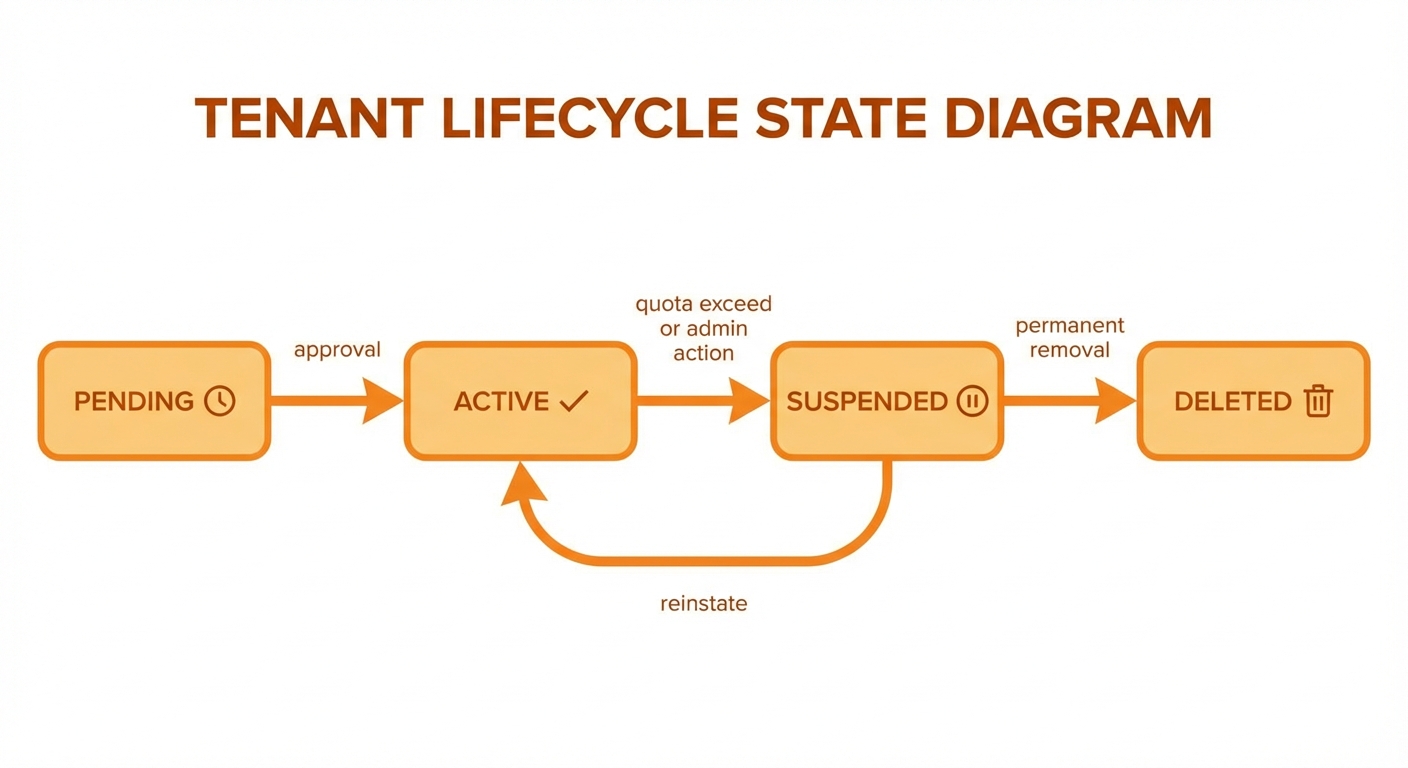
Create, use, update, delete - images are preserved
Best Practices
1. Start with Reference Images
Generate 2-3 initial images, pick the best, then create character with those as references.
2. Use Consistent Style Presets
Combine characters with style presets for brand consistency:
{
  character_name: "Luna",
  style_preset_name: "Fantasy Illustration"
}3. Organize with Tags
{
  character_name: "Luna",
  tags: ["fantasy", "protagonist", "book-cover-project"]
}4. Test Across Different Scenes
After creating, test in various contexts:
- Indoor vs outdoor
- Different lighting
- Various poses/actions
- Multiple aspect ratios