
MCP Integration
Quickest setup: gobananasai.com/connect has copy-ready steps for Claude, ChatGPT, Cursor, VS Code, Claude Code, Codex and Gemini CLI. Claude Code and Codex users can install the go-bananas plugin (server + skill). The MCP address is
https://mcp.gobananasai.com;https://gobananasai.com/mcpstill works. Go Bananas is listed on the official MCP Registry ascom.gobananasai/go-bananas.
Go Bananas! is built as a native Model Context Protocol (MCP) server, enabling seamless integration with AI assistants like Claude. Subscription entries describe an experimental capability available to signed-in users in the public deployment and disabled by default for self-hosting. Tool visibility is not proof of runner availability; see subscription readiness.
What is MCP?
The Model Context Protocol (MCP) is an open standard that allows AI assistants to interact with external tools and data sources. Think of it as a universal adapter that lets AI systems:
- Execute tools - Perform actions like generating images
- Access resources - Read data from external systems
- Maintain context - Keep track of conversation state
Why MCP for Image Generation?
Traditional image generation APIs require:
- Manual prompt construction
- Explicit image ID tracking
- Session management code
- Complex error handling
With MCP, you get:
- Natural language - "Add clouds to the image"
- Context awareness - AI knows which image you mean
- Conversational flow - Multi-turn editing workflows
- Built-in state - Session handled automatically
Available Tools
Go Bananas! provides 53 MCP tools organized into categories. The local STDIO proxy (gobananas-mcp) adds a 54th, go_bananas_diagnose, which checks the proxy's own connection and sign-in.
ChatGPT Subscription (2 tools)
| Tool | Description |
|---|---|
get_subscription_status | Check the current OAuth user’s connected subscription |
generate_with_subscription | Generate and save one image without provider API fallback |
Image Generation, Editing & Video Handoff (13 tools)
| Tool | Description |
|---|---|
generate_image | Generate images from text prompts |
generate_poster | Generate structured posters, flyers, covers, and campaign assets |
list_poster_styles | Browse curated poster style IDs |
request_higgsfield_video | Submit async Higgsfield image-to-video jobs |
get_higgsfield_video_status | Poll Higgsfield request status and video URL |
edit_image | Edit image by database ID |
upload_image_for_editing | Upload a public image URL for editing |
edit_uploaded_image | Edit user-uploaded images |
upload_media | Upload image, video, or audio to durable storage |
continue_editing | Edit last image conversationally |
get_image_info | Get image metadata |
get_session_history | List session images |
search_images | Search across all images |
Style Presets (5 tools)
| Tool | Description |
|---|---|
create_style_preset | Create reusable style template |
list_style_presets | Browse saved presets |
get_style_preset | Get preset details |
update_style_preset | Update preset settings |
delete_style_preset | Remove a preset |
Characters (11 tools)
| Tool | Description |
|---|---|
create_character | Save character design |
update_character | Modify character |
delete_character | Remove character |
list_characters | Browse character library |
get_character | Get character details |
get_character_video | Retrieve a character reference video |
refresh_character_identity | Start a character identity refresh |
get_character_identity_refresh_status | Poll identity refresh progress |
revert_character_identity | Restore previous identity references |
generate_with_character | Generate with character |
generate_with_multiple_characters | Multi-character scenes |
Products (6 tools)
| Tool | Description |
|---|---|
create_product_reference | Save product from URL |
list_product_references | Browse products |
get_product_reference | Get product details |
update_product_reference | Update product name, description or tags |
delete_product_reference | Remove product |
generate_with_product | Generate marketing images |
Reference Groups (5 tools)
Save and reuse sets of reference images for style transfer or composition:
| Tool | Description |
|---|---|
create_reference_group | Create a named group of reference images |
list_reference_groups | Browse saved reference groups |
get_reference_group | Get group details and images |
update_reference_group | Rename or change group contents |
delete_reference_group | Remove a reference group |
Scenes (5 tools)
Save and reuse scene presets with prompts and reference images:
| Tool | Description |
|---|---|
create_scene | Create a scene preset |
list_scenes | Browse saved scene presets |
get_scene | Get scene details |
update_scene | Modify a scene preset |
delete_scene | Remove a scene preset |
Models & Analytics (5 tools)
| Tool | Description |
|---|---|
get_usage_stats | Usage statistics |
get_account_summary | Account overview |
list_models | Tenant model capability discovery |
check_quota | Pre-flight quota, service health, and cost estimate |
get_help | Tool documentation |
Batch Operations (1 tool)
| Tool | Description |
|---|---|
batch_generate | Generate 1–8 images in parallel |
MCP Transports
Go Bananas! supports two MCP transport methods:
Streamable HTTP (Recommended)
POST /mcpModern, efficient transport with streaming support:
- Stateless MCP 2026-07-28 via
server/discover - Automatic legacy Streamable HTTP fallback for negotiating clients
- Request/response via HTTP POST
- Server-to-client streaming for real-time updates
- Better for production deployments
Server-Sent Events (Legacy)
GET /sseLegacy transport
/sse is still served for older MCP clients, but it is legacy. Use /mcp (or https://mcp.gobananasai.com) for every new connection.
Original SSE-based transport:
- Persistent connection
- Only for older clients that cannot use Streamable HTTP
Connecting MCP Clients
Auth Modes
Go Bananas supports both remote HTTP OAuth and a local STDIO proxy:
| Mode | Use When | Auth Location |
|---|---|---|
| Remote HTTP OAuth | Your client can connect directly to https://mcp.gobananasai.com and run MCP OAuth | The client stores OAuth tokens for the remote URL |
| Local STDIO proxy | Your client needs a command-based MCP server or you want API-key/headless auth | gobananas-mcp reads gobananas-cli OAuth tokens or GO_BANANAS_API_KEY |
Do not configure both modes with the same go-bananas name in the same client scope. Authenticate the entry your MCP status screen says it is using.
Claude Code (Remote HTTP OAuth)
claude mcp add --transport http -s user go-bananas https://mcp.gobananasai.comThen run /mcp and click Authenticate.
Equivalent project .mcp.json:
Add to .mcp.json or ~/.claude.json:
{
  "mcpServers": {
    "go-bananas": {
      "type": "http",
      "url": "https://mcp.gobananasai.com"
    }
  }
}Codex (Remote HTTP OAuth)
codex mcp add go-bananas --url https://mcp.gobananasai.com
codex mcp login go-bananasVerify with codex mcp get go-bananas.
Claude Desktop / Claude.ai Remote Connector
Use Settings > Connectors > Add custom connector and enter:
https://mcp.gobananasai.comLocal STDIO Proxy
Run browser login once:
npx -y gobananas-cli auth loginThen add the proxy to clients that need a command-based MCP server:
{
  "mcpServers": {
    "go-bananas": {
      "command": "npx",
      "args": ["-y", "gobananas-mcp"],
      "env": {
        "GO_BANANAS_SERVER_URL": "https://gobananasai.com",
        "GO_BANANAS_MCP_TRANSPORT": "streamable-http"
      }
    }
  }
}For headless/API-key auth, add:
"GO_BANANAS_API_KEY": "sk_live_your_key_here"inside the same env object.
Claude Code STDIO:
claude mcp add -s user go-bananas \
  -e GO_BANANAS_SERVER_URL=https://gobananasai.com \
  -e GO_BANANAS_MCP_TRANSPORT=streamable-http \
-- npx -y gobananas-mcpCodex STDIO:
codex mcp add go-bananas \
  --env GO_BANANAS_SERVER_URL=https://gobananasai.com \
  --env GO_BANANAS_MCP_TRANSPORT=streamable-http \
-- npx -y gobananas-mcpCursor .cursor/mcp.json:
{
  "mcpServers": {
    "go-bananas": {
      "command": "npx",
      "args": ["-y", "gobananas-mcp"],
      "env": {
        "GO_BANANAS_SERVER_URL": "https://gobananasai.com",
        "GO_BANANAS_MCP_TRANSPORT": "streamable-http"
      }
    }
  }
}Custom Integration
Use any MCP-compatible client library:
import {
  Client,
  StreamableHTTPClientTransport,
} from '@modelcontextprotocol/client';

const client = new Client(
  {
    name: 'my-app',
    version: '1.0.0',
  },
  {
    capabilities: {},
    versionNegotiation: { mode: 'auto' },
  }
);

// Connect via Streamable HTTP (recommended)
await client.connect(
  new StreamableHTTPClientTransport(new URL('https://mcp.gobananasai.com'), {
    requestInit: {
      headers: { 'X-API-Key': 'sk_live_xxx' },
    },
  })
);

// List available tools
const tools = await client.listTools();

// Call a tool
const result = await client.callTool({
  name: 'generate_image',
  arguments: {
    prompt: 'a sunset over mountains',
    session_id: 'my-editing-workflow',
  },
});OAuth 2.1 Authorization (MCP Authorization)
MCP also supports OAuth 2.1 + PKCE:
- Register a client with
POST /oauth/register. - Send users to
/oauth/authorize; browsers are redirected to the console login at/?return_to=.... - Exchange the code at
/oauth/token. - Call
/mcpwithAuthorization: Bearer <access_token>(the legacy/sseendpoint accepts the same header).
Example call:
curl -X POST https://mcp.gobananasai.com \
  -H "Authorization: Bearer <access_token>" \
  -H "Content-Type: application/json" \
-d '{"method":"tools/list","params":{}}'Tool Response Format
All tools return structured responses:
{
  "content": [
    {
      "type": "text",
      "text": "Generated image successfully!\n\nImage ID: 342\nURL: https://pub-xxx.r2.dev/tenant/image.png\nDimensions: 1024x768"
    }
  ]
}For image generation, responses include:
- Public URL for the generated image
- Thumbnail URL
- Database ID for reference
- Dimensions and metadata
Error Handling
MCP tools return errors in a standard format:
{
  "error": {
    "code": "RATE_LIMIT_EXCEEDED",
    "message": "Rate limit exceeded. Try again in 30 seconds.",
    "details": {
      "limit": 60,
      "window": "1 minute",
      "retry_after": 30
    }
  }
}Common error codes:
| Code | Description |
|---|---|
AUTHENTICATION_ERROR | Invalid API key |
RATE_LIMIT_EXCEEDED | Too many requests |
QUOTA_EXCEEDED | Storage quota reached |
INVALID_INPUT | Bad parameters |
RESOURCE_NOT_FOUND | Image/character not found |
GEMINI_API_ERROR | Upstream API failure |
Session Management
MCP 2026 transport requests are stateless. Go Bananas maintains editing continuity through an explicit application session_id on session-aware tools. The Go Bananas CLI and stdio proxy add their persisted application session ID automatically; custom clients should reuse one value for a related editing workflow.
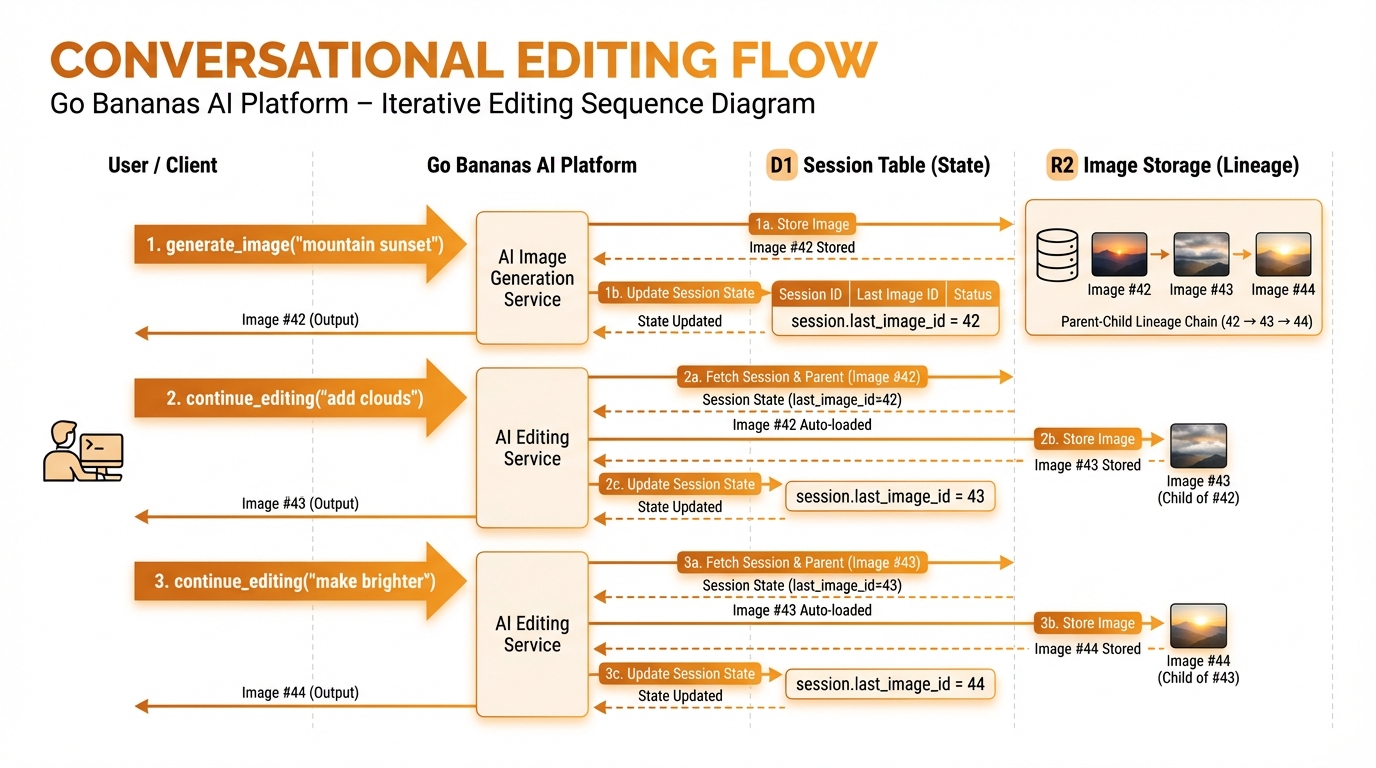
Generate image, save state, continue editing with automatic context
Best Practices
1. Use Natural Language
Let the AI interpret your intent:
✅ "Generate a sunset with dramatic clouds"
✅ "Make the colors more vibrant"
✅ "Add Luna to this scene"

❌ "Call generate_image with prompt='sunset'"2. Leverage Context
Reuse the same application session_id so the session tracks your current image:
Generate a mountain landscape
→ Image #1 created

Add a lake in the foreground
→ Edits image #1 automatically

Make the water more blue
→ Edits the latest version3. Use Characters for Consistency
Create a character named "Max" - friendly robot
→ Character saved

Show Max in a kitchen
→ Consistent character

Show Max at a beach
→ Same character, new scene4. Batch Related Operations
Generate multiple variations:
Generate 4 images of sunset landscapes
→ Creates 4 images in one callRate Limits
MCP operations count against your rate limit:
| Limit | Default |
|---|---|
| Requests per minute | 60 |
| Concurrent requests | 10 |
| Images per request | 4 |