
Claude Code Skills
Native AI image generation directly within Claude Code using Go Bananas! skills.
Overview
Claude Code Skills provide the deepest integration with Go Bananas!, embedding image generation capabilities directly into your Claude Code sessions. After the MCP server is configured, authenticated and permitted, skills guide Claude Code in calling its real tools. A skill does not establish the connection or supply provider credentials.
Key Benefits
- Reusable instructions — Skills guide relevant workflows after setup
- Permission-aware access — Available tools depend on client permissions, OAuth scopes and server feature flags
- Context-Aware — Skills include best practices and prompt patterns
- Conversational — Generate and edit images naturally in chat
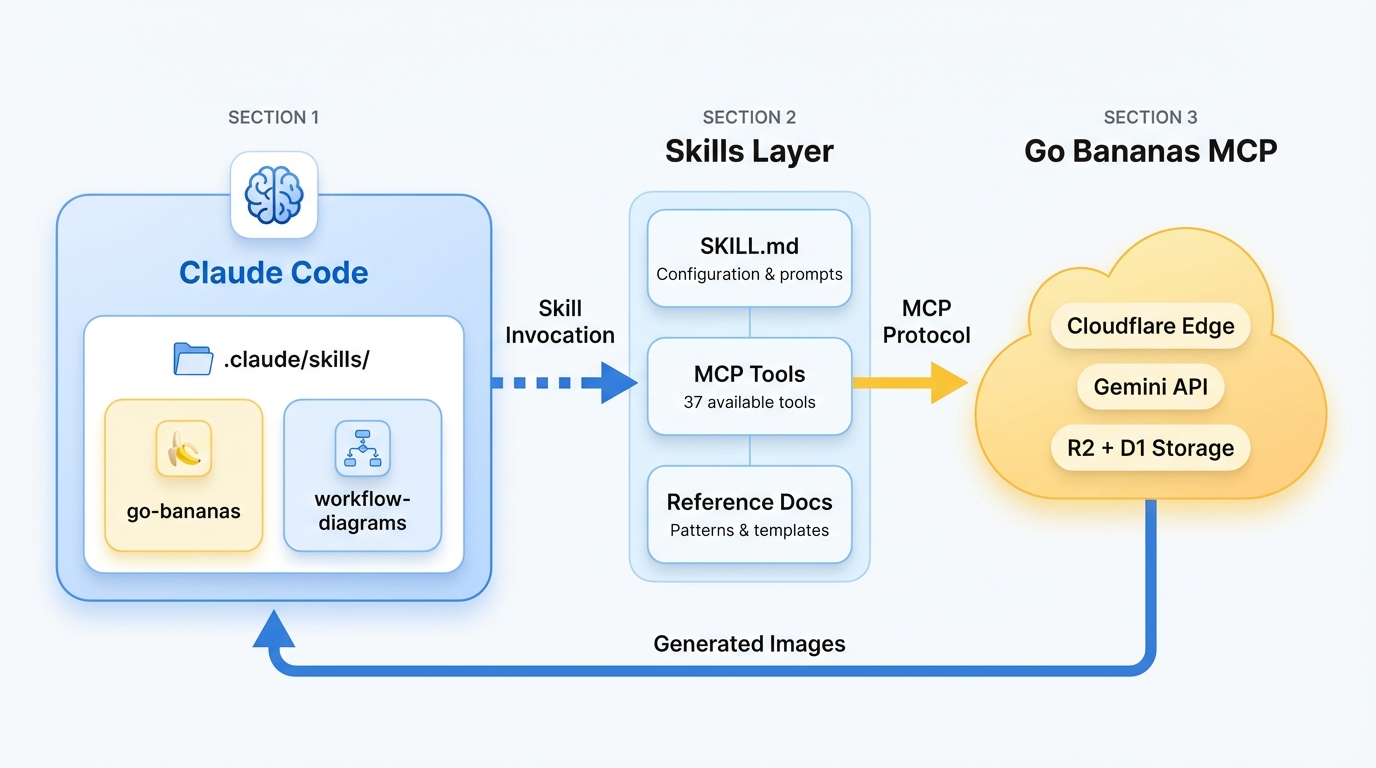
Claude Code loads skills from .claude/skills/ and invokes MCP tools via Go Bananas! server
Installation
Prerequisites
- Claude Code — The Anthropic CLI (
claudecommand) - Go Bananas! account — Log in here
- MCP Server — Go Bananas! MCP configured in Claude Code
Step 1: Configure MCP Server
Add Go Bananas! to Claude Code with remote HTTP OAuth:
claude mcp add --transport http -s user go-bananas https://mcp.gobananasai.comThen run /mcp, click Authenticate, and complete the browser login.
If you need the local STDIO proxy instead, run npx -y gobananas-cli auth login and use:
// .mcp.json or ~/.claude.json
{
  "mcpServers": {
    "go-bananas": {
      "command": "npx",
      "args": ["-y", "gobananas-mcp"],
      "env": {
        "GO_BANANAS_SERVER_URL": "https://gobananasai.com",
        "GO_BANANAS_MCP_TRANSPORT": "streamable-http"
      }
    }
  }
}For CI/headless use, add an API key to the same env object:
"GO_BANANAS_API_KEY": "sk_live_your_api_key"Do not mix a direct HTTP entry and a STDIO proxy entry under the same go-bananas server name/scope.
Step 2: Install Skills (Optional)
Skills are bundled with Go Bananas! and can be installed to your Claude Code environment:
# Clone or copy skills to your Claude Code skills directory
mkdir -p ~/.claude/skills
cp -r go-bananas-app/.claude/skills/* ~/.claude/skills/Or add as a project-level skill:
# In your project directory
mkdir -p .claude/skills
cp -r /path/to/go-bananas-app/.claude/skills/go-bananas .claude/skills/
cp -r /path/to/go-bananas-app/.claude/skills/workflow-diagrams .claude/skills/Available Skills
go-bananas
The primary skill for AI image generation, editing, and management.
Triggers on:
- Requests for AI images or photo generation
- Character design and consistency
- Product shots and marketing assets
- Multi-scene storytelling
- Image editing requests
Capabilities:
| Feature | Description |
|---|---|
| Image Generation | Create images from text prompts |
| Conversational Editing | "Add clouds", "make it brighter" |
| Character Consistency | Save and reuse character designs |
| Product Marketing | Generate product images at scale |
| Style Presets | Apply consistent branding |
| Reference Groups | Use multiple reference images |
Example Usage:
User: Generate an image of a sunset over mountains

Claude: [Invokes generate_image tool]
Generated: https://gobananasai.com/images/sunset-mountains.jpgUser: Create a character named Luna - a young girl with silver hair
Claude: [Invokes create_character tool]
Character "Luna" saved with ID 42
User: Generate Luna playing in a meadow
Claude: [Invokes generate_with_character tool]
Generated: https://gobananasai.com/images/luna-meadow.jpgworkflow-diagrams
Transform Mermaid syntax or natural language into professional visual diagrams.
Triggers on:
- Flowcharts and process diagrams
- Decision trees and org charts
- Timelines and Gantt charts
- Infographics and data visualization
- Mind maps and sequence diagrams
Capabilities:
| Format | Description |
|---|---|
| Flowchart | Process flows with decision points |
| Sequence Diagram | API flows and interactions |
| Timeline | Project phases and milestones |
| Infographic | Statistics and comparisons |
| Org Chart | Team hierarchies |
| Mind Map | Idea organization |
Example Usage:
User: Create a flowchart showing the login process

Claude: [Invokes generate_image with diagram prompt]
Generated professional flowchart imageUser: Convert this Mermaid diagram to a visual:
graph TD
A[Start] --> B{Valid?}
B -->|Yes| C[Process]
B -->|No| D[Error]
Claude: [Invokes generate_image with Pro model]
Generated: https://gobananasai.com/images/login-flowchart.jpgHow Skills Work
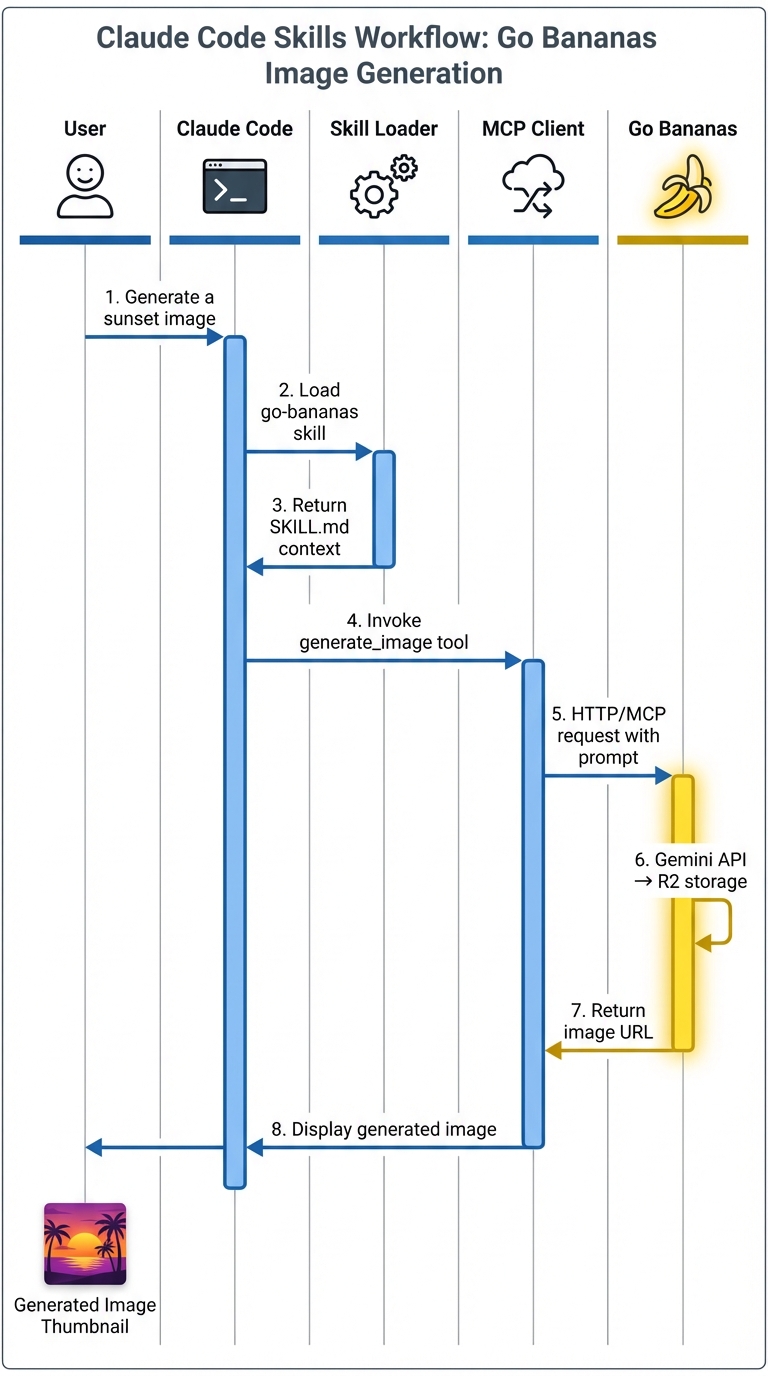
User request flows through Claude Code → Skill → MCP → Go Bananas! → Generated image
Skill Loading
- Trigger Detection — Claude Code detects keywords matching skill descriptions
- Context Injection — Skill's SKILL.md content is loaded into context
- Tool Selection — Claude selects appropriate MCP tools based on request
- Execution — Tools are invoked via MCP protocol
- Response — Generated images returned to user
Skill Structure
Each skill contains:
.claude/skills/go-bananas/
├── SKILL.md              # Main skill documentation
├── mcp-tools.md          # Tool reference
├── prompt-patterns.md    # Best practices
└── use-cases.md # Common scenariosThe SKILL.md frontmatter defines when the skill activates:
---
name: go-bananas
description: AI image generation using Go Bananas! MCP server...
---Golden Rules
Best practices from Google DeepMind's Gemini Pro guide:
| Rule | Description |
|---|---|
| Edit, Don't Re-roll | If 80% correct, use editing instead of regenerating |
| Natural Language | Write full sentences, not tag soups |
| Materiality | Describe textures: "brushed steel", "soft velvet" |
| Context | Add purpose: "for a luxury cookbook" |
| Identity Locking | "Keep facial features exactly the same" |
Bad prompt: dog, park, 4k, realistic
Good prompt: "A golden retriever playing fetch in a sunny park, captured in photorealistic detail"
Models
| Feature | Standard (Flash) | Pro |
|---|---|---|
| Speed | Fast | Quality-optimized |
| Resolution | 1K | Up to 4K |
| Reference images | 3 max | 14 max |
| Text rendering | Basic | Advanced |
| Web grounding | No | Yes |
When to use:
- Standard — Rapid prototyping, high-volume generation, simple edits
- Pro — Production assets, infographics, text-heavy content, diagrams
Example Workflows
Character Campaign
1. "Generate a robot mascot with chrome finish and LED eyes"
   → Creates initial design

2. "Save this as a character named RoboBot"
   → Stores character definition

3. "Generate RoboBot waving in an office"
   → Consistent character in new scene

4. "Generate RoboBot celebrating with confetti"
→ Same character, different contextProduct Marketing
1. "Save this water bottle image as a product"
   → Stores product reference

2. "Generate the bottle on a mountain trail at sunset"
   → Marketing scene 1

3. "Generate the bottle at a beach with waves"
   → Marketing scene 2

4. "Make the colors more vibrant"
→ Edits last imageTechnical Diagram
1. "Create a flowchart showing user authentication:
    - User enters credentials
    - Validate input
    - If valid: generate token, return success
    - If invalid: increment attempts, check lockout"
   → Professional flowchart image

2. "Add a database symbol for credential storage"
→ Edits the diagramAdvanced Configuration
Custom Skill Settings
Create a .claude/go-bananas.local.md file for project-specific settings:
---
default_model: gemini-pro-image
default_aspect_ratio: 16:9
style_preset: "Corporate Brand"
---

# Project-specific prompting notes

Always use company brand colors (#0066CC, #FFE135).
Include logo watermark on marketing images.Environment Variables
| Variable | Description |
|---|---|
GO_BANANAS_API_KEY | Your API key |
GO_BANANAS_SERVER_URL | Custom server URL |
GO_BANANAS_DEFAULT_MODEL | Default model ID |
Comparison with Other Methods
| Feature | Skills | MCP Direct | REST API | CLI |
|---|---|---|---|---|
| Setup complexity | Low | Medium | Medium | Low |
| Natural language | Native | Limited | None | Limited |
| Context awareness | Full | Partial | None | None |
| Prompt guidance | Built-in | Manual | Manual | Manual |
| Best for | Claude Code users | AI assistants | Custom apps | Automation |
Troubleshooting
Skill Not Loading
# Check skill is in correct location
ls ~/.claude/skills/go-bananas/SKILL.md

# Verify frontmatter is valid YAML
head -10 ~/.claude/skills/go-bananas/SKILL.mdMCP Connection Issues
# Test MCP server directly
gobananas-mcp diagnose

# Check API key is set
echo $GO_BANANAS_API_KEYTool Not Found
Ensure the MCP server is properly configured and the Go Bananas! service is accessible:
# Test connection
curl -H "X-API-Key: sk_live_xxx" https://gobananasai.com/api/profileNext Steps
- MCP Protocol Guide — Direct MCP integration
- Character Consistency Guide — Deep dive into characters
- Workflow Diagrams Guide — Creating diagrams
- CLI Reference — Command-line interface