
Sessions
Sessions provide conversation context for natural image editing workflows.
What is a Session?
A session is a working context that tracks your image generation activity. It enables features like:
- Continue editing: Edit the last image without specifying which one
- Context awareness: AI knows what you've been working on
- History tracking: View all images from a conversation
Session Lifecycle
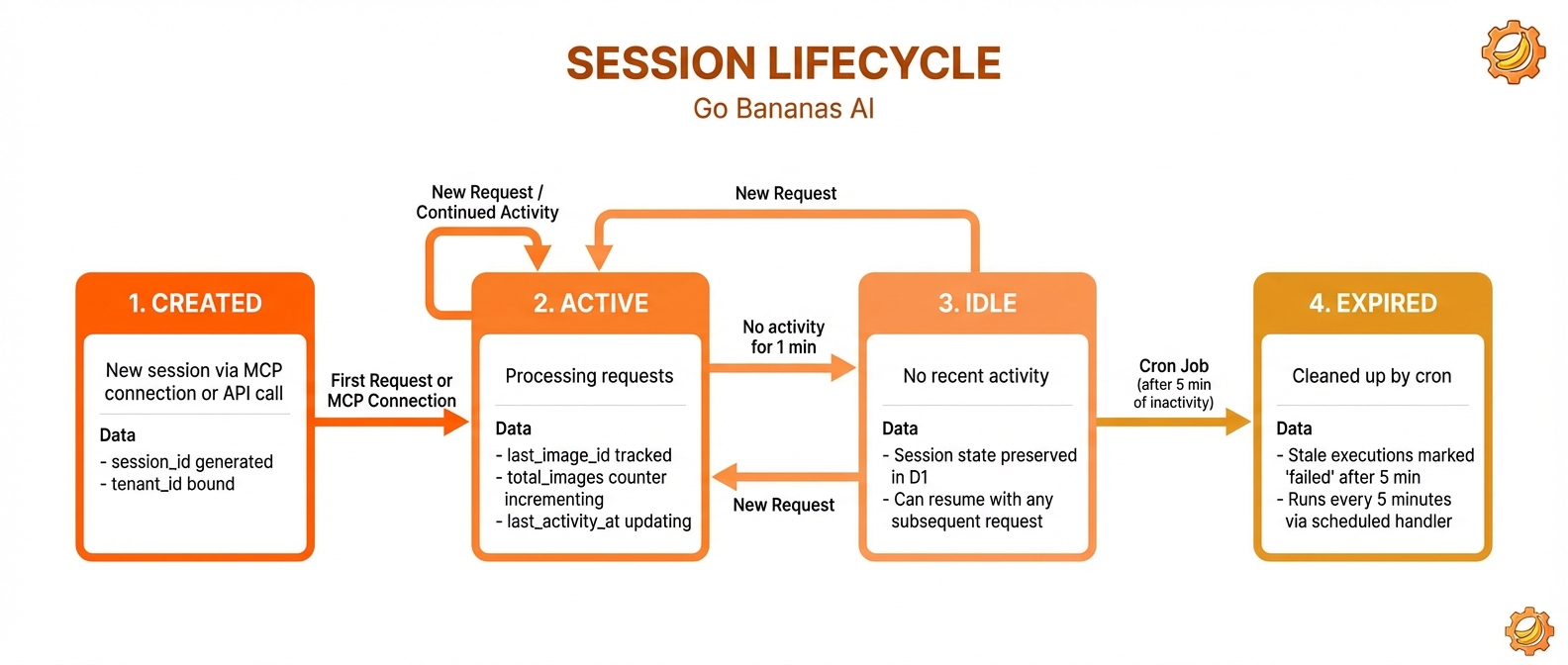
Created → Active (generating/editing) → Idle → Expired after 24h
How Sessions Work
Automatic Session Creation
Sessions are created automatically on your first image operation:
User: Generate a sunset image
System: [Creates session, generates image, saves last_image_id]

User: Add some clouds
System: [Uses last_image_id, edits, updates session]Session State
| Field | Description |
|---|---|
session_id | Unique identifier (e.g., sess_abc123xyz) |
tenant_id | Your tenant account |
last_image_id | Most recent image ID |
total_images | Count of images generated |
total_edits | Count of edit operations |
created_at | When session started |
last_activity_at | Last operation time |
is_active | Whether session is active |
Session ID Sources
Sessions can be identified by:
- Automatic: Generated from your MCP connection
- Custom: Specified in API requests
{
  "tool": "generate_image",
  "params": {
    "prompt": "a sunset",
    "session_id": "my-custom-session-123"
  }
}Continue Editing
The primary benefit of sessions is conversational editing:
Generate a portrait of a businessman
→ Session records: last_image_id = 42

Make the background darker
→ Uses last_image_id (42), creates image 43
→ Session updates: last_image_id = 43

Add a subtle vignette
→ Uses last_image_id (43), creates image 44
→ Session updates: last_image_id = 44Without sessions, each edit would require:
Edit image #42: Make the background darker
Edit image #43: Add a subtle vignetteViewing Session History
Get Current Session Images
Show me all images from this sessionReturns images in reverse chronological order:
{
  "session_id": "sess_abc123",
  "images": [
    { "id": 44, "prompt": "...", "operation": "edit" },
    { "id": 43, "prompt": "...", "operation": "edit" },
    { "id": 42, "prompt": "...", "operation": "generate" }
  ],
  "total_images": 3,
  "total_edits": 2
}Session Summary
What's my session summary?Returns:
- Total images generated
- Total edits made
- Session duration
- Storage used
Managing Sessions
Starting Fresh
To start a new session explicitly:
Start a new image sessionOr use a custom session ID:
{
  "session_id": "project-x-scene-1"
}Session Isolation
Each session is isolated:
- Data: Images belong to one session
- Context:
last_image_idis per-session - History: Each session has its own history
Session Expiration
Sessions expire after 24 hours of inactivity:
- Active sessions: Keep working, session stays alive
- Idle sessions: After 24h, marked as inactive
- Data preserved: Images remain accessible, just context is lost
Session Patterns
Single Project Workflow
Use one session for a complete project:
Session: "Book Cover Design"
1. Generate base concept
2. Iterate on composition
3. Refine colors
4. Add final detailsMultiple Variations
Use separate sessions for different directions:
Session A: "Cover - Option 1"
Generate dark, mysterious concept
Iterate...

Session B: "Cover - Option 2"
Generate bright, cheerful concept
Iterate...API Integration
Use custom session IDs for programmatic workflows:
# Generate images for different products
for product in products:
    session_id = f"marketing-{product.id}"
generate_with_product(product, session_id=session_id)Session vs. Image History
| Aspect | Session | Image History |
|---|---|---|
| Scope | Temporary context | Permanent record |
| Duration | 24h timeout | Forever |
| Purpose | Enable editing | Search, browse |
last_image_id | ✅ Tracked | ❌ Not applicable |
| Searchable | By session_id | Full search |
Session Best Practices
1. One Session Per Task
✅ Good: One session for "Homepage Hero Image"
❌ Bad: Mixing multiple unrelated images in one session2. Use Descriptive Custom IDs
✅ Good: "product-launch-2024-hero"
❌ Bad: "test123"3. Check Session Before Editing
If unsure which image will be edited:
What's my last image in this session?4. Start Fresh for New Projects
Start a new session for this projectAPI Details
Session in Generation
{
  "tool": "generate_image",
  "params": {
    "prompt": "a landscape",
    "session_id": "optional-custom-id"
  }
}Get Session History
{
  "tool": "get_session_history",
  "params": {
    "limit": 50,
    "offset": 0
  }
}REST API Sessions
# List all sessions
curl -H "X-API-Key: sk_live_xxx" \
  https://api.example.com/api/sessions

# Get specific session
curl -H "X-API-Key: sk_live_xxx" \
https://api.example.com/api/sessions/sess_abc123Troubleshooting
"No image to edit"
The session has no last_image_id. Generate an image first:
Generate a landscape image
Then: Add mountains in the backgroundWrong Image Edited
Check which image is current:
What's my last image?Or edit by ID:
Edit image #42: Make it brighterSession Lost
Sessions expire after 24h idle. Your images are still accessible:
Show me image #42Then start a new edit chain:
Edit image #42: Continue from here