
Core Concepts
Understanding these core concepts will help you get the most out of Go Bananas!.
Model Context Protocol (MCP)
What is MCP?
MCP (Model Context Protocol) is an open standard for connecting AI assistants to external tools and data sources. It defines how AI models like Claude can:
- Discover available tools and their capabilities
- Execute tool calls with structured parameters
- Receive structured responses
Why MCP?
Before MCP, every AI integration required custom code. MCP provides:
- Standardization: One protocol for all AI-tool integrations
- Discovery: AI can ask "what can you do?" and get a structured answer
- Type Safety: Parameters and responses are schema-validated
- Composability: Combine multiple MCP servers for complex workflows
MCP in Go Bananas!
Go Bananas! exposes 53 MCP tools across categories:
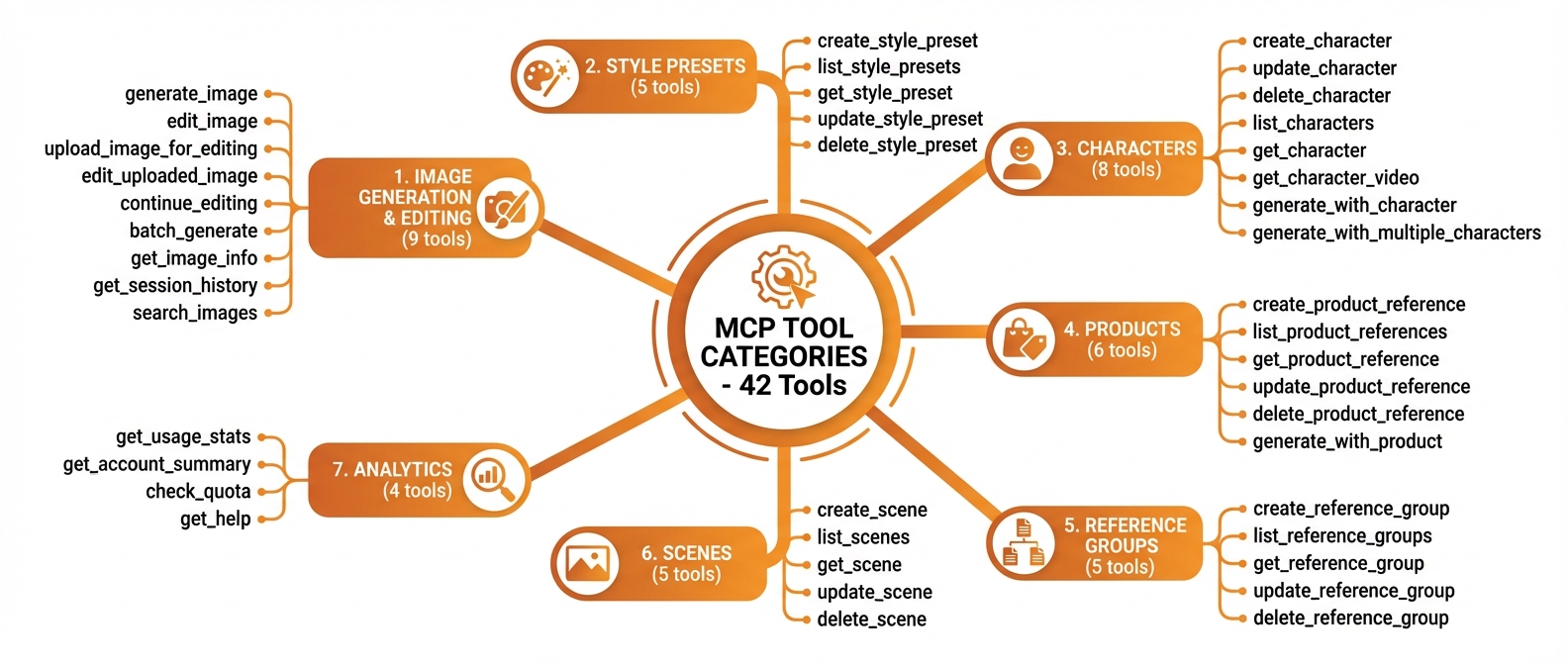
Generation, Editing, Posters, Characters, Products, Style Presets, Reference Groups, Scenes, Models, Analytics
Prompting Philosophy
The Golden Rules
Go Bananas! Pro is a "Thinking" model. It doesn't just match keywords; it understands intent, physics, and composition. Stop using tag soups and start acting like a Creative Director.
Golden Rules of Prompting
| Rule | Description |
|---|---|
| Edit, Don't Re-roll | If 80% correct, use continue_editing instead of regenerating |
| Natural Language | Write full sentences like briefing an artist, not tag soups |
| Materiality | Describe textures: "brushed steel", "soft velvet", "crumpled paper" |
| Context | Add "for whom": "for a luxury cookbook" changes everything |
| Identity Locking | "Keep facial features exactly the same as Image 1" |
Good vs Bad Prompts
Bad (Tag Soup):
dog, park, 4k, realisticGood (Natural Language):
A golden retriever playing fetch in a sunny park, captured in photorealistic detailLearn Pro Model Best Practices →
Negative Prompting
Tell the model what NOT to include using the negative_prompt parameter.
Common Negative Prompts:
| Negative | Why |
|---|---|
no date stamp | Pro adds timestamps to corners |
no text | Clean images without text |
not rustic | Model tends to age things |
no watermarks | Prevents generated watermarks |
{
  "prompt": "Modern minimalist kitchen",
  "negative_prompt": "not rustic, no wood grain, no farmhouse style"
}Prompt Evolution
Start simple and iterate with continue_editing:
1. generate_image({ prompt: "A portrait" })
   → Model shows defaults

2. continue_editing({ prompt: "make it dramatic" })
   → Adds contrast, intensity

3. continue_editing({ prompt: "add studio lighting" })
   → Professional photography style

4. continue_editing({ prompt: "avant-garde fashion" })
→ Final creative directionEdit, Don't Re-roll
If 80% correct, use continue_editing instead of regenerating!
Tenants
What is a Tenant?
A tenant is an isolated account within Go Bananas!. Each tenant has:
- Unique ID:
acme-corp,creative-studio, etc. - API Keys: One or more keys for authentication
- Encrypted Credentials: Provider API keys (Gemini and/or OpenAI) stored separately, AES-GCM encrypted in
tenant_provider_credentials - Allowed Models:
allowedModelslist controls which providers each tenant can route through - Quotas: Storage limits, rate limits
- Data: Images, characters, presets - all isolated
Multi-Tenant Architecture
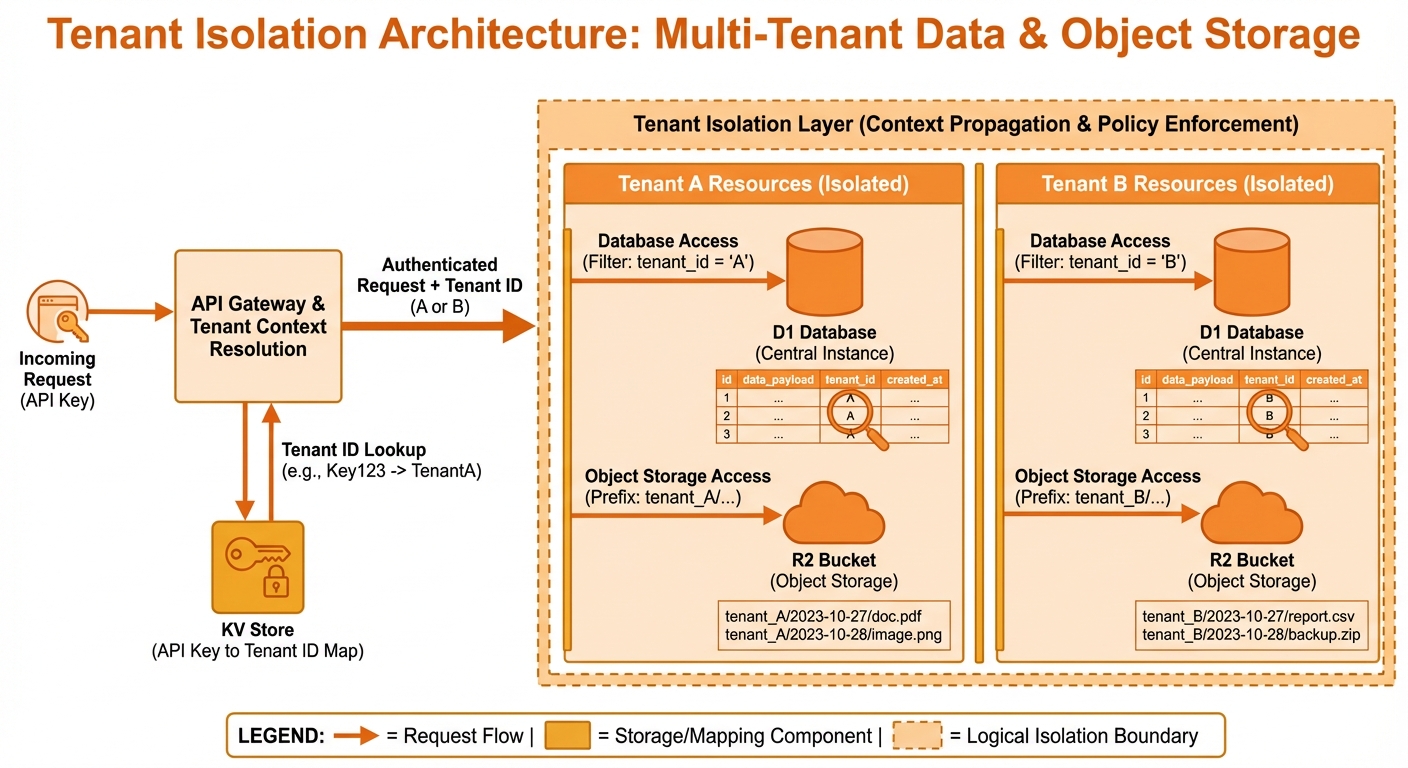
Complete data isolation between tenants
Tenant Isolation
- Database: All tables have
tenant_idforeign keys - Storage: R2 keys prefixed with
{tenant_id}/ - Encryption: Each tenant's provider keys are individually encrypted; revoking one provider doesn't affect the others
- Quotas: Usage tracked per-tenant
Sessions
What is a Session?
A session represents a conversation context for image operations. It tracks:
- Last Image ID: For conversational editing
- Total Images: Count of images in session
- Total Edits: Count of edit operations
- Activity: Last activity timestamp
Session Lifecycle
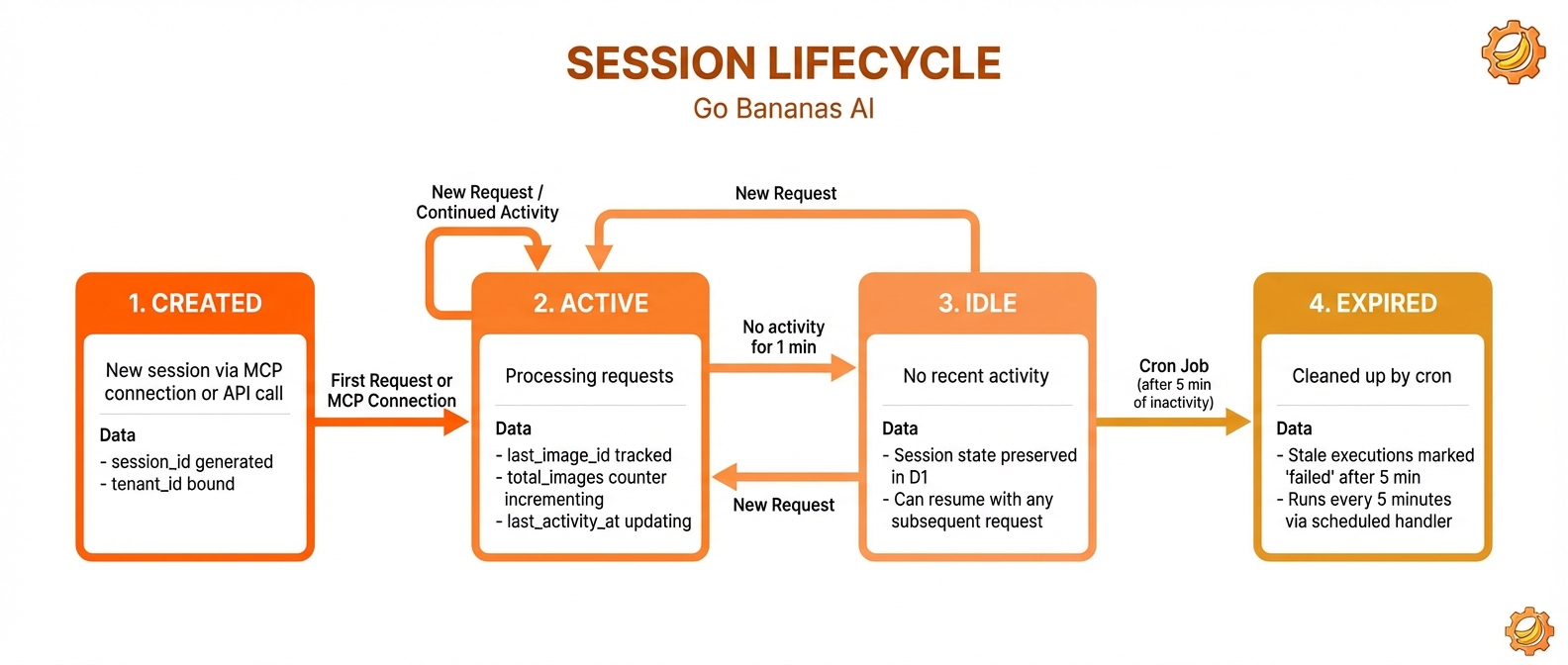
New → Active → Editing → Inactive states
Why Sessions Matter
Sessions enable conversational editing:
User: Generate a sunset image
Bot: [Creates Image A, session.lastImageId = A]

User: Add some birds
Bot: [Edits A → creates B, session.lastImageId = B]

User: Make it more dramatic
Bot: [Edits B → creates C, session.lastImageId = C]Without sessions, each edit would require specifying which image to edit.
Session vs Image History
- Session: Temporary working context
- Image History: Permanent record of all generated images
Characters
What is a Character?
A character is a saved design that maintains visual consistency across multiple image generations.
Character Components
| Component | Purpose |
|---|---|
character_name | Unique identifier |
base_prompt | Core appearance description |
reference_image_ids | Example images for consistency |
negative_prompt | What to avoid |
system_instruction | Style guidance |
tags | Organization |
How Character Generation Works
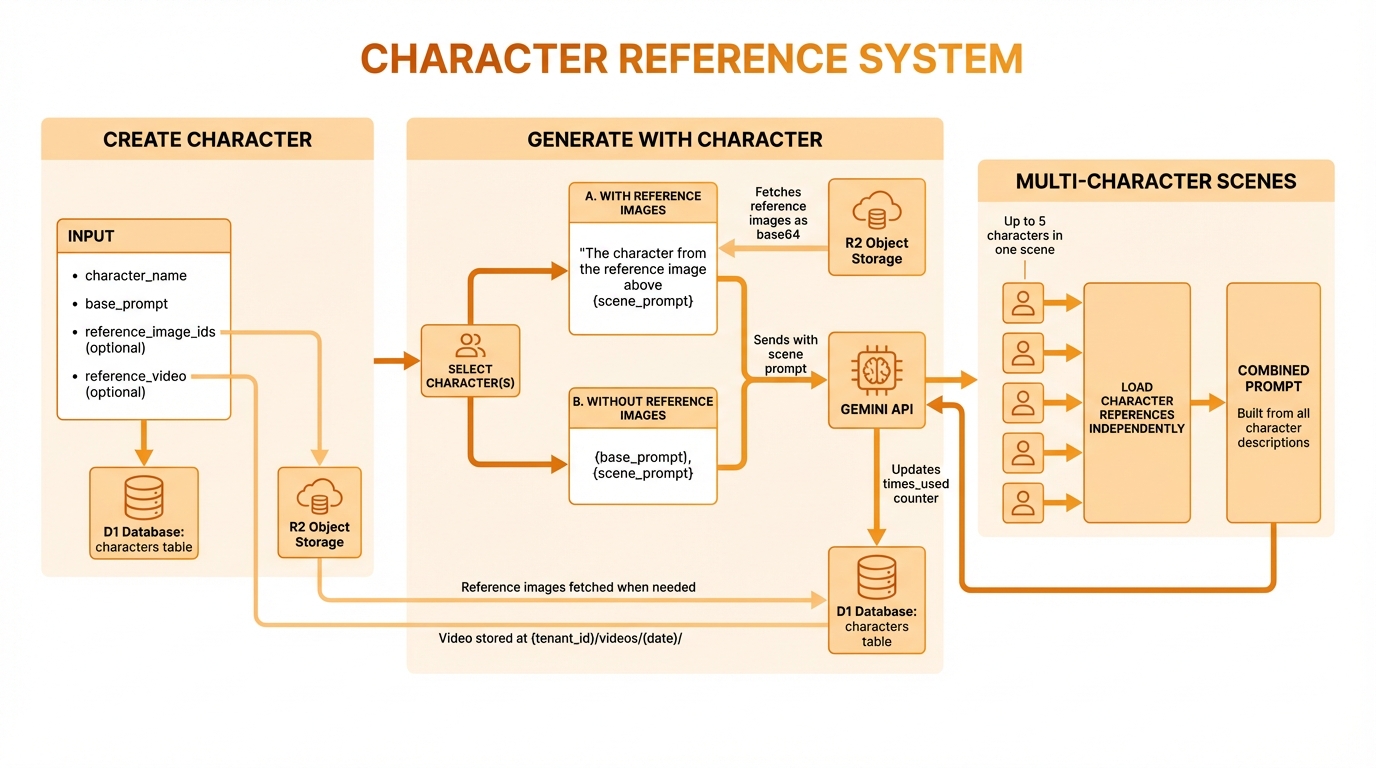
Load character, build prompt, generate with references
Best Practices
- Detailed base prompt: Include all distinctive features
- Reference images: Add 2-3 good examples
- Consistent style: Use similar system instructions
- Test variations: Generate test scenes to verify consistency
Style Presets
What is a Style Preset?
A style preset is a saved template of prompt settings for consistent styling across generations.
Preset Components
| Component | Applied How |
|---|---|
prompt | Prepended to user prompt |
negative_prompt | Added to negative prompt |
system_instruction | Sets model behavior |
aspect_ratio | Default ratio |
Example: "Vintage Film" Preset
{
  "name": "Vintage Film",
  "prompt": "vintage 35mm film photograph, grain texture",
  "negative_prompt": "digital, sharp, modern, oversaturated",
  "system_instruction": "Create images with the aesthetic of 1970s film photography",
  "aspect_ratio": "4:3"
}When used:
- User prompt: "a coffee shop"
- Final prompt: "vintage 35mm film photograph, grain texture, a coffee shop"
Image Lineage
Edit History
Every edited image maintains a link to its parent:
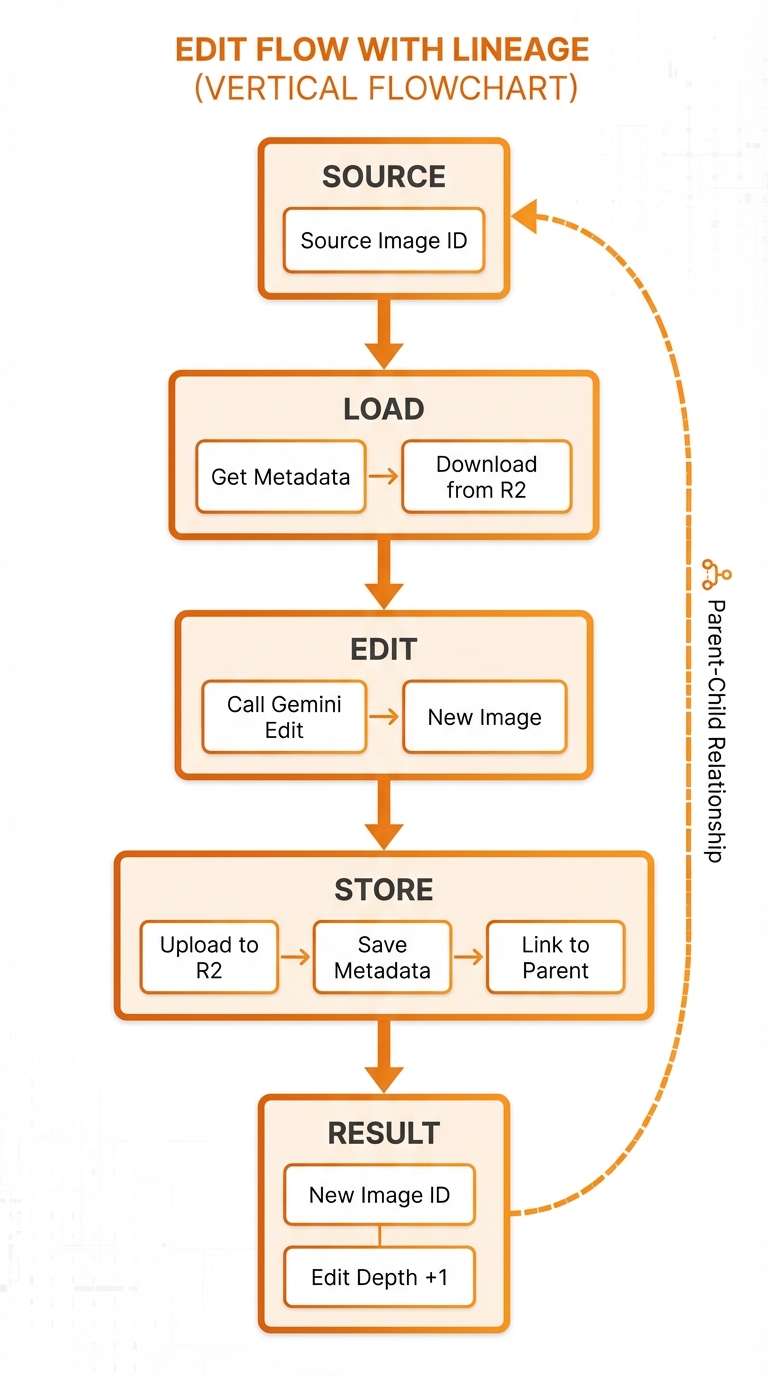
Version branching and lineage tracking
Tracking Lineage
| Field | Purpose |
|---|---|
parent_image_id | Previous version |
edit_depth | How many edits deep |
operation_type | generate, edit, character, product |
This enables:
- Version history: See how an image evolved
- Branching: Create variations from any point
- Attribution: Track original sources
Storage Architecture
Hybrid R2 + D1
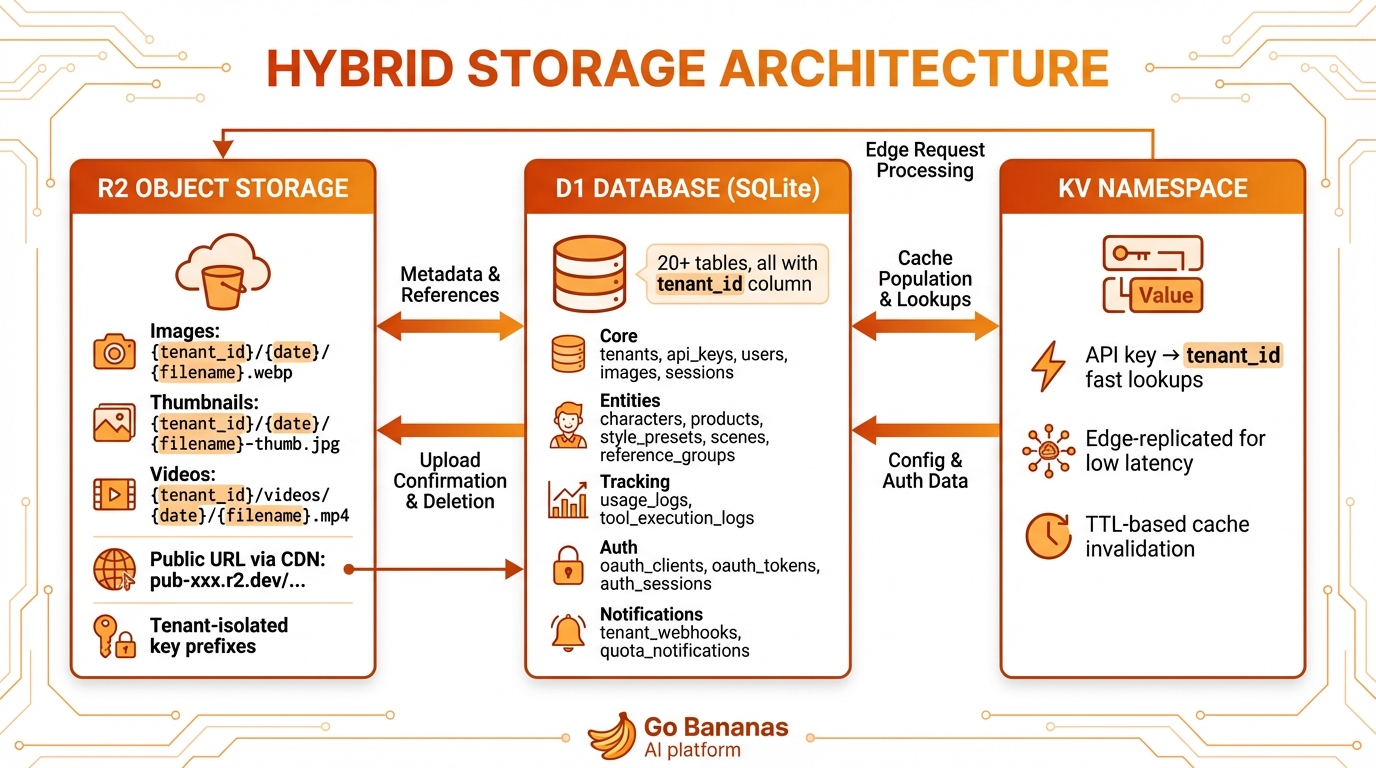
R2 for images, D1 for metadata and queries
Why Hybrid?
| Storage | Best For |
|---|---|
| R2 | Large binary files, CDN delivery |
| D1 | Queries, relationships, search |
Storage Paths
Images are stored with tenant isolation:
{tenant_id}/{date}/generate-{uuid}.png
{tenant_id}/{date}/generate-{uuid}-thumb.jpgGemini Files API
Temporary Caching
When Gemini generates an image, it returns a gemini_file_id that can be reused for 48 hours:
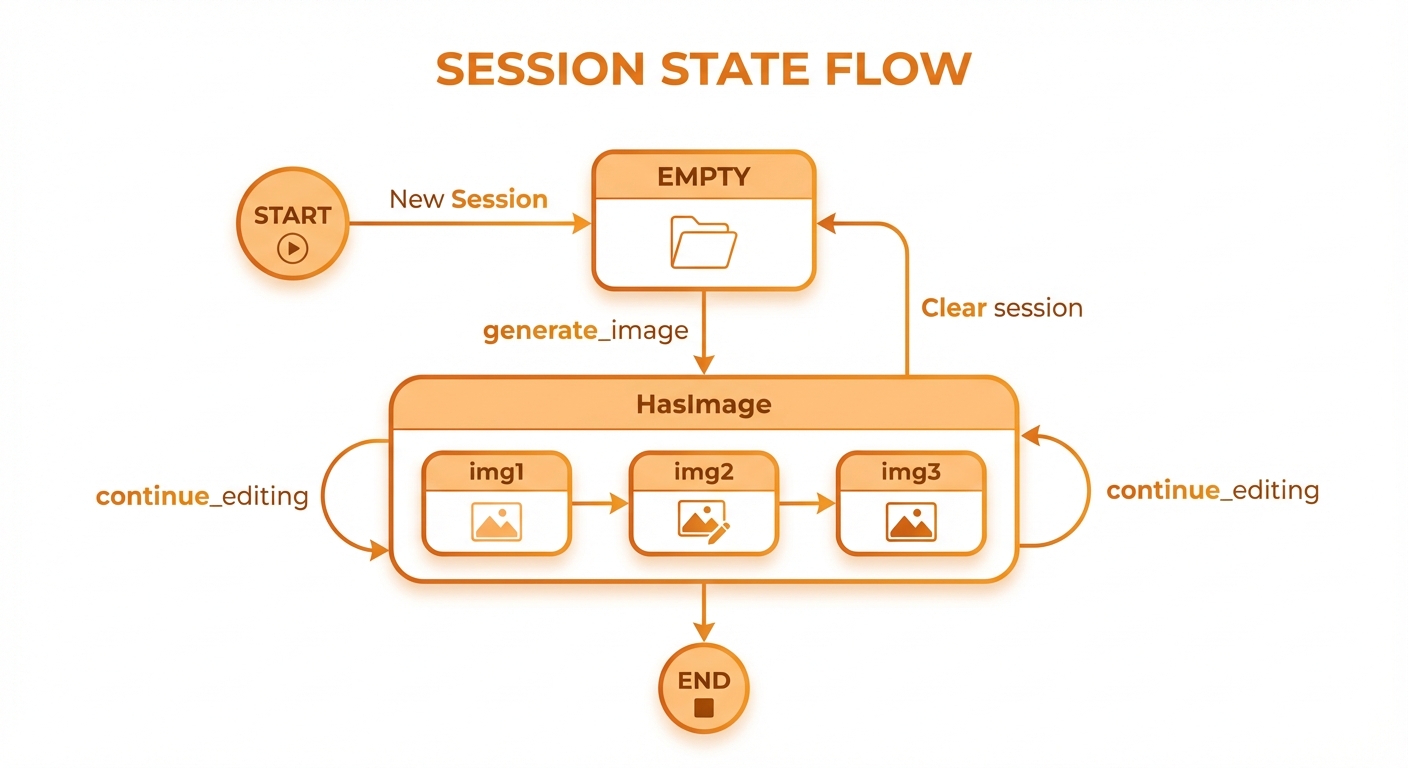
Fast edits within 48 hours, automatic fallback after expiry
Benefits
- Faster edits: No re-upload needed within 48 hours
- Lower latency: Skip R2 round-trip
- Automatic fallback: Gracefully handles expired files
Next Steps
Now that you understand the core concepts: