
API Reference
Complete REST API documentation for Go Bananas!.
Overview
The Go Bananas! API provides programmatic access to all image generation, management, and administrative features. The API follows REST conventions with JSON request/response bodies.
Response envelope
- Most endpoints return
{ data: ... }(no top‑levelsuccessflag). - List endpoints return
{ data: [...], pagination: { limit, offset, total } }. - Errors return
{ error: "message", ... }with optionaldetails.
Base URL
Production: https://gobananasai.com
Development: http://localhost:8787API Categories
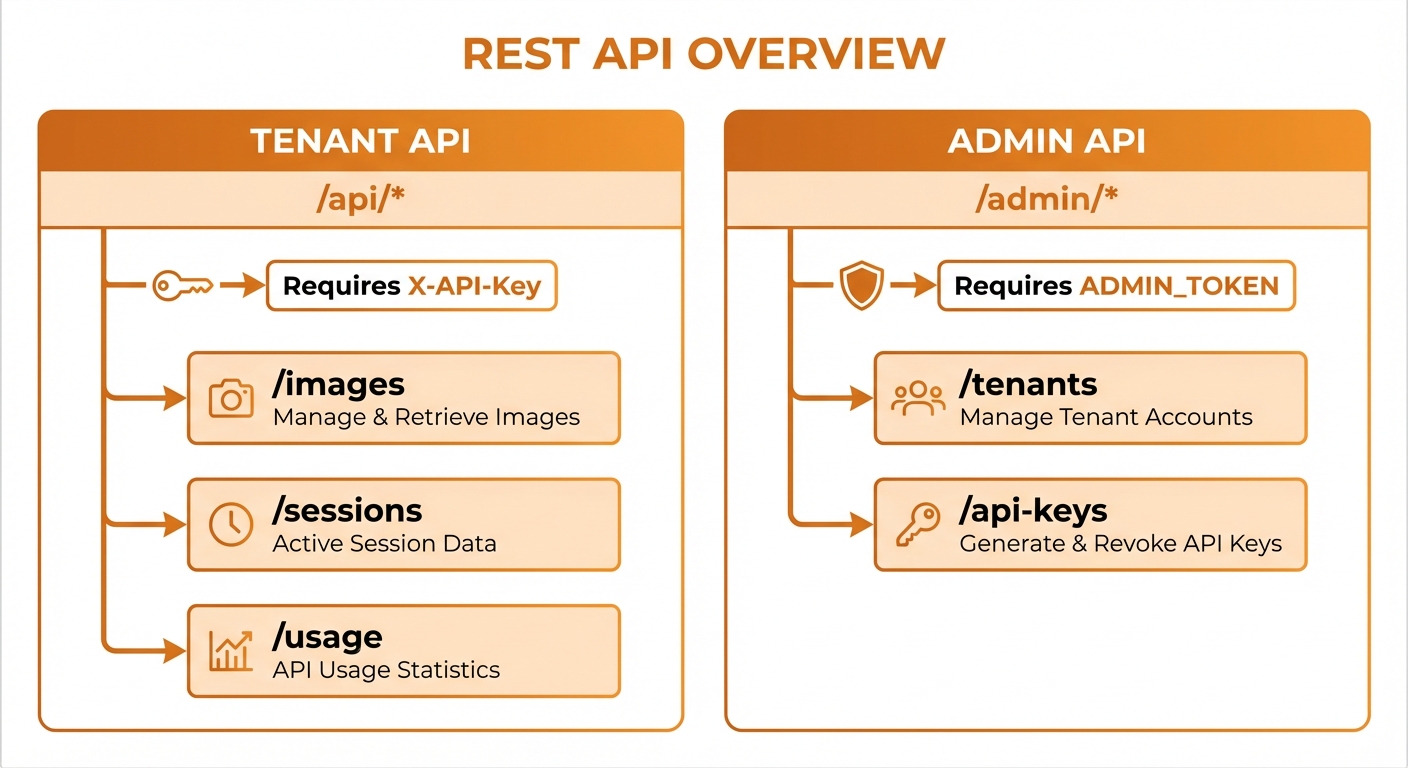
Tenant API, Admin API, and MCP endpoints
Quick Reference
Tenant Endpoints
| Method | Endpoint | Description |
|---|---|---|
| GET | /api/profile | Get tenant profile and quotas |
| GET | /api/images | List images with pagination |
| POST | /api/images | Generate new image |
| GET | /api/images/:id | Get image details |
| DELETE | /api/images/:id | Delete image |
| GET | /api/sessions | List sessions |
| GET | /api/sessions/:id | Get session details |
| GET | /api/characters | List characters |
| POST | /api/characters | Create character |
| GET | /api/characters/:id | Get character |
| PATCH | /api/characters/:id | Update character |
| DELETE | /api/characters/:id | Delete character |
| POST | /api/characters/:id/generate | Generate with character |
| POST | /api/characters/generate-multi | Multi‑character generation |
| GET | /api/products | List product references |
| POST | /api/products | Create product reference |
| GET | /api/products/:id | Get product reference |
| PATCH | /api/products/:id | Update product reference |
| DELETE | /api/products/:id | Delete product reference |
| POST | /api/products/:id/generate | Generate with product |
| GET | /api/reference-groups | List reference groups |
| POST | /api/reference-groups | Create reference group |
| GET | /api/reference-groups/:id | Get reference group |
| PATCH | /api/reference-groups/:id | Update reference group |
| DELETE | /api/reference-groups/:id | Delete reference group |
| GET | /api/style-presets | List style presets |
| POST | /api/style-presets | Create style preset |
| PATCH | /api/style-presets/:id | Update style preset |
| DELETE | /api/style-presets/:id | Delete style preset |
| GET | /api/scenes | List scene presets |
| POST | /api/scenes | Create scene preset |
| GET | /api/scenes/:id | Get scene preset |
| PATCH | /api/scenes/:id | Update scene preset |
| DELETE | /api/scenes/:id | Delete scene preset |
| GET | /api/search-presets | List saved search presets |
| POST | /api/search-presets | Create search preset |
| DELETE | /api/search-presets/:id | Delete search preset |
| GET | /api/usage | Get usage statistics |
| GET | /api/sessions/:id/logs | Session execution logs |
| GET | /api/executions/active | Active executions |
| POST | /api/images/upload | Direct file upload (multipart) |
| POST | /api/images/batch | Batch generate (1-8 images) |
| POST | /api/images/delete-bulk | Bulk delete (max 20) |
| POST | /api/edit-image | Edit existing image |
| POST | /api/upload-for-editing | Upload image for editing |
| GET | /api/quota-check | Pre-flight quota/rate-limit check |
| GET | /api/webhooks | List tenant webhooks |
| POST | /api/webhooks | Create webhook |
| DELETE | /api/webhooks/:id | Delete webhook |
| GET | /api/keys | List API keys |
| GET | /api/settings | Get tenant settings |
Admin Endpoints
| Method | Endpoint | Description |
|---|---|---|
| GET | /admin/tenants | List all tenants |
| POST | /admin/tenants | Create new tenant |
| GET | /admin/tenants/:id | Get tenant details |
| PATCH | /admin/tenants/:id | Update tenant |
| POST | /admin/tenants/:id/api-keys | Create API key |
| GET | /admin/users | List users |
| PATCH | /admin/users/:id | Update user |
| POST | /admin/users/:id/unlock | Unlock user account |
| GET | /admin/invitations | List invitations |
| POST | /admin/invitations | Create invitation |
| DELETE | /admin/invitations/:token | Revoke invitation |
MCP Endpoints
| Method | Endpoint | Description |
|---|---|---|
| POST | /mcp | MCP HTTP transport |
| GET | /sse | Server-Sent Events transport (legacy; use /mcp) |
OAuth 2.1 Endpoints
| Method | Endpoint | Description |
|---|---|---|
| GET | /.well-known/oauth-protected-resource | Protected resource metadata |
| GET | /oauth/.well-known/openid-configuration | Authorization server metadata |
| GET | /oauth/authorize | Authorization with PKCE |
| POST | /oauth/token | Token exchange/refresh |
| POST | /oauth/register | Dynamic client registration |
Authentication
REST API endpoints (/api/*) require API keys. MCP endpoints (/mcp, and the legacy /sse) accept API keys or OAuth access tokens.
API Key Authentication
curl -X GET "https://gobananasai.com/api/profile" \
-H "X-API-Key: sk_live_your_key_here"Or using Bearer token:
curl -X GET "https://gobananasai.com/api/profile" \
-H "Authorization: Bearer sk_live_your_key_here"OAuth 2.1 Authentication (MCP)
curl -X POST "https://mcp.gobananasai.com" \
  -H "Authorization: Bearer <oauth_access_token>" \
  -H "Content-Type: application/json" \
-d '{"method":"tools/list","params":{}}'See OAuth 2.1 API → for complete OAuth documentation.
Admin API
curl -X GET "https://gobananasai.com/admin/tenants" \
-H "Authorization: Bearer <admin_session_token>"Request Format
Headers
Content-Type: application/json
X-API-Key: sk_live_xxx (or Authorization: Bearer sk_live_xxx)
Authorization: Bearer <access_token> (OAuth for /mcp)
X-Session-Id: optional-session-id (for session tracking)Request Body
{
  "field": "value",
  "nested": {
    "key": "value"
  }
}Response Format
Success Response
{
  "data": {
    // Response data
  }
}Some endpoints return a bare top‑level object (for example /api/profile returns { tenant: ... }).
Error Response
{
  "error": "Human-readable error message",
  "code": "OPTIONAL_ERROR_CODE",
  "details": {
    // Additional context (optional)
  }
}Paginated Response
{
  "data": [...],
  "pagination": {
    "total": 100,
    "limit": 20,
    "offset": 0,
    "hasMore": true
  }
}Rate Limiting
Rate limits are applied per tenant:
| Tier | Requests/minute | Daily limit |
|---|---|---|
| Free | 10 | 100 |
| Basic | 60 | 1,000 |
| Pro | 300 | 10,000 |
| Enterprise | Custom | Custom |
Rate Limit Headers
X-RateLimit-Limit: 60
X-RateLimit-Remaining: 45
X-RateLimit-Reset: 1704067200Rate Limit Exceeded
{
  "error": "Rate limit exceeded. Try again in 30 seconds.",
  "retryAfter": 30
}Pagination
List endpoints support pagination:
curl "https://gobananasai.com/api/images?limit=20&offset=40" \
-H "X-API-Key: sk_live_xxx"Parameters
| Parameter | Type | Default | Max | Description |
|---|---|---|---|---|
limit | integer | 20 | 100 | Items per page |
offset | integer | 0 | - | Skip items |
Filtering
Many list endpoints support filtering:
# Search images by prompt
curl "https://gobananasai.com/api/images?search=sunset" \
  -H "X-API-Key: sk_live_xxx"

# Filter by date range
curl "https://gobananasai.com/api/images?dateFrom=2024-01-01&dateTo=2024-02-01" \
  -H "X-API-Key: sk_live_xxx"

# Filter by operation type
curl "https://gobananasai.com/api/images?operationType=generate" \
-H "X-API-Key: sk_live_xxx"Sorting
Images are returned newest‑first; sorting is not currently configurable.
CORS
The API supports CORS for browser-based applications:
Access-Control-Allow-Origin: *
Access-Control-Allow-Methods: GET, POST, PUT, PATCH, DELETE, OPTIONS
Access-Control-Allow-Headers: Content-Type, X-API-Key, Authorization, X-Session-Id
Access-Control-Max-Age: 86400Health Check
curl "https://gobananasai.com/health"Response:
{
  "status": "ok",
  "timestamp": "2024-01-15T10:30:00.000Z"
}SDK Support
While no official SDKs are provided, the REST API is easy to integrate:
JavaScript/TypeScript
class NanoBananaClient {
  constructor(private apiKey: string, private baseUrl: string) {}

  async request(method: string, path: string, body?: any) {
    const response = await fetch(`${this.baseUrl}${path}`, {
      method,
      headers: {
        'Content-Type': 'application/json',
        'X-API-Key': this.apiKey,
      },
      body: body ? JSON.stringify(body) : undefined,
    });
    return response.json();
  }

  // Images
  listImages(params?: { limit?: number; offset?: number; search?: string }) {
    const query = new URLSearchParams(params as any).toString();
    return this.request('GET', `/api/images?${query}`);
  }

  generateImage(prompt: string, options?: GenerateOptions) {
    return this.request('POST', '/api/images', { prompt, ...options });
  }

  // Characters
  listCharacters() {
    return this.request('GET', '/api/characters');
  }

  createCharacter(data: CharacterInput) {
    return this.request('POST', '/api/characters', data);
  }
}Python
import requests

class NanoBananaClient:
    def __init__(self, api_key: str, base_url: str):
        self.api_key = api_key
        self.base_url = base_url

    def _request(self, method: str, path: str, json=None):
        response = requests.request(
            method,
            f"{self.base_url}{path}",
            headers={"X-API-Key": self.api_key},
            json=json
        )
        return response.json()

    def list_images(self, limit=20, offset=0):
        return self._request("GET", f"/api/images?limit={limit}&offset={offset}")

    def generate_image(self, prompt: str, **options):
        return self._request("POST", "/api/images", {"prompt": prompt, **options})