
Image Generation
Generate images from text prompts using Nano Banana 2 Lite (Gemini 3.1 Flash Lite, default), Nano Banana 2 (Gemini 3.1 Flash), Go Bananas! Pro (Gemini 3 Pro Image), OpenAI GPT Image 2, or OpenAI GPT Image 2.5 (Flare and Sunburst).
Basic Generation
The simplest way to generate an image:
Generate an image of a mountain landscape at sunriseThis creates a single 1024x1024 image with default settings.
Parameters
Prompt (Required)
The text description of what you want to generate.
Tips for effective prompts:
| Aspect | Example |
|---|---|
| Subject | "a red fox" |
| Action | "running through snow" |
| Setting | "in a winter forest" |
| Lighting | "golden hour sunlight" |
| Style | "oil painting style" |
| Mood | "peaceful, serene" |
Good prompt example:
A red fox running through fresh snow in a winter pine forest,
golden hour sunlight filtering through the trees, photorealistic,
detailed fur texture, breath visible in cold airNegative Prompt (Optional)
What to avoid in the image:
Generate a portrait photo of a business professional
Avoid: cartoon, anime, illustration, blurry, low qualityCommon negative prompt additions:
blurry, low quality, pixelatedtext, watermark, signaturedeformed, distortedmultiple subjects(for single-subject images)
Aspect Ratio
| Value | Dimensions | Best For |
|---|---|---|
square | 1:1 | Social media, profiles |
portrait | 3:4 | Character art, posters |
landscape | 4:3 | Scenes, environments |
16:9 | Widescreen | Desktop wallpapers, videos |
9:16 | Vertical | Mobile, stories |
Default: with no aspect ratio, the image is square (1:1). The request's own aspect_ratio always wins; if you leave it out, a default saved on a scene, style preset or character you use applies (checked in that order), and only then square. Edits keep the source image's shape unless you pass aspect_ratio or a scene, style preset or character you use supplies one.
Generate a cinematic landscape in 16:9 aspect ratioNumber of Images
Generate 1-4 variations in a single request:
Generate 4 variations of a fantasy castleModel Selection
Default Model
Nano Banana 2 Lite (gemini-flash-lite-image) is the current default — fastest, lowest-cost, and optimized for 1K generation/editing. Pass model_id to override per request, subject to your tenant's allowed-models list.
| Model | Provider | Use Case |
|---|---|---|
gemini-flash-lite-image | Gemini 3.1 Flash Lite | Fastest, lowest cost, 1K output (default) |
gemini-flash-image | Gemini 3.1 Flash | Strong all-around model, 2K/4K tiers, broader ratios |
gemini-pro-image | Gemini 3 Pro | Best Gemini quality, Google Search grounding, 1K/2K/4K tiers |
openai-gpt-image-2 | OpenAI GPT Image 2 | Text rendering, prompt adherence, quality tiers, JPEG/WebP output |
openai-gpt-image-2.5-flare | OpenAI GPT Image 2.5 Flare | Fast everyday generation; xhigh/max quality, transparent backgrounds |
openai-gpt-image-2.5-sunburst | OpenAI GPT Image 2.5 Sunburst | Precise generation and editing; same controls as Flare |
model_id is validated against your tenant's allowedModels allowlist. Omit it to use the tenant default (Nano Banana 2 Lite); unknown or disallowed values are rejected. See the OpenAI gpt-image-2 deep-dive and the GPT Image 2.5 page for provider-specific parameters.
Generate a detailed architectural renderingTo use the general-purpose Flash model explicitly:
Generate a quick sketch using the Flash modelOpenAI-Specific Parameters
When model_id is an OpenAI model (openai-gpt-image-2, openai-gpt-image-2.5-flare or openai-gpt-image-2.5-sunburst), these extra parameters are honored:
| Parameter | Values | Purpose |
|---|---|---|
output_format | png, jpeg, webp | Native compression formats |
output_compression | 0–100 | JPEG/WebP only; rejected for PNG |
quality | low, medium, high, auto (+ xhigh, max on GPT Image 2.5) | Trade cost vs. detail |
size | auto or WIDTHxHEIGHT | Custom GPT Image 2 size under OpenAI constraints |
background | auto, opaque (+ transparent on GPT Image 2.5, png/webp only) | Transparent is not supported by GPT Image 2 |
moderation | auto, low | low is less restrictive |
{
  "prompt": "Marketing poster with the headline 'Summer Sale' in a bold serif",
  "model_id": "openai-gpt-image-2",
  "aspect_ratio": "4:5",
  "size": "auto",
  "output_format": "webp",
  "output_compression": 85,
  "quality": "high"
}System Instruction
Guide the model's overall approach:
System instruction: Professional product photography style
Generate a smartwatch on a marble surfaceReference Images
Use existing images as style or composition guides:
Generate an image in the style of [reference image URL]Limits (total reference images per request):
- Gemini models (Nano Banana 2 Lite, Nano Banana 2, Go Bananas! Pro): Up to 14 reference images
- OpenAI GPT Image 2 and 2.5: Up to 16 reference images (routed through
/v1/images/edits)
Character references are capped separately: when generating with a saved character, up to 4 of its reference images are used on the standard-tier models (Nano Banana 2 Lite and Nano Banana 2) and up to 5 on the pro-tier models (Go Bananas! Pro and the OpenAI models). With several characters, each contributes up to 3, within the same total.
Reference images must be at least 512x512 pixels for reliable character consistency.
Style Presets
Apply saved style templates:
Generate a coffee shop scene using the "Vintage Film" style presetAdvanced Options (Pro Model)
Resolution Tiers
| Tier | Quality | Speed |
|---|---|---|
1024 | Standard | Fastest |
768 | Medium | Medium |
512 | Lower | Fast |
Google Search Grounding
Enable real-world accuracy for specific subjects:
Generate the Eiffel Tower at sunset with Google Search grounding enabledThinking Mode
Enable step-by-step reasoning for complex compositions:
Generate a detailed steampunk cityscape with thinking mode enabledOutput
Each generated image returns:
{
  "images": [
    {
      "id": 42,
      "full_url": "https://cdn.example.com/image.png",
      "thumbnail_url": "https://cdn.example.com/image-thumb.jpg",
      "width": 1024,
      "height": 1024,
      "size_bytes": 524288,
      "format": "png"
    }
  ],
  "session_id": "sess_abc123",
  "model": "gemini-flash-image"
}Generation Workflow
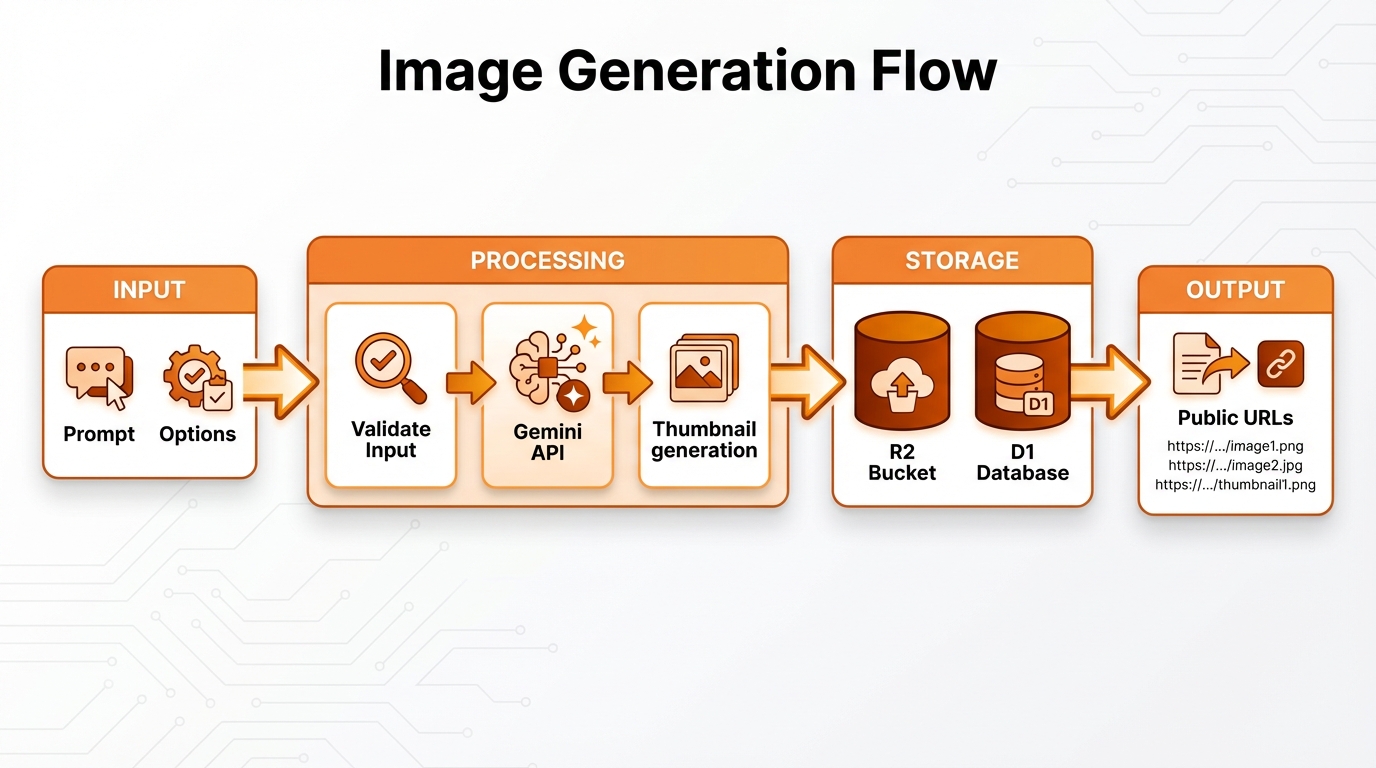
Prompt → Style preset → References → Gemini or OpenAI API → R2 storage → Metadata
Tips for Better Results
Be Specific
❌ "a cat" ✅ "a fluffy orange tabby cat lounging on a velvet cushion, soft window light"
Use Art Terminology
- Photography: "shallow depth of field", "golden hour", "macro shot"
- Painting: "impasto technique", "chiaroscuro lighting", "watercolor wash"
- Digital: "3D render", "vector illustration", "low poly"
Iterate
- Start with a basic prompt
- Review the result
- Add details to improve
- Use editing for refinements
Combine Techniques
Generate a portrait in the style of [reference image],
with dramatic Rembrandt lighting, shallow depth of field,
using the "Cinematic" style presetCombined Character & Product Generation
Generate images with multiple characters AND products in a single request for marketing and branding content.
Multi-Character Scenes
Generate scenes with up to 5 saved characters:
Generate an image of characters 19 and 20 having a team meeting in a modern officeThe system automatically:
- Fetches character reference images from your library
- Builds optimal prompts for character consistency
- Maintains exact likeness across scenes
Character + Product Placement
Combine characters with product references:
Generate characters 19 and 20 at a product photoshoot with product 2Example API call:
{
  "prompt": "at a professional photoshoot",
  "character_ids": [19, 20],
  "product_ids": [2],
  "aspect_ratio": "16:9"
}Automatic Prompt Construction:
- Characters only: "The characters from the reference images {scene}"
- Products only: "Using the products shown, {scene}. Maintain exact design..."
- Both: "The characters with the products shown, {scene}. Maintain exact product design..."
Limits
| Resource | Maximum |
|---|---|
| Characters per scene | 5 |
| Products per scene | 6 |
| Total reference images | 14 |
WARNING
Cannot mix singular and array parameters (e.g., character_id with character_ids). Use one form consistently.
Common Use Cases
Product Shots
Professional product photography of a luxury watch on a marble
surface, soft studio lighting, reflection, minimalist backgroundCharacter Concept Art
Fantasy character concept art, elven ranger with silver hair,
green cloak, bow and arrows, forest background, digital painting styleMarketing Graphics
Modern social media banner for a tech startup, abstract geometric
shapes in blue and purple, clean minimalist design, 16:9 aspect ratioArchitectural Visualization
Photorealistic architectural render of a modern beach house,
floor-to-ceiling windows, infinity pool, sunset view, 4:3 landscapeRate Limits & Quotas
- Rate limit: 60 requests/minute (configurable per tenant)
- Storage quota: Tracked per image stored
- Tokens: Prompt length counts against model limits