
Products
Save product images and generate consistent marketing materials across unlimited scenes.
Master Guide: For comprehensive guidance including source image quality, Flash vs Pro comparison, platform-specific guidelines, and troubleshooting, see the Product Marketing Master Guide.
Why Product References?
E-commerce and marketing teams need consistent product imagery:
❌ Without product references:
Upload product image → Generate in scene → Upload again → Generate in another scene
(Each time requires re-uploading, results may vary)

✅ With product references:
Save product once → Generate unlimited marketing scenes
(Consistent product appearance every time)How It Works
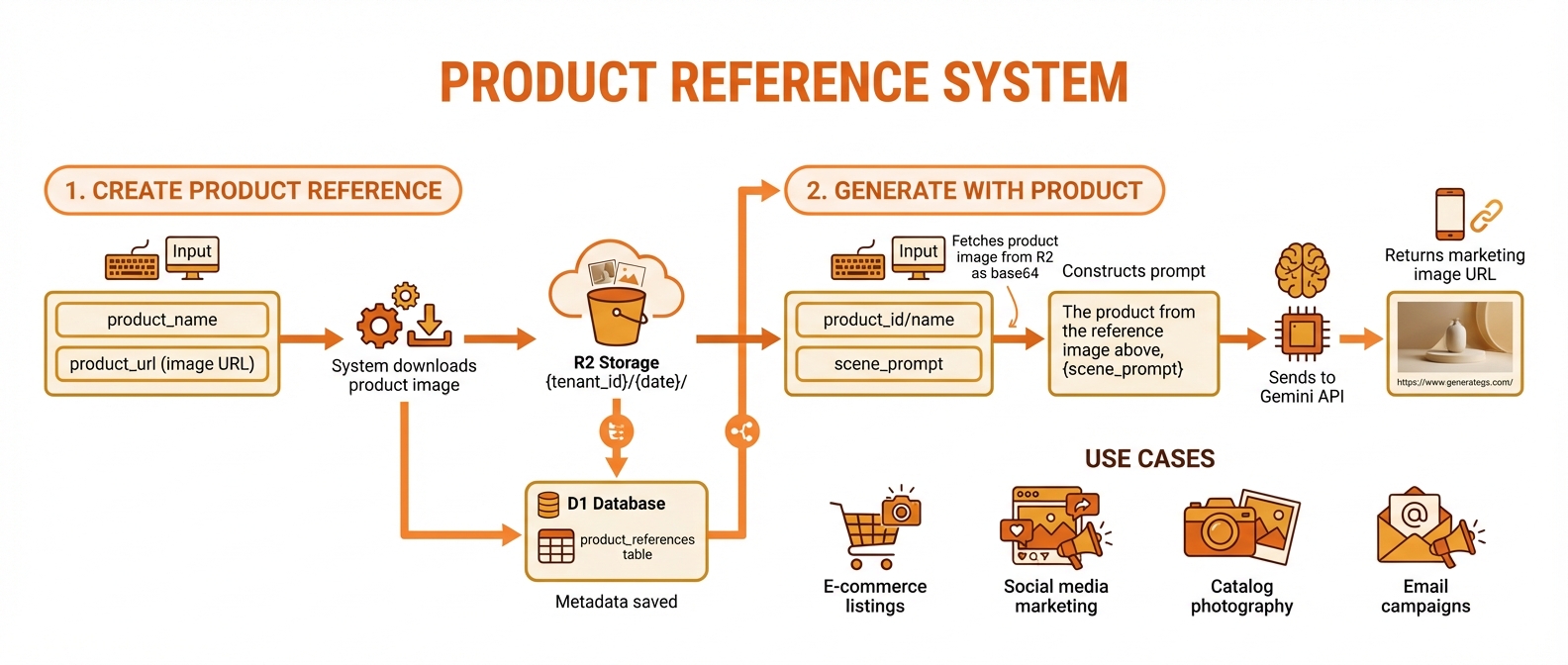
Save product URL once, generate unlimited consistent marketing images
Creating a Product Reference
From URL
Save this product image: https://example.com/water-bottle.jpg
Name: Premium Water Bottle
Description: Stainless steel 32oz bottle with bamboo cap
Tags: drinkware, outdoor, eco-friendlyWhat Gets Stored
| Data | Storage | Purpose |
|---|---|---|
| Full image | R2 Bucket | Source for generation |
| Thumbnail | R2 Bucket | Quick previews |
| Metadata | D1 Database | Search, organization |
| Gemini cache | Gemini Files API | Fast generation |
Generating Marketing Images
Basic Usage
Generate the Premium Water Bottle on a hiking trailScene Variations
Generate the bottle on a gym bench with workout equipment
Generate the bottle at a beach sunset
Generate the bottle on an office desk with laptop
Generate the bottle in a camping scene by a tentWith Style Control
Generate the bottle in a minimalist studio setup
Style: Professional product photography, soft shadows, clean backgroundMultiple Variations
Generate 4 variations of the bottle on a kitchen counterProduct Consistency
The product generation system automatically:
- Preserves exact design - Same shape, proportions
- Maintains colors - Original product colors
- Keeps materials - Metallic, matte, glossy textures
- Respects details - Logos, patterns, features
Example Prompt Construction
Your input:
Generate the Premium Water Bottle at a yoga studioInternal prompt:
The exact product from the reference image, maintaining its precise
design, colors, materials, and textures, placed at a yoga studio
[+ reference image included]Managing Products
List Products
Show me all my product referencesReturns:
- Product names and thumbnails
- Usage count
- Tags
- Safe-to-delete status
View Product Details
Show details of the Premium Water Bottle productReturns:
- Original URL
- Stored image dimensions
- Usage statistics
- Associated generated images
Delete Product
Delete product reference "Old Test Product"Safe Deletion
The system checks if any generated images reference the product before deletion to avoid orphaned references.
Best Practices
1. High-Quality Source Images
| Good | Bad |
|---|---|
| High resolution (1000px+) | Low resolution |
| Clean background | Cluttered background |
| Good lighting | Harsh shadows |
| True colors | Color-cast |
| Multiple angles (if available) | Single angle only |
2. Accurate Descriptions
Good:
Name: EcoTech Smart Water Bottle
Description: 24oz matte black stainless steel bottle with
LED temperature display on cap, silicone grip band, and
gradient blue-to-teal accent ring

Bad:
Name: Bottle
Description: A water bottle3. Useful Tags
Tags: drinkware, smart-tech, fitness, eco-friendly, temperature-displayTags help with:
- Searching products
- Organizing catalogs
- Filtering by category
4. Test Before Campaigns
Generate test images in key contexts before full campaign:
Generate the bottle in a lifestyle setting - test 1
Generate the bottle in a studio setting - test 2
Generate the bottle in an outdoor setting - test 3Use Cases
E-Commerce Listings
Generate the product on a white studio background
Generate the product with lifestyle context (person using it)
Generate the product showing scale (next to common object)Social Media Content
Generate the product in a flat-lay arrangement with accessories
Generate the product being used in action shot
Generate the product in seasonal theme (holiday, summer)Marketing Campaigns
Campaign: "Adventure Awaits"
Generate the bottle at a mountain summit
Generate the bottle at a waterfall
Generate the bottle at a desert canyon
Generate the bottle at a forest trailA/B Testing
Generate the product with warm lighting
Generate the product with cool lighting
Generate the product with dramatic shadows
Generate the product with soft, even lightingProduct vs. Character
| Feature | Products | Characters |
|---|---|---|
| Source | URL download | AI generation |
| Consistency | Exact match | Approximate |
| Reference images | Single product image | Multiple character images |
| Best for | Physical products | People, creatures, mascots |
| Modifications | None (exact product) | Scene adaptations |
API Details
Create Product Reference
json
{
  "tool": "create_product_reference",
  "params": {
    "product_name": "Premium Water Bottle",
    "product_url": "https://example.com/bottle.jpg",
    "product_description": "32oz stainless steel with bamboo cap",
    "tags": "drinkware,outdoor,eco-friendly"
  }
}Generate with Product
json
{
  "tool": "generate_with_product",
  "params": {
    "product_name": "Premium Water Bottle",
    "scene_prompt": "on a hiking trail with mountain background",
    "additional_details": "morning light, dew drops",
    "aspect_ratio": "landscape",
    "number_of_images": 2
  }
}List Products
json
{
  "tool": "list_product_references",
  "params": {
    "search": "bottle",
    "page": 1,
    "page_size": 20
  }
}Troubleshooting
Product looks different in generations
- Ensure source image is high quality
- Try generating with simpler scenes first
- Check that lighting in scene matches product style
Product appears distorted
- Original image may have unusual perspective
- Try a different source image angle
- Use simpler scene prompts
Product colors look wrong
- Source image may have color cast
- Specify color accuracy in additional details
- Use neutral scene lighting