
OpenAI gpt-image-2
Looking for the September 2026 release? See GPT Image 2.5 Flare and Sunburst. This page covers the earlier GPT Image 2 model.
OpenAI's state-of-the-art image generation model — gpt-image-2-2026-04-21 snapshot, integrated into Go Bananas! as a tenant-selectable provider.
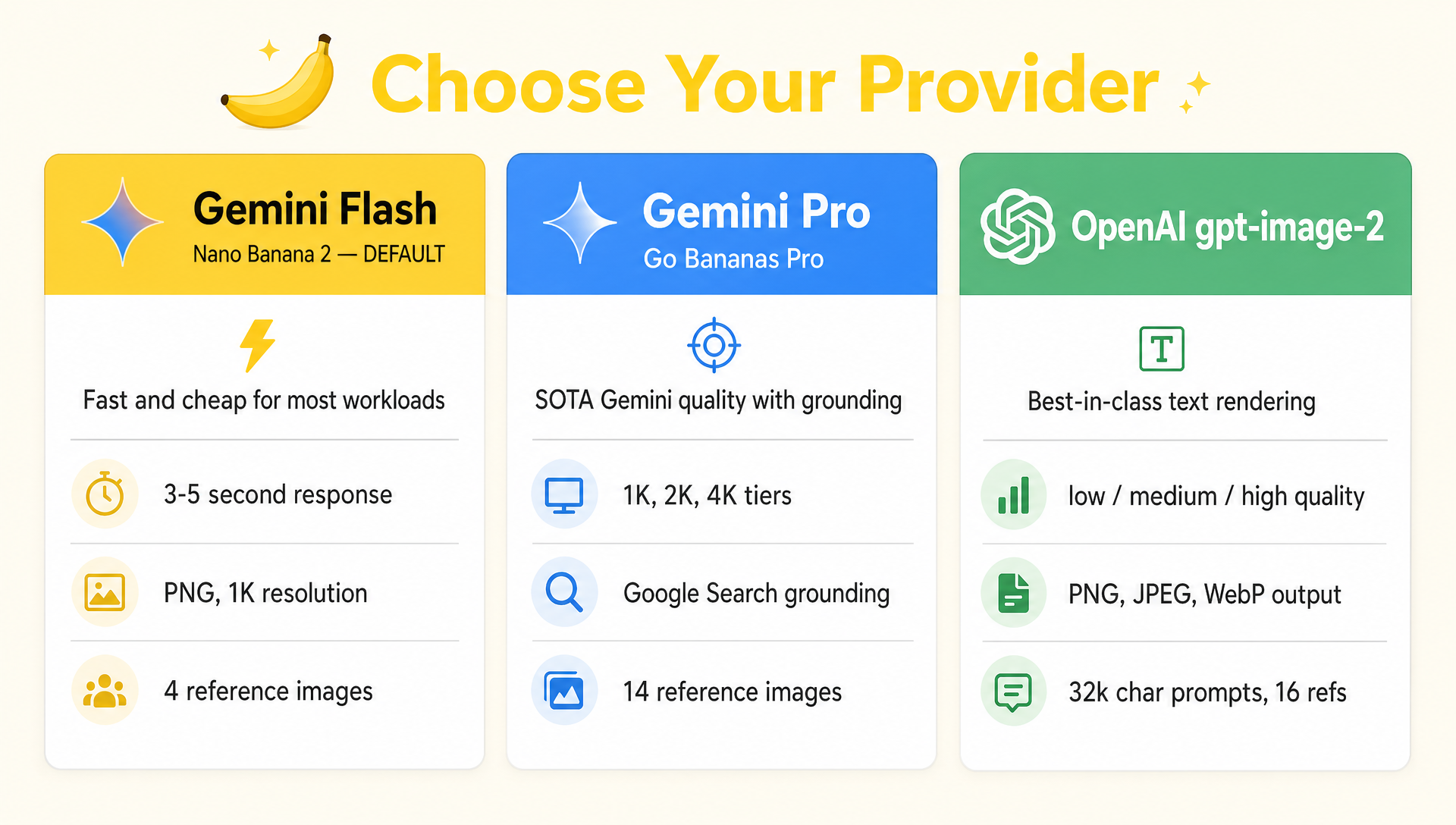
Choose your provider — every Go Bananas! tenant can mix Gemini Flash, Gemini Pro, and OpenAI gpt-image-2 per request. (Generated with gpt-image-2 itself.)
openai-gpt-image-2 runs alongside the Gemini family in the model registry. Tenants enable it by adding one to five OpenAI API keys in workspace settings and including it in their allowedModels list, then opt in per request via model_id.
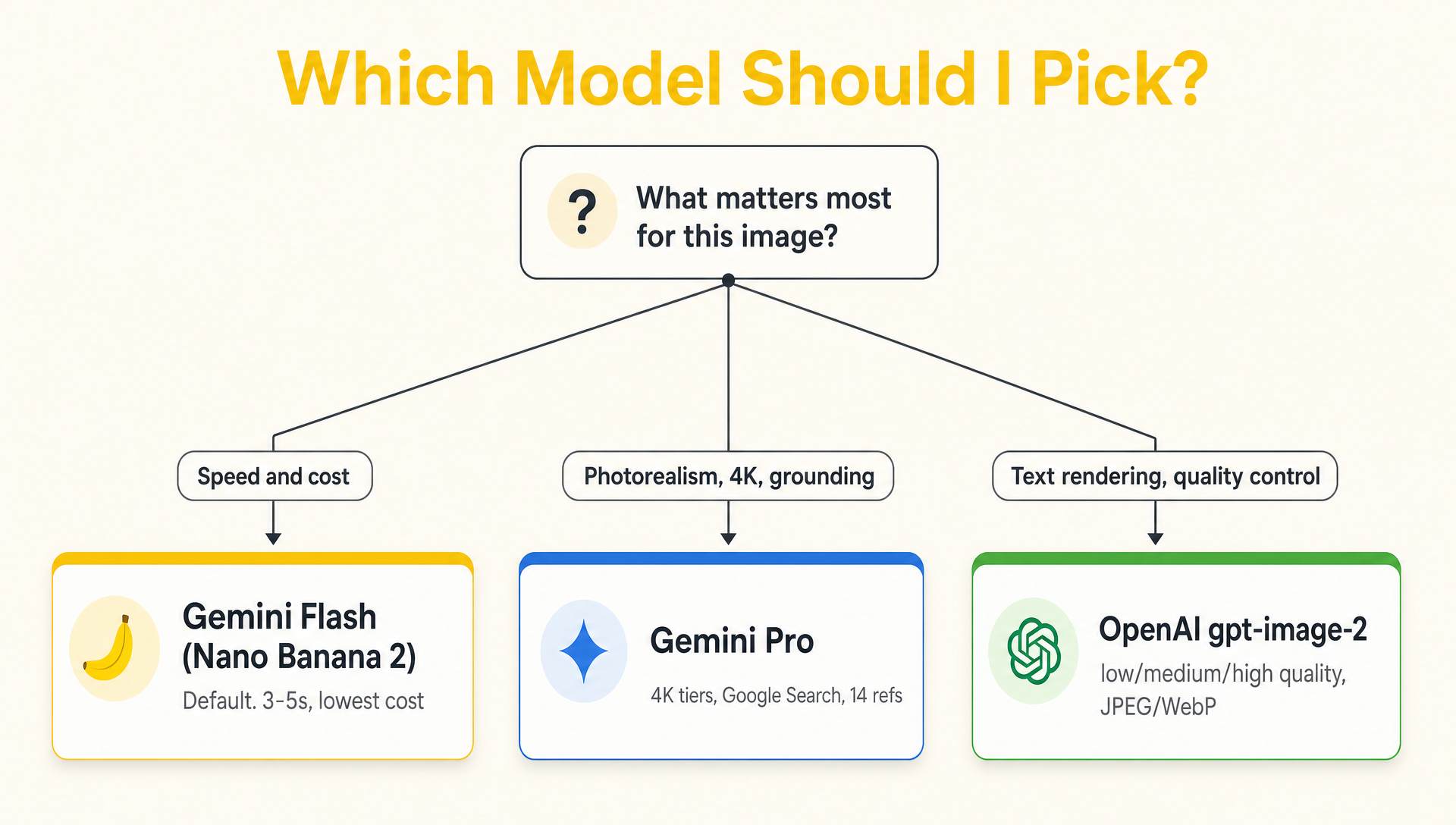
Quick decision tree — gpt-image-2 wins for text-heavy work and quality control; Pro wins for grounding and 4K; Flash for everything else.
When to Pick gpt-image-2
| Strength | Why |
|---|---|
| Text rendering | OpenAI calls this its "killer feature" — small text, multilingual characters, dense compositions, infographics |
| Prompt adherence | Stronger instruction-following than older OpenAI models; reliable for structured layouts |
| Quality control | First-class low / medium / high / auto quality levels with explicit pricing tiers |
| Output formats | Native PNG, JPEG, and WebP with optional output_compression |
| Aspect-ratio range | Broader supported set including 21:9 cinematic, 4:5 / 5:4 social formats |
| Edits with refs | Up to 16 reference images via /v1/images/edits for consistent multi-image edits |
Constraints to Know
| Constraint | Value |
|---|---|
| Maximum edge | ≤3,840px |
| Edge multiple | Both edges must be multiples of 16px |
| Aspect ratio cap | Long-to-short ≤3:1 |
| Pixel range | 655,360–8,294,400 total pixels |
| Max reference images | 16 |
| Default request timeout | 240s (set in src/models/registry.ts) |
| Transparent background | Not supported — background: "transparent" rejected |
| Google Search grounding | Not supported (Gemini Pro only) |
| Native "thinking" mode | Not exposed by Go Bananas! at this layer |
Per-Request Parameters
gpt-image-2 exposes a richer parameter surface than the Gemini providers. Pass these alongside model_id: "openai-gpt-image-2":
| Parameter | Type | Description |
|---|---|---|
model_id | string | "openai-gpt-image-2" — required to select this provider |
prompt | string | Text prompt (max 32,000 chars) |
negative_prompt | string | Appended as Avoid: … to the OpenAI prompt |
system_instruction | string | Prepended to the prompt |
aspect_ratio | enum | One of: square, portrait, landscape, 1:1, 2:3, 3:2, 3:4, 4:3, 4:5, 5:4, 9:16, 16:9, 21:9 |
size | string | "auto" or explicit WIDTHxHEIGHT (validated against the constraints above) |
n | int | 1–4 images through Go Bananas (mapped to OpenAI n) |
output_format | enum | png (default), jpeg, webp |
output_compression | int | 0–100 — JPEG/WebP only; rejected for PNG |
quality | enum | low, medium, high, auto (default) |
background | enum | auto (default) or opaque — transparent rejected |
moderation | enum | auto (default) or low for less-restrictive filtering |
reference_images | array | Up to 16 input images (sent to /v1/images/edits) |
mask_image_id | int | Optional stored mask image for edit_image / edit_uploaded_image with OpenAI |
Format selection
PNG is best for line art, screenshots, and anything you'll edit downstream. JPEG with output_compression: 80 cuts storage cost ~70% for photographic output. WebP is the best compromise for web delivery.
Recommended Resolutions
| Use case | Size | Notes |
|---|---|---|
| Square hero / avatar | 1024x1024 | Fastest, cheapest |
| Landscape product shot | 1536x1024 | Standard 3:2 |
| Portrait poster | 1024x1536 | Standard 2:3 |
| 2K square print | 2048x2048 | Higher detail |
| 4K landscape wallpaper | 3840x2160 | Maximum edge |
| 4K portrait poster | 2160x3840 | Maximum edge |
| Cinematic banner | 3840x1648 | 21:9 |
The provider rounds and validates against maxEdge, edgeMultiple, maxAspectRatio, minPixels, and maxPixels from the registry. Out-of-range sizes are rejected with a clear error rather than silently truncated.
Editing with Reference Images
gpt-image-2 routes edits through OpenAI's /v1/images/edits endpoint. When you pass reference_images, Go Bananas! automatically:
- Bundles each reference as a multipart
image[]field with the correct extension - Uploads in canonical order (text first, references after — matching Gemini's pattern for cross-provider consistency)
- Preserves input fidelity (high-fidelity processing is automatic for
gpt-image-2; not user-configurable)
{
  "prompt": "Place this product on a marble bathroom counter, soft morning light",
  "model_id": "openai-gpt-image-2",
  "quality": "high",
  "output_format": "webp",
  "output_compression": 85,
  "reference_images": [42, 43]
}Mask-Guided Edits
For localized OpenAI edits, pass mask_image_id to edit_image or edit_uploaded_image. The mask must already exist in the Go Bananas image library; upload or generate it first, then pass its image ID with model_id: "openai-gpt-image-2".
{
  "image_id": 6367,
  "mask_image_id": 6401,
  "prompt": "Replace only the masked sign with a brushed steel logo plaque",
  "model_id": "openai-gpt-image-2",
  "quality": "high"
}Masking is OpenAI-only in Go Bananas. Gemini edit tools will reject mask_image_id instead of silently ignoring it. OpenAI also requires the mask to match the source image size and format and include an alpha channel; Go Bananas validates the size/format before sending the request.
Quality vs. Cost
OpenAI publishes token pricing for gpt-image-2; Go Bananas uses practical 1024×1024 heuristics for pre-flight estimates:
| Quality | Approx. cost per image | Use when |
|---|---|---|
low | ~$0.006 | Drafts, thumbnails, A/B mock-ups |
medium | ~$0.053 | Most production work |
high | ~$0.211 | Hero assets, print, final marketing |
auto | Variable | Let the model pick — best for mixed workloads |
Reference-based edits cost more because the input image counts against your input-token budget (full-fidelity processing). Cached identical inputs are billed at a lower rate.
Output cost dominates
Unlike Gemini's flat per-call pricing, gpt-image-2 charges by output tokens which scale with quality and resolution. Budgeting high quality at 4K can be ~30× the cost of low quality at 1K. Use check_quota and get_account_summary to monitor.
Reliability
OpenAIImageProvider (src/services/image-provider/openai-provider.ts) wraps every call with the same production patterns as Gemini:
- Key pool: Each tenant can store up to five OpenAI keys. Consecutive requests rotate their starting key to spread load across the pool.
- Automatic failover: Authentication, authorization, rate-limit, insufficient-quota, and billing-hard-limit errors move immediately to the next configured key instead of retrying the rejected key.
- Per-key circuit breaker: A rejected key is quarantined for 60 seconds, while healthy keys continue serving traffic. Invalid image requests do not poison key health.
- Safe retry policy: Read-only connection checks may retry transient provider/network failures. Image generation and edit POSTs are never replayed after an ambiguous timeout or 5xx, avoiding duplicate billed generations. Key-specific rate and billing responses fail over immediately.
- Timeout budget: 240s per provider request (set in registry, vs. 60s Flash and 120s Pro) because gpt-image-2 takes longer at
highquality and large sizes - Aspect-ratio enforcement: Output is post-cropped if it deviates >5% from the requested ratio, using the same WASM Photon cropper as Gemini
Pooling reduces avoidable failures but cannot guarantee unlimited throughput. Keys under the same OpenAI project or account may share organization-level rate or billing limits.
When NOT to Use gpt-image-2
| Need | Use instead |
|---|---|
| Google Search grounding for live data | gemini-pro-image |
| Native thinking mode for complex compositions | gemini-pro-image |
| Gemini-specific high-fidelity object workflows | gemini-pro-image |
| Resolution tiers (1K/2K/4K presets) | gemini-pro-image |
| Lowest latency at large batch sizes | gemini-flash-lite-image (Nano Banana 2 Lite) |
| Transparent backgrounds | Crop out post-generation; gpt-image-2 doesn't expose this |
Setting Up gpt-image-2 for a Tenant
- Add the keys: Open the tenant admin view → Manage OpenAI Key Pool → enter one to five keys. The whole pool is stored as a versioned AES-GCM-encrypted credential in
tenant_provider_credentials; existing single-key rows remain compatible. - Add to allowlist: Update the tenant's
allowedModelsarray to include"openai-gpt-image-2". - Test: Call
generate_imagewithmodel_id: "openai-gpt-image-2". The frontendModelSelectorwill start surfacing it once the allowlist permits. - Monitor:
check_quotavalidates Go Bananas storage and request-rate limits, but it cannot preflight OpenAI account billing or project-level rate limits. Provider-key failover reacts when OpenAI rejects an actual request.
Related Reading
- Pro Model Best Practices — comparable deep-dive for Gemini Pro
- Image Generation — full parameter reference for the unified API
- Multi-tenancy — how the model registry and per-tenant credentials fit together