
Characters
Create consistent characters that maintain their appearance across multiple image generations.
Need advanced techniques? See the Character Consistency Master Guide for identity locking, troubleshooting, multi-character scenes, Flash vs Pro comparison, and more.
Why Characters?
Without characters, generating the same character multiple times is challenging:
❌ Problem:
"Generate a girl with red hair" → Character A
"Generate a girl with red hair in a forest" → Different Character B
"Generate a girl with red hair at the beach" → Different Character CWith characters:
✅ Solution:
Create character "Luna" with detailed description + reference images
"Generate Luna in a forest" → Consistent Luna
"Generate Luna at the beach" → Same Luna
"Generate Luna flying a kite" → Same LunaCreating a Character
Basic Creation
Create a character named "Captain Rex" - a robot explorer with:
- Bronze metallic body
- Glowing blue eyes
- Antenna ears
- Red scarf around neck
- Friendly, adventurous personalityDetailed Creation
For best results, include:
| Element | Example |
|---|---|
| Name | "Luna" |
| Physical appearance | "Young girl, ~10 years old, silver hair in twin tails, purple eyes" |
| Clothing | "Star-patterned blue cloak, white dress, silver boots" |
| Accessories | "Wooden staff with glowing crystal, silver moon pendant" |
| Style notes | "Anime/fantasy style, soft lighting preferred" |
| What to avoid | "Realistic style, dark colors, scary expressions" |
Character Components
| Field | Purpose | Example |
|---|---|---|
character_name | Unique identifier | "Luna" |
base_prompt | Core description | "Young witch with silver hair..." |
negative_prompt | What to avoid | "realistic, dark, scary" |
system_instruction | Style guidance | "Anime fantasy illustration style" |
reference_image_ids | Example images | [42, 43, 44] |
preferred_aspect_ratio | Default ratio | "portrait" |
tags | Organization | ["fantasy", "main character"] |
description | Human notes | "Main character for storybook project" |
Adding Reference Images
Reference images dramatically improve consistency:
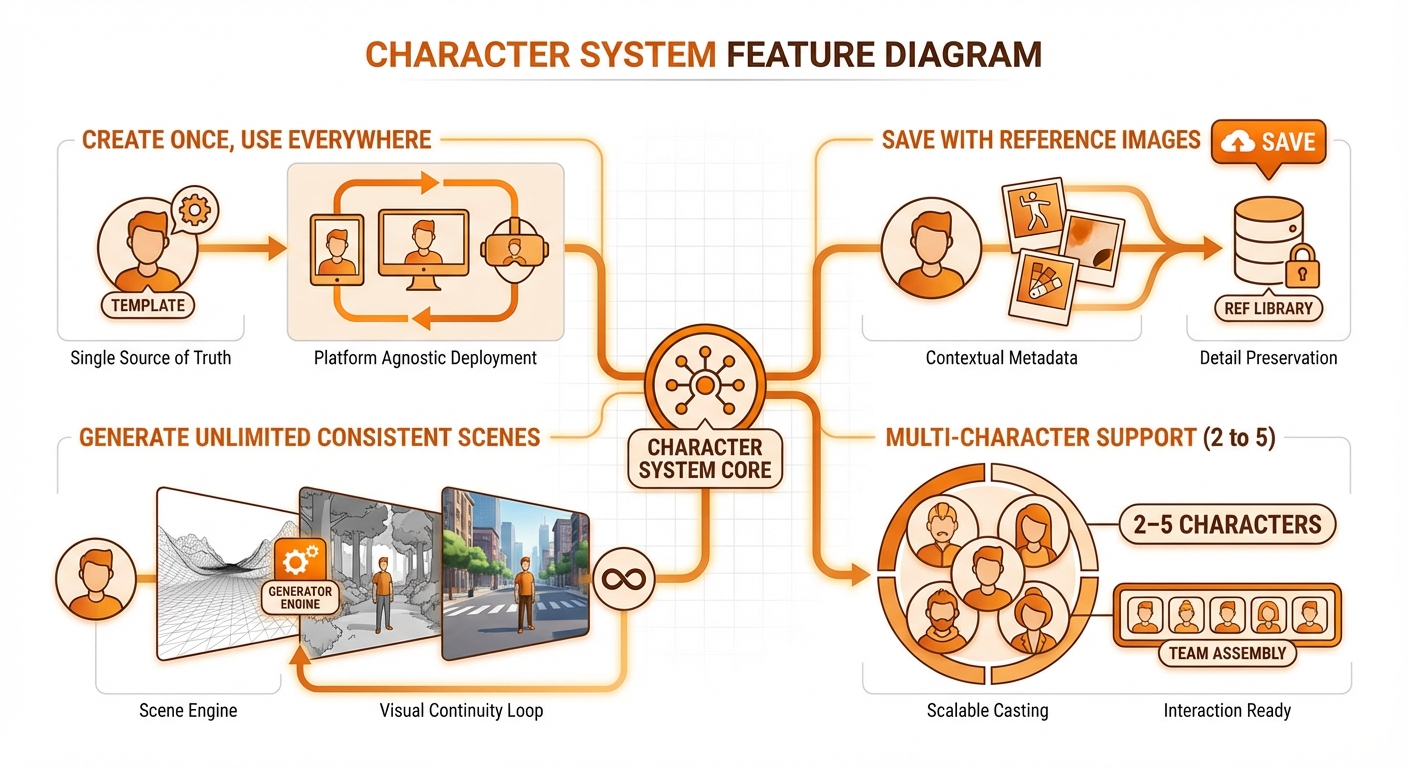
Create character, generate test image, refine until 2-3 good references
Recommended workflow:
- Create character with detailed
base_prompt - Generate a test image
- If good, add it as a reference image
- Repeat 2-3 times for best results
Generate Luna standing in a neutral pose, full body visible

[If result is good]
Add image #42 as a reference for character LunaGenerating with Characters
Single Character
Generate Luna reading a book by candlelightWhat happens internally:
- Load Luna's
base_promptandreference_image_idsfrom DB - Download reference images from R2 (up to 4 on Flash, 5 on Pro)
- Build identity-locked prompt:
"The character in Image 1 — keep the face, hair, and outfit EXACTLY the same. Character details: Young witch with silver hair... Scene: reading a book by candlelight" - Send to Gemini: text part first, then reference image parts (Google canonical order)
- Return consistent Luna!
Tip: Upload 3-4 front-facing, well-lit reference images for best consistency. The system rejects images smaller than 512x512 pixels.
Scene Variations
Generate Luna exploring a magical library
Generate Luna brewing a potion in her workshop
Generate Luna flying on a broomstick over a moonlit city
Generate Luna having tea with forest animalsAdditional Details
Add scene-specific details without changing the character:
Generate Luna at the beach
Additional details: Summer clothes variant, beach umbrella, sandcastleMulti-Character Scenes
Generate 2-5 characters together:
Create character "Felix" - Luna's cat familiar, a black cat
with purple eyes and a small wizard hat

Generate Luna and Felix exploring a haunted mansion togetherMulti-Character Tips
- Use landscape aspect ratio for multiple characters
- Describe interactions between characters
- Keep the scene simple - fewer elements = better consistency
- Characters should have distinct visual features
Generate Luna teaching magic to Felix in her study,
Luna demonstrating a spell while Felix watches attentivelyCharacter Management
List Characters
Show me all my charactersReturns:
- Character names and thumbnails
- Usage statistics (times used)
- Tag filtering options
View Character Details
Show me the details of character LunaReturns:
- Full description and prompts
- Reference images
- Usage history
- Settings
Update Character
Update Luna's description: Change her cloak from blue to purpleDelete Character
Delete character "Old Test Character"Best Practices
1. Detailed Base Prompts
❌ "A girl with red hair"
✅ "Young woman, approximately 20 years old, long wavy auburn red hair reaching her mid-back, bright green eyes with gold flecks, light freckles across her nose and cheeks, warm smile, wearing a cream-colored knit sweater, modern casual style"
2. Good Reference Images
- Variety: Different angles, expressions, poses
- Consistency: Same character in all references
- Quality: Clear, well-lit images
- Quantity: 2-3 references is ideal
3. Clear Negative Prompts
Negative prompt: Different character, wrong hair color, wrong eye color,
inconsistent style, multiple characters unless specified4. Consistent Style Instructions
System instruction: Anime illustration style, Studio Ghibli inspired,
soft lighting, detailed backgrounds, warm color palette5. Test Before Committing
Generate 3-5 test images before adding references to ensure the base description produces consistent results.
Character Use Cases
Storytelling
Create characters for a story, generate consistent illustrations:
Characters: Luna (hero), Felix (sidekick), Shadow (villain)

Scene 1: Luna discovers a mysterious map
Scene 2: Luna and Felix begin their journey
Scene 3: Shadow appears to challenge them
Scene 4: Epic finale confrontationMascots
Create brand mascots for marketing:
Character: "Banana Bob" - Friendly banana mascot
Generate Banana Bob waving at customers
Generate Banana Bob on a product package
Generate Banana Bob in an advertisementGame Assets
Create game character sprites:
Character: "Warrior Kira"
Generate Kira idle pose, front view
Generate Kira attack pose, side view
Generate Kira victory pose
Generate Kira defeat poseAPI Details
Create Character
{
  "tool": "create_character",
  "params": {
    "character_name": "Luna",
    "base_prompt": "Young witch with silver hair...",
    "negative_prompt": "realistic, dark",
    "system_instruction": "Anime fantasy style",
    "preferred_aspect_ratio": "portrait",
    "tags": ["fantasy", "protagonist"]
  }
}Generate with Character
{
  "tool": "generate_with_character",
  "params": {
    "character_name": "Luna",
    "scene_prompt": "exploring a magical forest",
    "additional_details": "Morning light, butterflies"
  }
}Generate with Multiple Characters
{
  "tool": "generate_with_multiple_characters",
  "params": {
    "character_names": ["Luna", "Felix"],
    "scene_prompt": "having a picnic in a meadow",
    "aspect_ratio": "landscape"
  }
}