
Security Architecture
How Go Bananas! protects tenant data, credentials, and access.
Security Layers
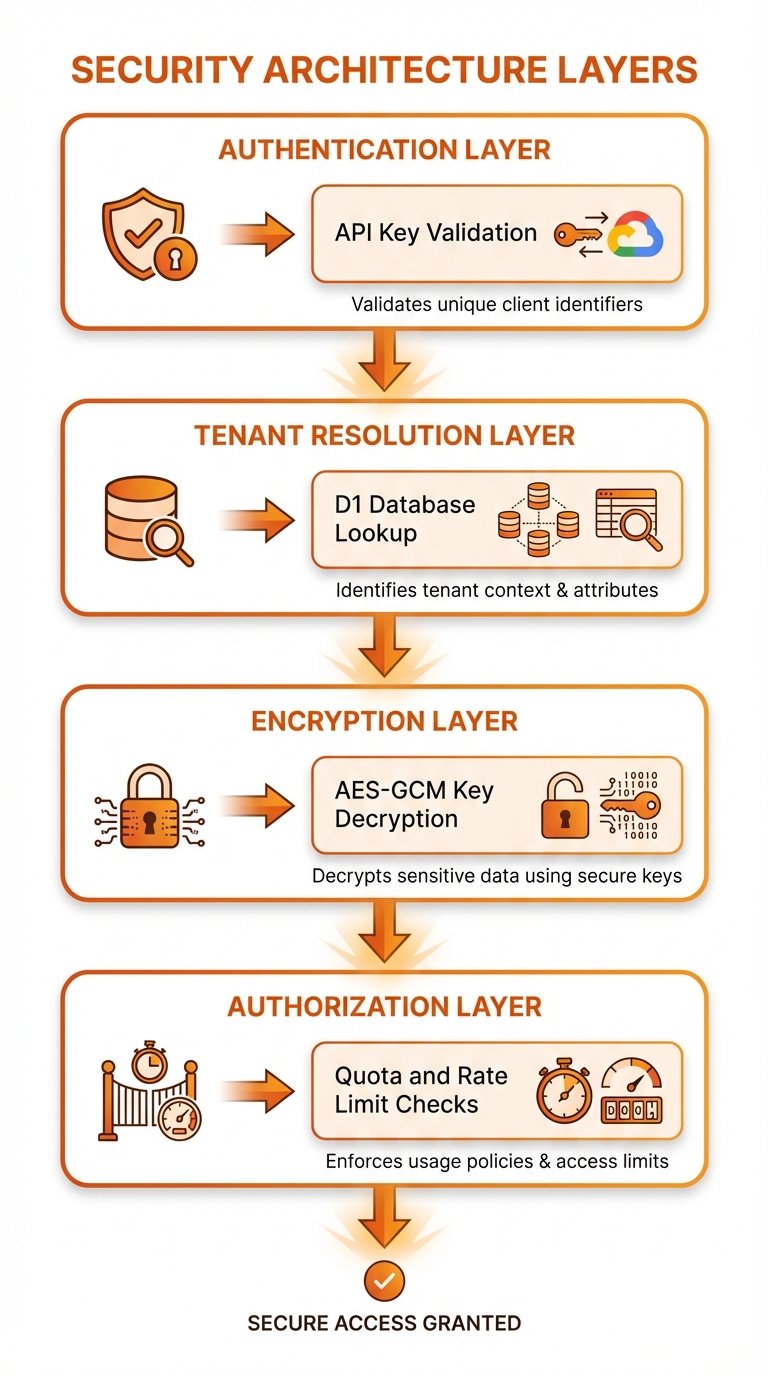
Four-layer security: Transport → Authentication → Authorization → Data Protection
Encryption at Rest
Provider API Key Encryption
Tenant API keys for image providers (Gemini and OpenAI) are encrypted using AES-GCM. Each provider key is stored independently in tenant_provider_credentials (migration 0034) so a tenant can rotate or revoke one provider without touching the others.
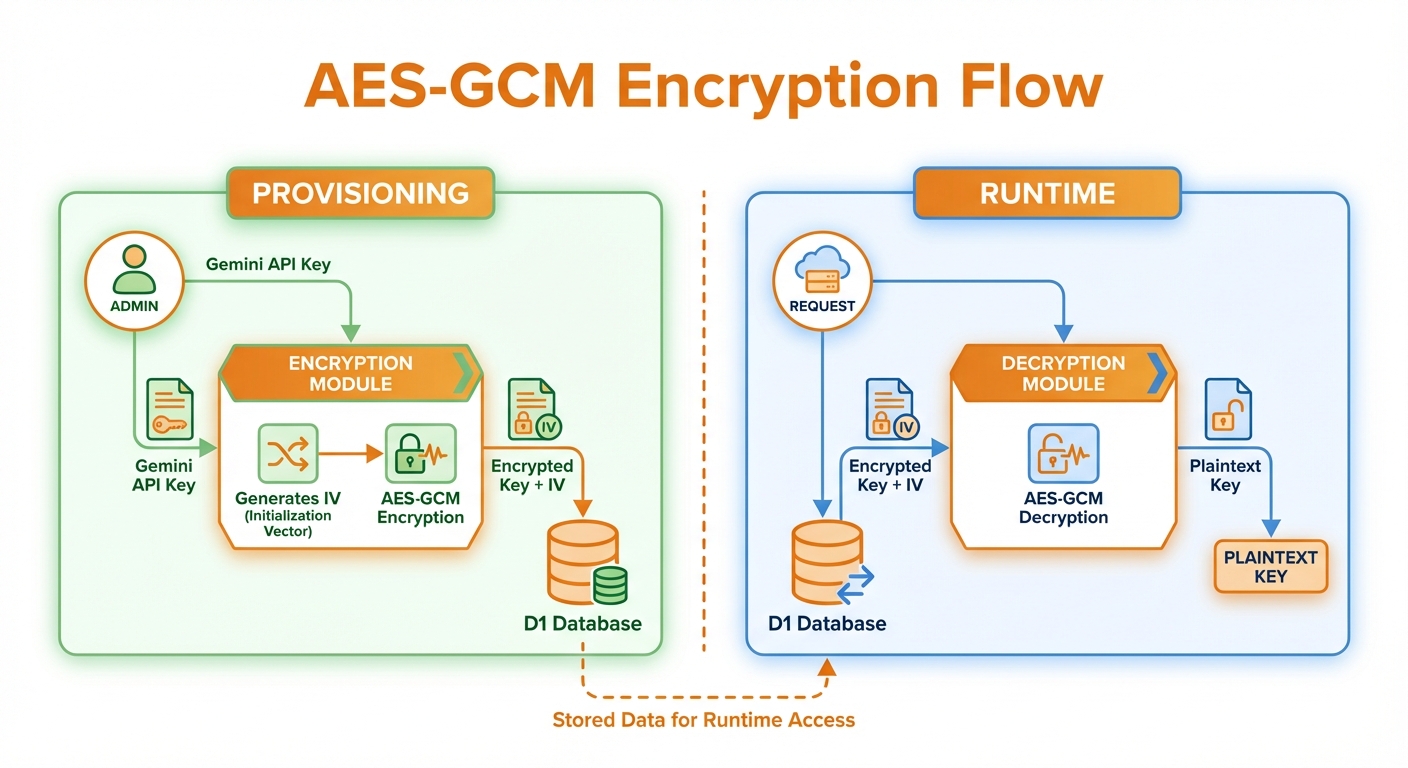
Encryption at provisioning, decryption at runtime with IV and auth tag
Encryption Implementation
async function encryptToken(
  plaintext: string,
  encryptionKey: string
): Promise<{ encrypted: string; iv: string }> {
  // Convert hex key to bytes
  const keyBytes = hexToBytes(encryptionKey);

  // Import as CryptoKey
  const key = await crypto.subtle.importKey(
    'raw',
    keyBytes,
    { name: 'AES-GCM' },
    false,
    ['encrypt']
  );

  // Generate random IV
  const iv = crypto.getRandomValues(new Uint8Array(12));

  // Encrypt
  const encrypted = await crypto.subtle.encrypt(
    { name: 'AES-GCM', iv },
    key,
    new TextEncoder().encode(plaintext)
  );

  return {
    encrypted: btoa(String.fromCharCode(...new Uint8Array(encrypted))),
    iv: btoa(String.fromCharCode(...iv)),
  };
}Decryption Implementation
async function decryptToken(
  encrypted: string,
  iv: string,
  encryptionKey: string
): Promise<string> {
  const keyBytes = hexToBytes(encryptionKey);

  const key = await crypto.subtle.importKey(
    'raw',
    keyBytes,
    { name: 'AES-GCM' },
    false,
    ['decrypt']
  );

  const decrypted = await crypto.subtle.decrypt(
    { name: 'AES-GCM', iv: base64ToBytes(iv) },
    key,
    base64ToBytes(encrypted)
  );

  return new TextDecoder().decode(decrypted);
}Key Management
# Generate 256-bit encryption key
openssl rand -hex 32

# Store as Cloudflare secret
wrangler secret put ENCRYPTION_KEY
# Enter: 64-character hex stringSecurity properties of AES-GCM:
- Confidentiality (encryption)
- Authenticity (authentication tag)
- Integrity (tamper detection)
API Key Authentication
Key Format
| Type | Format | Purpose |
|---|---|---|
| Live | sk_live_xxx | Production |
| Test | sk_test_xxx | Development |
Validation Flow
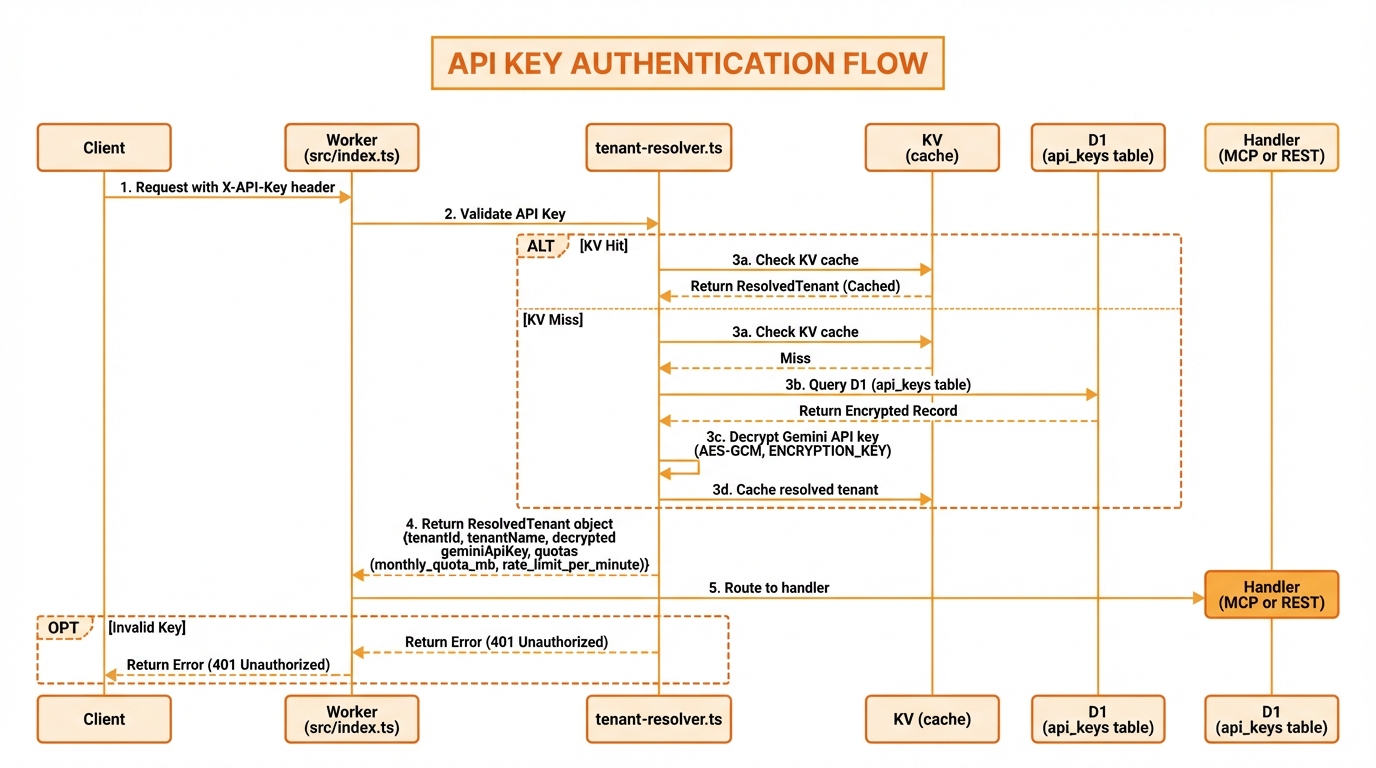
Validate format, check cache, query D1, verify active status
Key Extraction
function extractApiKey(request: Request): string | null {
  // Check X-API-Key header
  const headerKey = request.headers.get('X-API-Key');
  if (headerKey) return headerKey;

  // Check Authorization Bearer
  const auth = request.headers.get('Authorization');
  if (auth?.startsWith('Bearer ')) {
    return auth.slice(7);
  }

  return null;
}Key Validation
API keys are never stored. Only a SHA-256 hash is kept, and the full key is shown once, when it is created (src/auth/api-key-storage.ts). The api_keys.api_key column holds sha256:<hex>:<preview>, where the preview is the masked form the console shows (first 10 and last 4 characters). The API_KEYS KV namespace is keyed by sha256:<hex>. Both parts are worked out from the key a caller presents, so lookups stay exact matches:
// Simplified from src/auth/tenant-resolver.ts
async function resolveApiKey(apiKey: string, env: Env) {
  if (!apiKey.startsWith('sk_live_') && !apiKey.startsWith('sk_test_')) {
    throw new AuthenticationError('Invalid API key format');
  }

  // KV metadata is stored under the hash, never the key itself
  const kvName = await apiKeyKvName(apiKey); // "sha256:<hex>"
  let metadata = await env.API_KEYS.get(kvName, 'json');

  if (!metadata) {
    // D1 holds the hashed form; the plain form only matches keys created before hashing
    const row = await env.DB.prepare(
      'SELECT tenant_id, is_active FROM api_keys WHERE api_key IN (?, ?)'
    ).bind(...(await apiKeyLookupValues(apiKey))).first(); // [hashed, plain]
    if (!row) throw new AuthenticationError('Invalid API key. Key not found.');
    metadata = { tenantId: row.tenant_id, isActive: row.is_active === 1 };
  }

  if (!metadata.isActive) throw new AuthenticationError('API key is inactive.');
  return metadata.tenantId;
}Keys stored before hashing was introduced still work: the first successful use converts them to the hashed form, and a scheduled job converts any that remain. A revoked key cannot authenticate through an old plain-text KV entry, because that path re-checks D1.
OAuth 2.1 Security
Go Bananas! supports OAuth 2.1 for secure authentication of web and desktop applications. OAuth access tokens authenticate MCP endpoints (/mcp, and the legacy /sse); REST /api endpoints use API keys.
If no session exists, /oauth/authorize redirects HTML clients to /?return_to=... and returns login_required JSON (with login_url) for non-HTML clients.
PKCE (Required)
Proof Key for Code Exchange prevents authorization code interception:
code_verifier  ──▶  SHA-256  ──▶  BASE64URL  ──▶  code_challenge
      │                                                 │
      │              Authorization Request              │
      │                                                 ▼
      │         ┌─────────────────────────────────────────┐
      │         │   /oauth/authorize?                     │
      │         │     code_challenge=CHALLENGE            │
      │         │     code_challenge_method=S256          │
      │         └─────────────────────────────────────────┘
      │                                                 │
      │              Token Request                      │
      ▼                                                 │
┌─────────────────────────────────────────────────────────┐
│   /oauth/token                                          │
│     code_verifier=VERIFIER  ──▶  Verify against stored  │
└─────────────────────────────────────────────────────────┘Only the S256 method is supported per OAuth 2.1 requirements.
Refresh Token Rotation
Enhanced security through automatic token rotation:
Original Token ──▶ Use ──▶ New Token ──▶ Use ──▶ New Token
       │                        │                    │
       ▼                        ▼                    ▼
rotated_at rotated_at (current)Each refresh token can only be used once. The old token is marked as rotated and cannot be reused.
Replay Attack Detection
If a rotated refresh token is reused (indicating possible theft):
- Entire token family is revoked
- All related access tokens are invalidated
- Attacker and legitimate user both lose access
- User must re-authenticate
if (storedToken.rotated_at) {
  // Token already used - potential theft
  await revokeTokenFamily(originalTokenHash, env);
  return oauthError('invalid_grant', 'Token already used');
}Authorization Code Security
- Single-use: Codes can only be exchanged once
- Short TTL: 10-minute expiration
- PKCE binding: Code is bound to the code_challenge
If a code is reused, all tokens from that authorization are revoked:
if (authCode.used_at) {
  await revokeTokensForClient(clientId, tenantId, env);
  return oauthError('invalid_grant', 'Code already used');
}Token Storage
All tokens are stored as SHA-256 hashes:
| Token Type | Storage | Lookup |
|---|---|---|
| Authorization Code | code_hash | SHA-256(code) |
| Access Token | token_hash | SHA-256(token) |
| Refresh Token | token_hash | SHA-256(token) |
| Client Secret | client_secret_hash | SHA-256(secret) |
| Go Bananas API key | api_keys.api_key = sha256:<hex>:<preview> | SHA-256(key) |
Go Bananas API keys (sk_live_…, sk_test_…) follow the same rule: only the hash and a masked preview are stored, and the key is shown once when created. See Key Validation.
OAuth Scopes
Fine-grained permissions control access:
| Scope | Permission |
|---|---|
images:generate | Generate images |
images:edit | Edit images |
images:read | Read metadata |
images:delete | Delete images |
characters:manage | CRUD characters |
sessions:read | View sessions |
analytics:read | View analytics |
Request only the scopes your application needs.
Admin Authentication
Admin Token
Separate authentication for admin operations:
const ADMIN_ENDPOINTS = ['/admin/'];

function validateAdminToken(request: Request, env: Env): boolean {
  const token = request.headers.get('X-Admin-Token');
  return token === env.ADMIN_TOKEN;
}Role-Based Access
| Role | Capabilities |
|---|---|
| User | CRUD own data |
| Admin | + View all tenant data |
| Super Admin | + Create tenants, manage users |
Tenant Isolation
Database Isolation
Every query includes tenant context:
-- CORRECT: Always include tenant_id
SELECT * FROM images
WHERE tenant_id = ? AND id = ?;

-- WRONG: Allows cross-tenant access
SELECT * FROM images WHERE id = ?;Storage Isolation
R2 keys are prefixed:
{tenant_id}/{date}/{filename}Validation before serving:
function validateR2Access(r2Key: string, tenantId: string): boolean {
  return r2Key.startsWith(`${tenantId}/`);
}Reference Validation
Cross-references are validated:
// Validate character belongs to tenant
const character = await db.prepare(
  'SELECT * FROM characters WHERE id = ? AND tenant_id = ?'
).bind(characterId, tenantId).first();

if (!character) {
  throw new Error('Character not found');
}Rate Limiting
Implementation
async function checkRateLimit(
  tenantId: string,
  limit: number,
  env: Env
): Promise<{ allowed: boolean; remaining: number }> {
  const windowStart = new Date();
  windowStart.setSeconds(windowStart.getSeconds() - 60);

  const count = await env.DB.prepare(`
    SELECT COUNT(*) as count FROM usage_logs
    WHERE tenant_id = ? AND timestamp > ?
  `).bind(tenantId, windowStart.toISOString()).first();

  const used = count?.count || 0;
  const remaining = Math.max(0, limit - used);

  return {
    allowed: used < limit,
    remaining,
  };
}Rate Limit Headers
response.headers.set('X-RateLimit-Limit', String(limit));
response.headers.set('X-RateLimit-Remaining', String(remaining));
response.headers.set('X-RateLimit-Reset', String(resetTime));Input Validation
Numeric Parameter Bounds
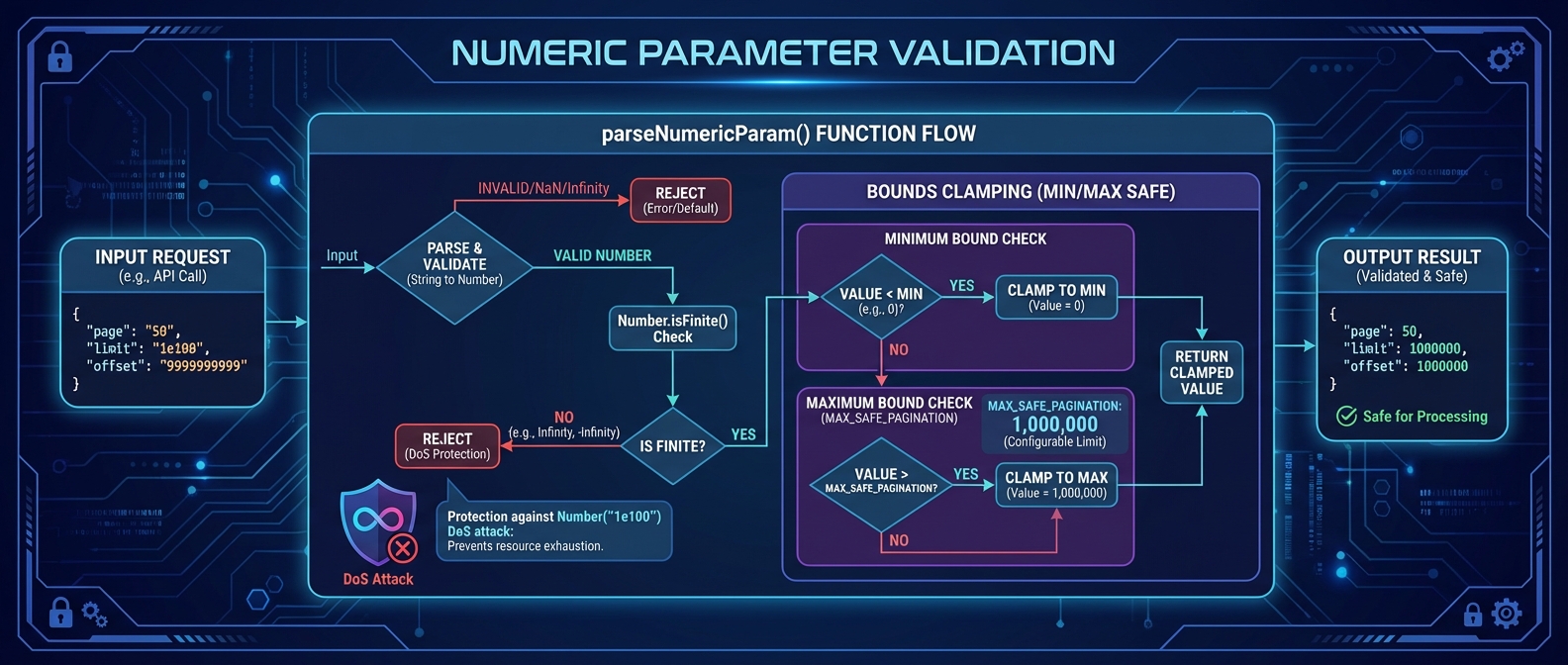
Protection against large numeric input DoS attacks
To prevent DoS attacks via large numeric inputs (e.g., Number("1e100")), all numeric parameters are validated with strict bounds:
// Constants
export const MAX_SAFE_PAGINATION = 1_000_000;

// Validation function
export function parseNumericParam(
  value: string | null,
  min: number,
  max: number
): number | null {
  if (!value) return null;
  const num = Number(value);

  // Reject non-finite numbers (Infinity, NaN)
  if (!Number.isFinite(num)) return null;

  // Clamp to bounds
  return Math.max(min, Math.min(max, Math.floor(num)));
}Usage in API handlers:
const limit = parseNumericParam(
  url.searchParams.get('limit'),
  1,
  100
) ?? 50;

const offset = parseNumericParam(
  url.searchParams.get('offset'),
  0,
  MAX_SAFE_PAGINATION
) ?? 0;Protected parameters:
| Parameter | Min | Max |
|---|---|---|
limit | 1 | 100-200 |
offset | 0 | 1,000,000 |
page | 1 | 10,000 |
page_size | 1 | 100 |
Zod Schemas
All inputs are validated:
const GenerateImageInput = z.object({
  prompt: z.string()
    .min(1, 'Prompt is required')
    .max(16384, 'Prompt too long'),
  negative_prompt: z.string()
    .max(1024)
    .optional(),
  aspect_ratio: z.enum(['square', 'portrait', 'landscape', '16:9', '9:16'])
    .default('square'),
  n: z.number()
    .int()
    .min(1)
    .max(4)
    .default(1),
});SQL Injection Prevention
Always use prepared statements:
// CORRECT: Parameterized query
const result = await db.prepare(
  'SELECT * FROM images WHERE tenant_id = ? AND prompt LIKE ?'
).bind(tenantId, `%${searchTerm}%`).all();

// WRONG: String interpolation
const result = await db.prepare(
  `SELECT * FROM images WHERE tenant_id = '${tenantId}'`
).all();CORS Configuration
Allowed Origins
const CORS_HEADERS = {
  'Access-Control-Allow-Origin': '*',  // Or specific origins
  'Access-Control-Allow-Methods': 'GET, POST, PUT, DELETE, OPTIONS',
  'Access-Control-Allow-Headers': 'Content-Type, X-API-Key, Authorization',
  'Access-Control-Max-Age': '86400',
};Preflight Handling
if (request.method === 'OPTIONS') {
  return new Response(null, {
    status: 204,
    headers: CORS_HEADERS,
  });
}Error Handling
Safe Error Messages
// Don't leak internal details
try {
  await operation();
} catch (error) {
  // Log full error internally
  console.error('Operation failed:', error);

  // Return safe message to client
  return new Response(JSON.stringify({
    error: {
      code: 'OPERATION_FAILED',
      message: 'An error occurred processing your request',
    }
  }), { status: 500 });
}Error Types
| Code | Status | When |
|---|---|---|
| AUTHENTICATION_ERROR | 401 | Invalid API key |
| FORBIDDEN | 403 | Inactive tenant/key |
| RATE_LIMIT_EXCEEDED | 429 | Too many requests |
| QUOTA_EXCEEDED | 402 | Storage limit |
| VALIDATION_ERROR | 400 | Invalid input |
| NOT_FOUND | 404 | Resource missing |
| INTERNAL_ERROR | 500 | Server error |
Security Best Practices
1. Rotate Keys Regularly
# Generate new encryption key
openssl rand -hex 32

# Update secret
wrangler secret put ENCRYPTION_KEY

# Re-encrypt all tenant keys (migration required)2. Use Test Keys for Development
Production: sk_live_xxx
Development: sk_test_xxx3. Monitor for Anomalies
-- Unusual activity patterns
SELECT
    tenant_id,
    COUNT(*) as request_count,
    DATE(timestamp) as day
FROM usage_logs
WHERE timestamp > datetime('now', '-7 days')
GROUP BY tenant_id, day
HAVING request_count > 1000
ORDER BY request_count DESC;4. Audit Access
-- API key usage
SELECT
    api_key,
    last_used_at,
    COUNT(*) OVER () as usage_count
FROM api_keys
WHERE tenant_id = ?
ORDER BY last_used_at DESC;5. Least Privilege
- Use test keys for development
- Separate keys for different applications
- Admin tokens only for admin operations
Compliance Considerations
Data Retention
A scheduled job (src/services/data-retention.ts) runs once an hour and deletes operational data once it is no longer needed:
| Data | Deleted |
|---|---|
| Sign-in sessions | 30 days after they end (expire or are revoked) |
| Connected-app (OAuth) access tokens | 7 days after expiry |
| Connected-app (OAuth) refresh tokens | 7 days after expiry |
| OAuth authorisation codes | 1 day after expiry |
| One-time links (password reset, email confirmation) | Once expired |
| Sign-in rate-limit records | Once expired |
| Job (tool execution) logs | 90 days after they started; never while still running |
| Security audit log | After 1 year |
| Invitation email delivery records | After 180 days |
Kept on purpose: account and workspace data, images and other content (until the user deletes them), and usage_logs, which drive quotas and the usage dashboard. The periods are also published in the Privacy Policy; change both together.
Data Export
Signed-in users can download their data from Your account (buildAccountExport in src/auth/account-deletion.ts). The export is one JSON document with the account details and the workspaces the person belongs to. For workspaces they own or manage it also includes images (as links), characters, product references, style presets, scenes, reference groups, sessions, webhooks and API key names with masked previews. Secrets never leave: no password hashes, session or OAuth tokens, provider keys, API key values or webhook signing secrets.
Data Deletion
Account deletion is self-service, with a 7-day grace period (src/auth/account-deletion.ts):
- Asking for deletion signs the person out everywhere (browser sessions and MCP OAuth tokens) and records a request.
- Signing in again before the 7 days are up cancels the request.
- After that, the hourly job deletes every workspace the person owns that has no other members, including its stored files in R2, and then the account. Membership of other people's workspaces goes with the account.
Someone who owns a workspace that other people also belong to cannot ask for deletion until they remove the other members or hand over ownership. The job checks this again before deleting (an invitation could be accepted during the grace period); if the account is blocked by then, the request is cancelled and the person is emailed instead. Super admin accounts cannot be deleted this way. See Account & Privacy for the user-facing description.