
Multi-Tenancy Architecture
Complete tenant isolation patterns for secure SaaS operation.
Tenant Model
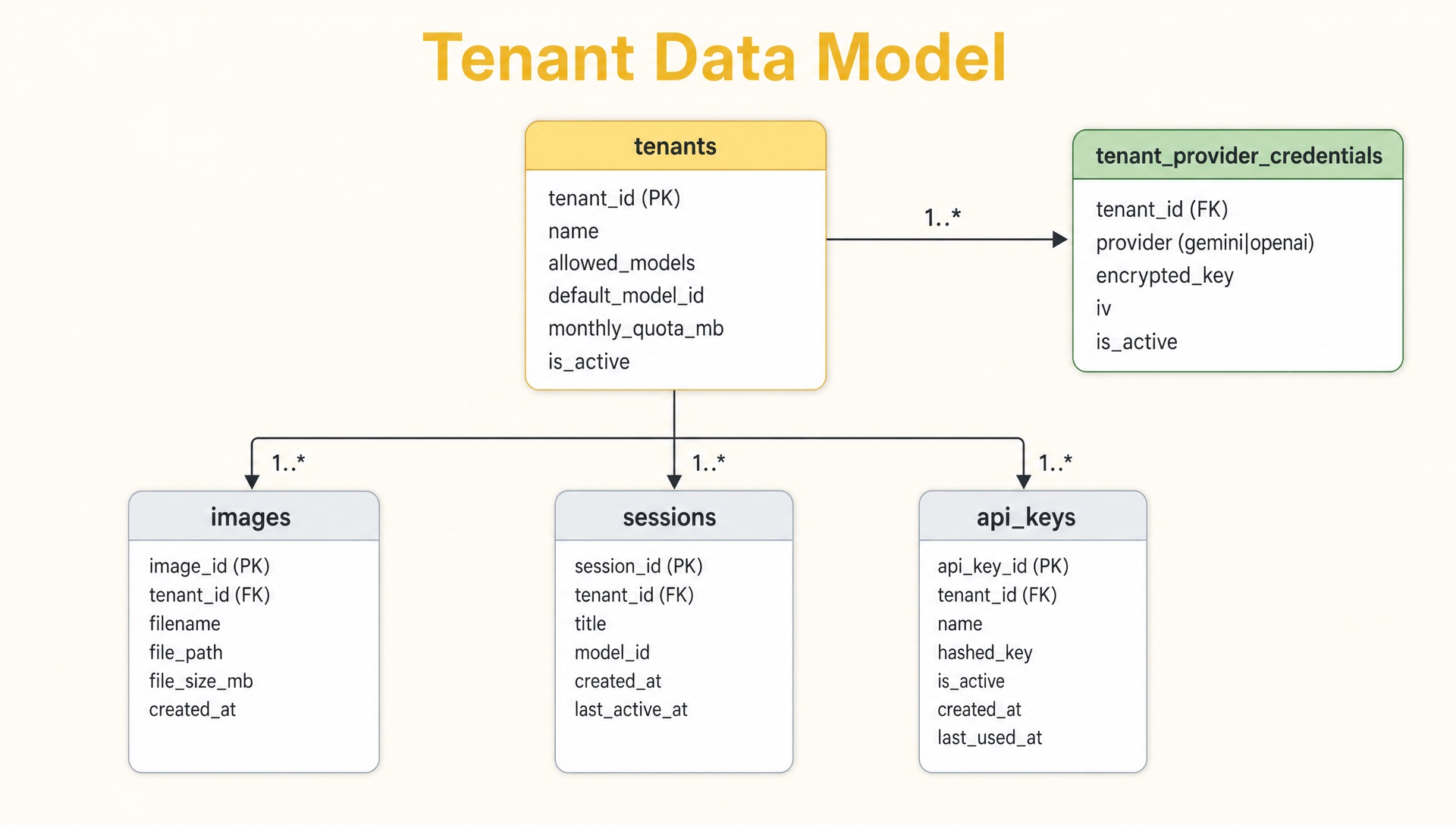
Complete tenant isolation with API keys, images, sessions, characters, products
Isolation Layers
Layer 1: API Key Authentication
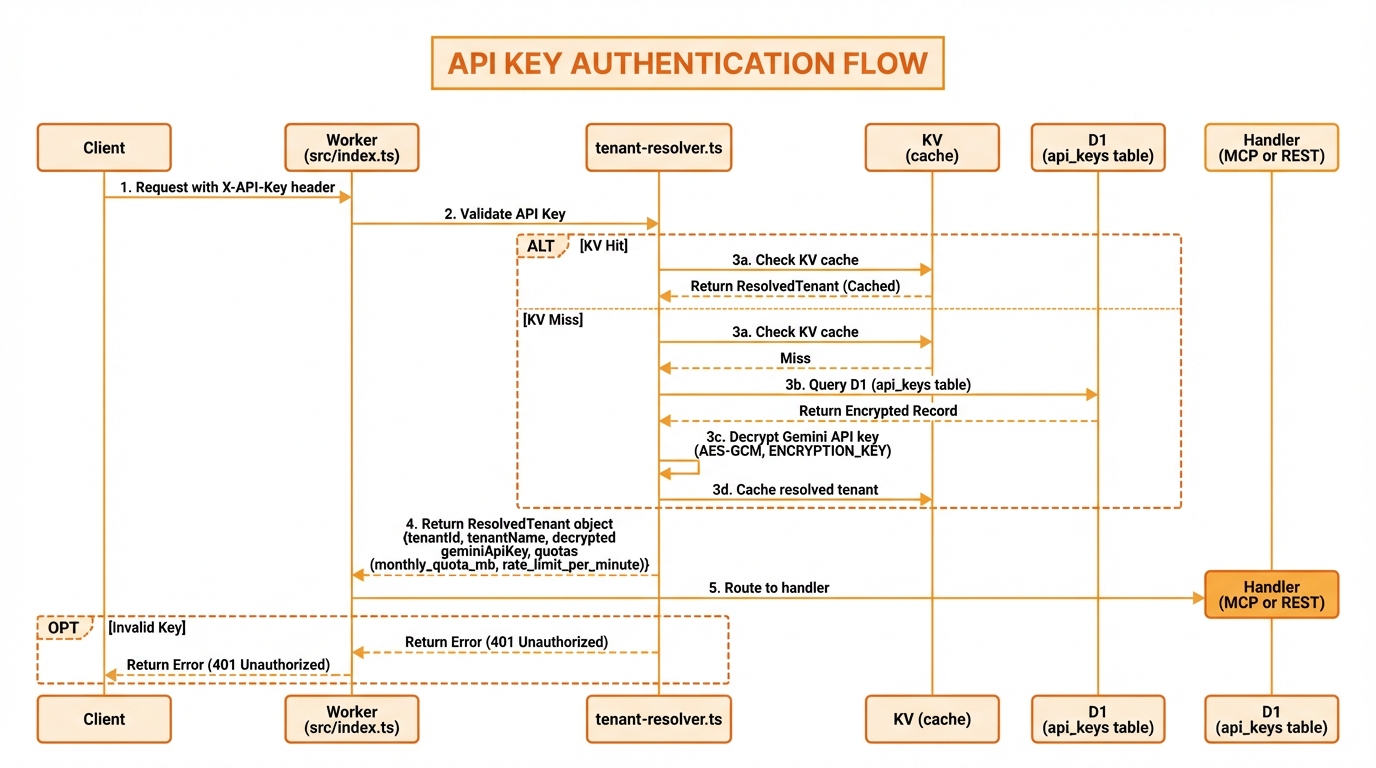
Validate key, lookup tenant, check active status
Every request includes an API key that maps to exactly one tenant:
const tenant = await authenticateAndResolveTenant(
  request.headers.get('X-API-Key'),
  env
);
// All subsequent operations use tenant.tenantIdLayer 2: Database Row-Level Security
All tables include tenant_id with enforced filtering:
-- Every query filters by tenant
SELECT * FROM images
WHERE tenant_id = ?
  AND prompt LIKE ?
ORDER BY created_at DESC
LIMIT ?;Schema pattern:
CREATE TABLE images (
    id INTEGER PRIMARY KEY AUTOINCREMENT,
    tenant_id TEXT NOT NULL,
    -- other columns
    FOREIGN KEY (tenant_id) REFERENCES tenants(tenant_id)
        ON DELETE CASCADE
);

CREATE INDEX idx_images_tenant ON images(tenant_id);Layer 3: Storage Path Isolation
R2 keys are prefixed with tenant ID:
{tenant_id}/{date}/{operation}-{random}.{format}

Examples:
acme-corp/2024-01-15/generate-abc123.png
acme-corp/2024-01-15/generate-abc123-thumb.jpg
creative-studio/2024-01-15/edit-xyz789.pngconst r2Key = `${tenantId}/${dateFolder}/${operation}-${randomId}.${format}`;
await env.R2_IMAGES.put(r2Key, imageBuffer);Layer 4: Session Isolation
Sessions are scoped to tenant:
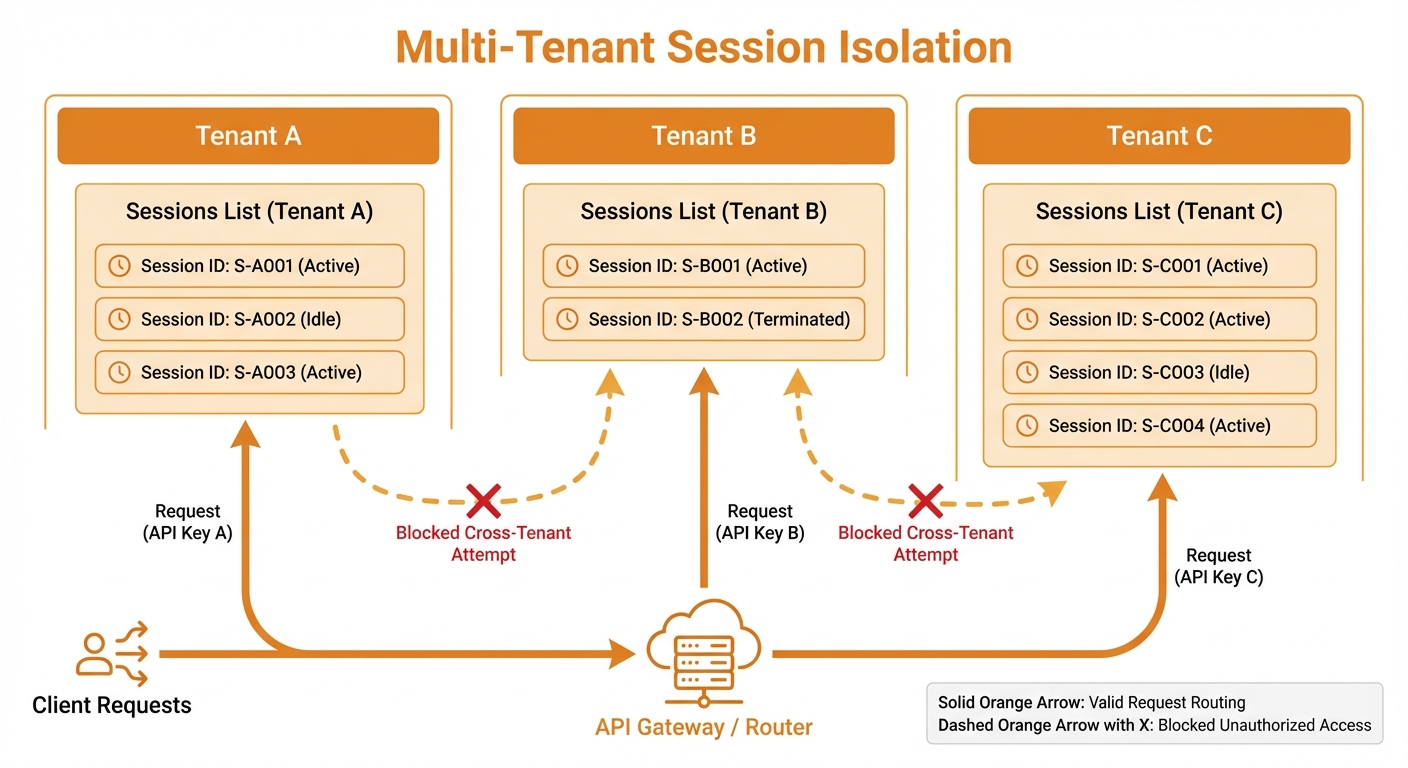
Each tenant's sessions and images are completely isolated
-- Session creation
INSERT INTO sessions (session_id, tenant_id, ...)
VALUES (?, ?, ...);

-- Session lookup always includes tenant
SELECT * FROM sessions
WHERE session_id = ? AND tenant_id = ?;Tenant Configuration
Tenant Record
interface Tenant {
  tenantId: string;
  name: string;
  encryptedGeminiKey: string;  // AES-GCM encrypted (legacy column kept for back-compat)
  iv: string;                   // Initialization vector for the legacy column
  allowedModels: ModelId[];    // e.g. ['gemini-flash-image', 'openai-gpt-image-2']
  defaultModelId: ModelId;
  monthlyQuotaMb: number;
  rateLimitPerMinute: number;
  isActive: boolean;
  createdAt: string;
}

// Provider keys live in their own table and are encrypted independently
interface TenantProviderCredential {
  tenantId: string;
  provider: 'gemini' | 'openai';
  encryptedKey: string;        // AES-GCM
  iv: string;
  isActive: boolean;
}Resolved Tenant (Runtime)
After authentication, the tenant context includes decrypted credentials for whichever provider the request is routed to. Other providers' keys are NOT decrypted unless needed.
interface ResolvedTenant {
  tenantId: string;
  name: string;
  allowedModels: ModelId[];
  defaultModelId: ModelId;
  providerCredentials: {
    gemini?: { apiKey: string; isActive: boolean };
    openai?: { apiKey: string; isActive: boolean };
  };
  quotas: {
    monthlyMb: number;
    usedMb: number;
    rateLimitPerMinute: number;
  };
}API Key Management
Key Types
| Type | Format | Purpose |
|---|---|---|
| Live | sk_live_xxx | Production use |
| Test | sk_test_xxx | Development/testing |
Multiple Keys per Tenant
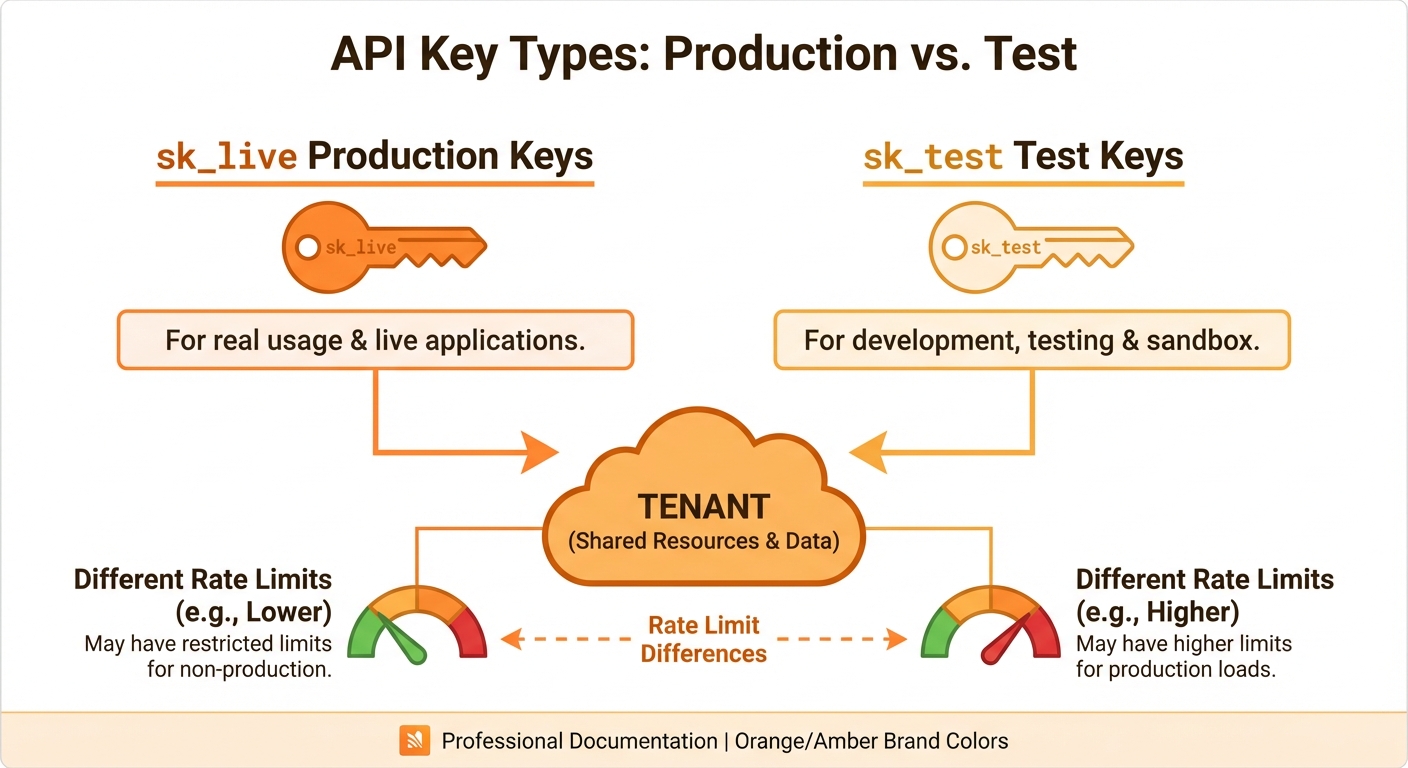
Production, backup, and test keys all map to one tenant
Use cases:
- Separate keys for different applications
- Key rotation without downtime
- Test keys for development
Key Lifecycle
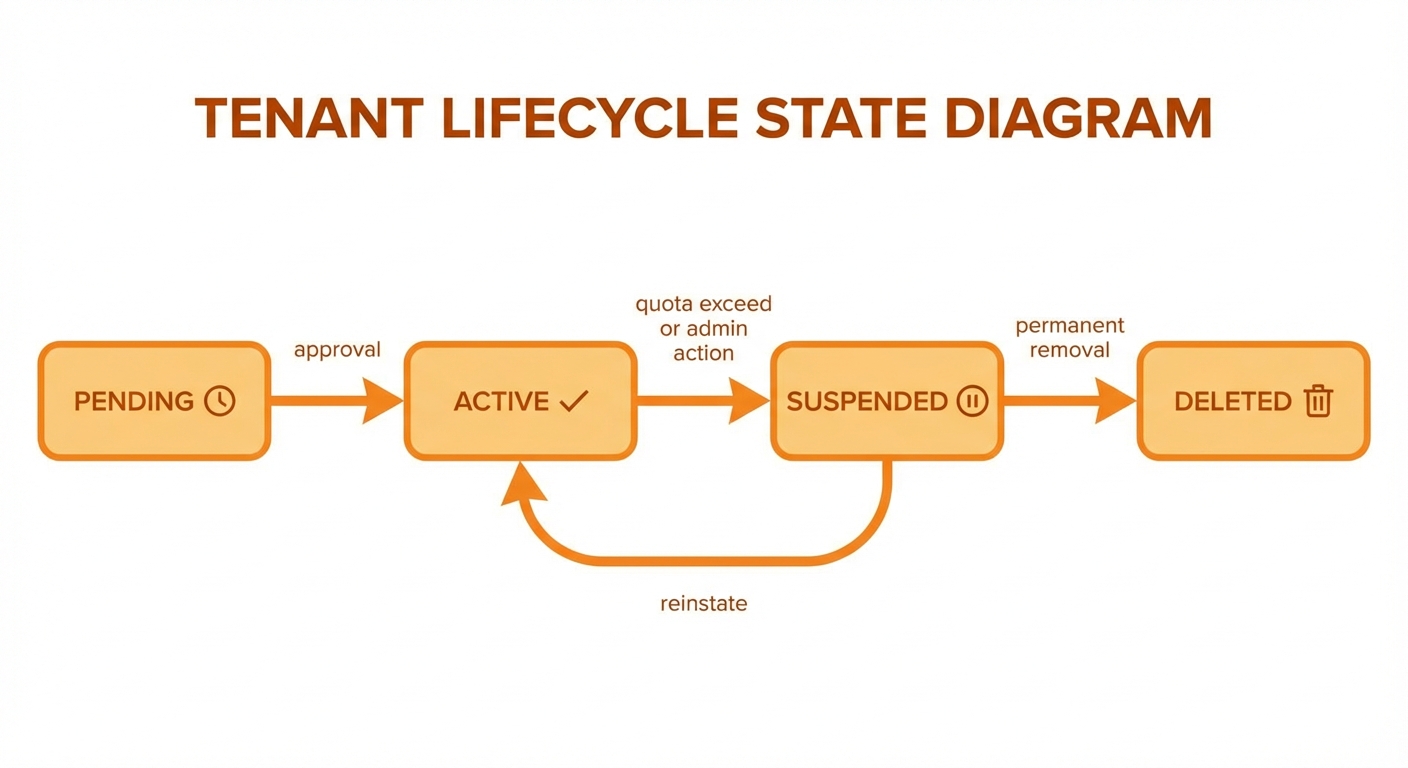
Created → Active → Revoked lifecycle with usage tracking
Quota Management
Storage Quota
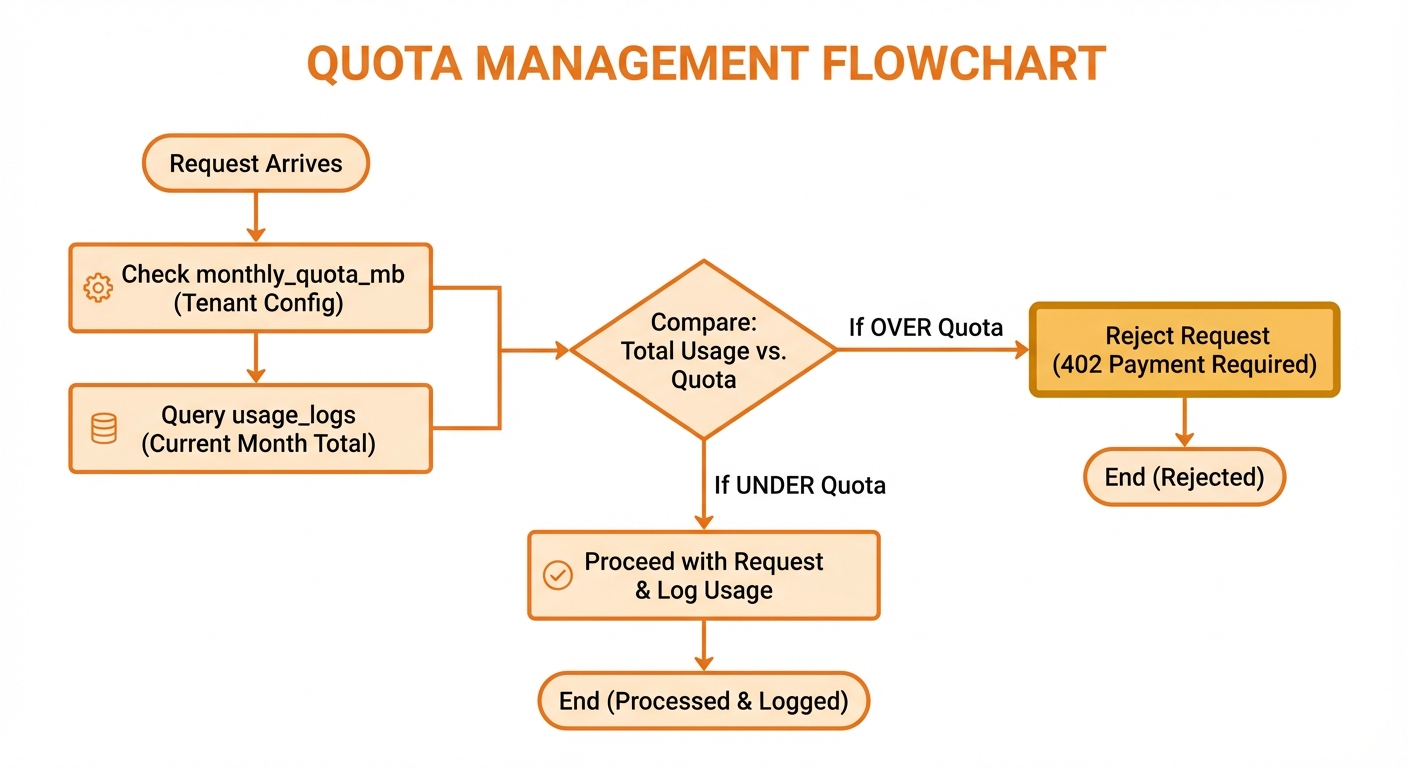
Check quota, allow/reject, track usage levels
Quota calculation:
SELECT COALESCE(SUM(size_bytes) / 1048576.0, 0) as used_mb
FROM images
WHERE tenant_id = ?;Rate Limiting
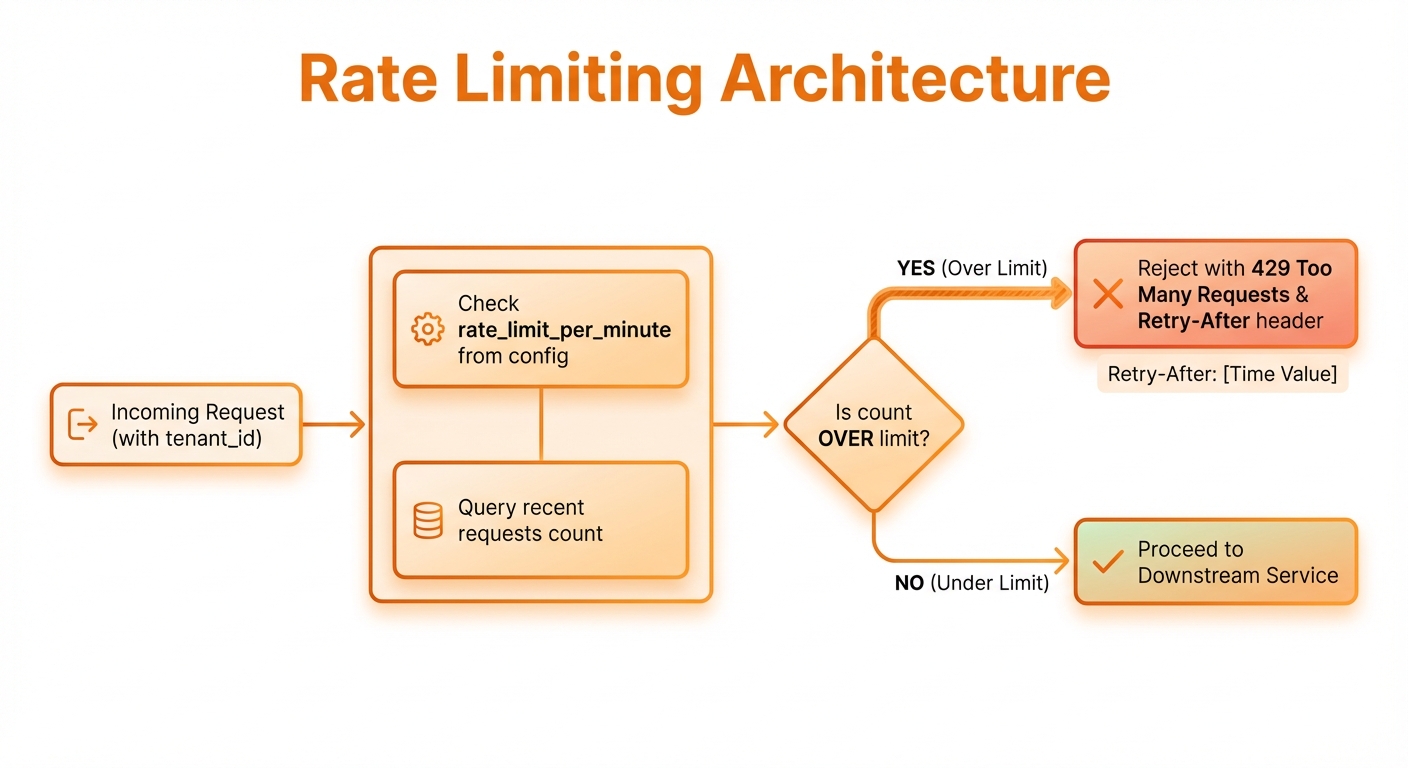
Track requests per minute, enforce limits, return 429 when exceeded
Implementation:
SELECT COUNT(*) FROM usage_logs
WHERE tenant_id = ?
AND timestamp > datetime('now', '-1 minute');Data Cascade Deletion
When a tenant is deleted:
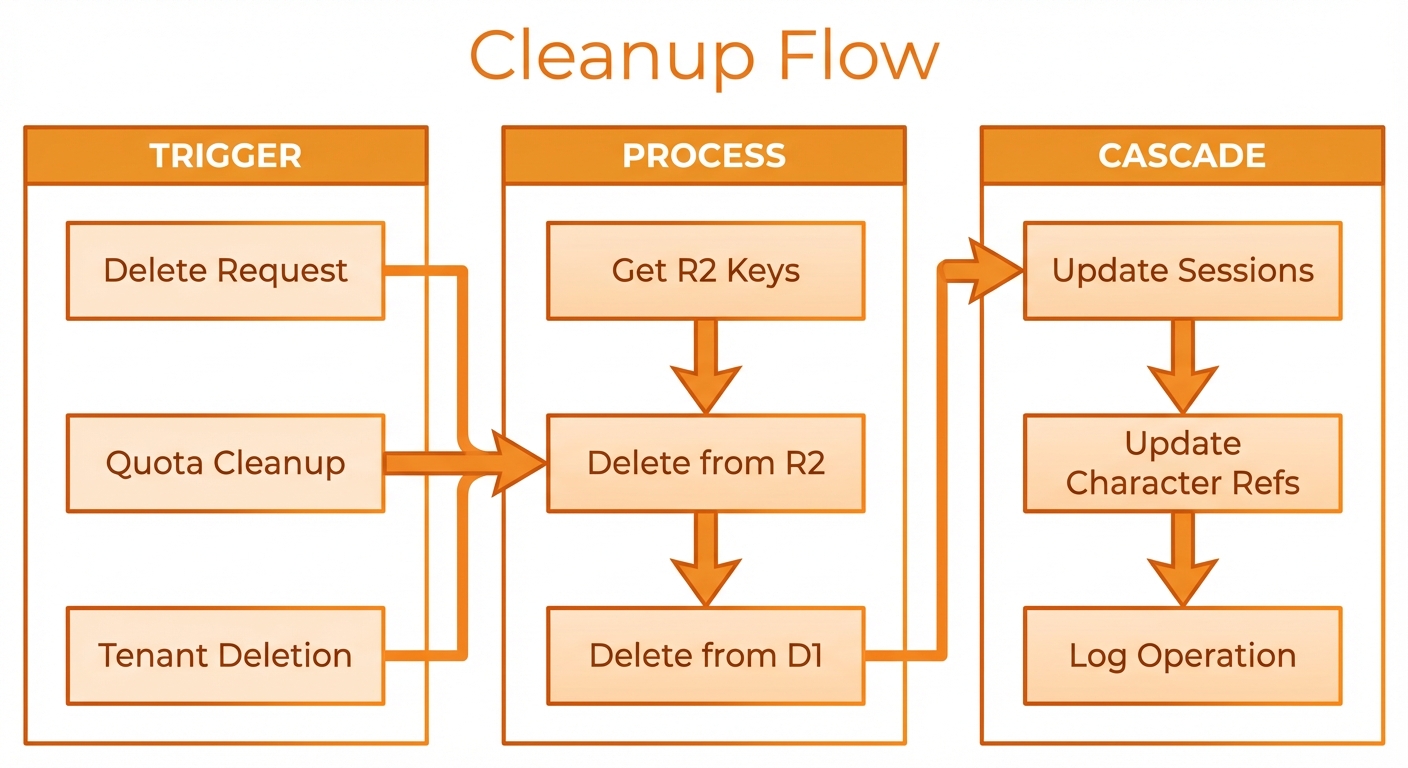
Cascade delete all data in D1 and clean up R2 storage
SQL cascade:
-- Foreign key with cascade
FOREIGN KEY (tenant_id) REFERENCES tenants(tenant_id)
ON DELETE CASCADER2 cleanup:
async function cleanupTenantStorage(tenantId: string, env: Env) {
  const prefix = `${tenantId}/`;
  const objects = await env.R2_IMAGES.list({ prefix });

  for (const object of objects.objects) {
    await env.R2_IMAGES.delete(object.key);
  }
}Cross-Tenant Protection
Query Parameter Validation
All queries include tenant context:
// WRONG - allows cross-tenant access
const image = await db.prepare(
  'SELECT * FROM images WHERE id = ?'
).bind(imageId).first();

// CORRECT - enforces tenant isolation
const image = await db.prepare(
  'SELECT * FROM images WHERE id = ? AND tenant_id = ?'
).bind(imageId, tenantId).first();Reference Validation
When referencing other records:
// Validate character belongs to tenant
const character = await db.prepare(
  'SELECT * FROM characters WHERE id = ? AND tenant_id = ?'
).bind(characterId, tenantId).first();

if (!character) {
  throw new Error('Character not found');
}R2 Key Validation
Before serving images:
// Ensure R2 key matches tenant
if (!r2Key.startsWith(`${tenantId}/`)) {
  throw new Error('Unauthorized access');
}Admin Operations
Tenant Creation
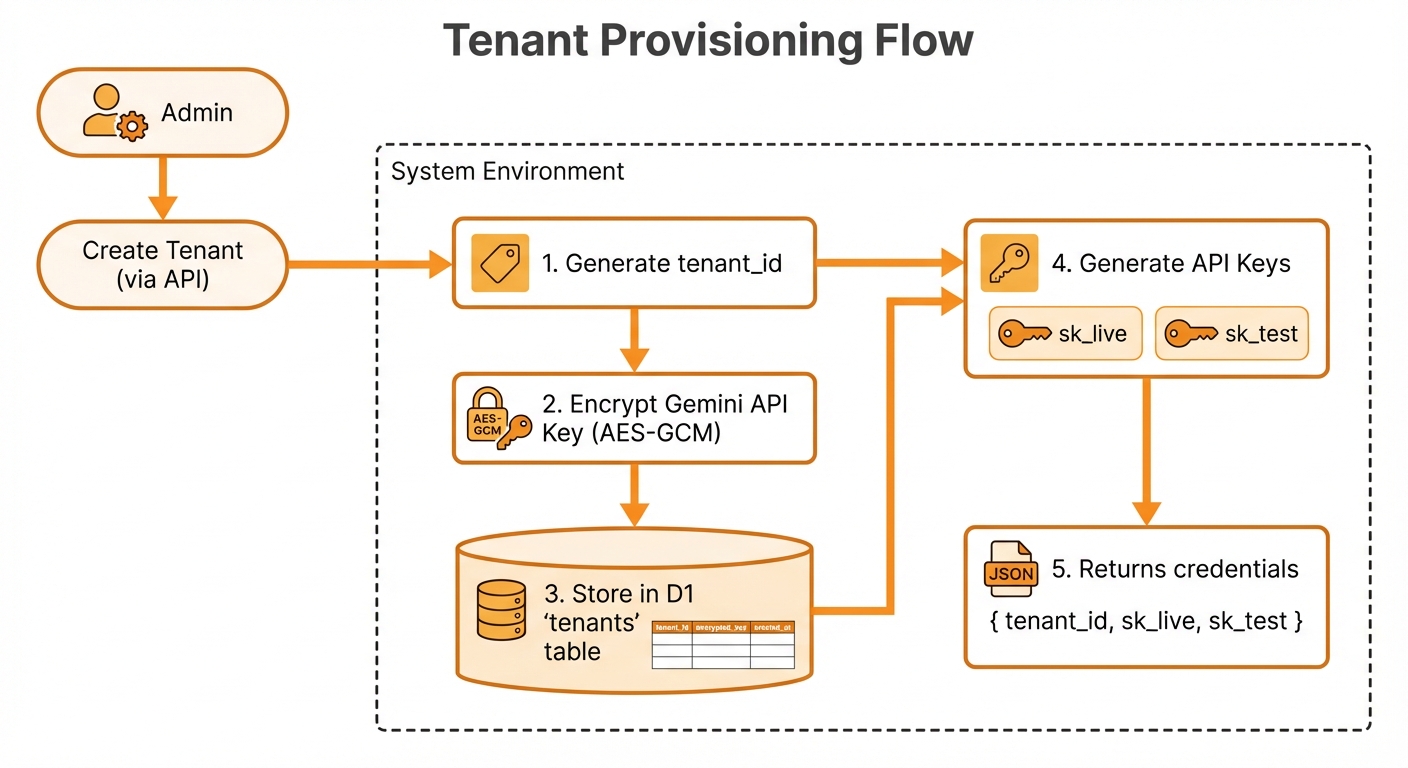
Validate admin, encrypt credentials, generate API key
Cross-Tenant Queries (Admin Only)
// Admin-only: list all tenants
if (!isAdmin) {
  throw new Error('Unauthorized');
}

const tenants = await db.prepare(
  'SELECT * FROM tenants'
).all();Best Practices
1. Always Include Tenant Context
// Every function receives tenantId
async function getImages(
  tenantId: string,
  filters: ImageFilters
): Promise<Image[]>2. Validate at Service Boundaries
// Validate in tool handler before any operations
const validatedInput = ImageInputSchema.parse(input);
// Then pass tenantId through all layers3. Use Prepared Statements
// Prepared statements prevent SQL injection
const stmt = db.prepare(
  'SELECT * FROM images WHERE tenant_id = ? AND id = ?'
);
await stmt.bind(tenantId, imageId).first();4. Log with Tenant Context
console.log({
  tenantId,
  operation: 'generate_image',
  imageId: result.id,
  duration: Date.now() - startTime
});