
Analytics Tools
Tools for tracking usage, discovering model capabilities, monitoring quotas, estimating provider cost, and getting help.
Overview
Analytics tools help you understand your usage:
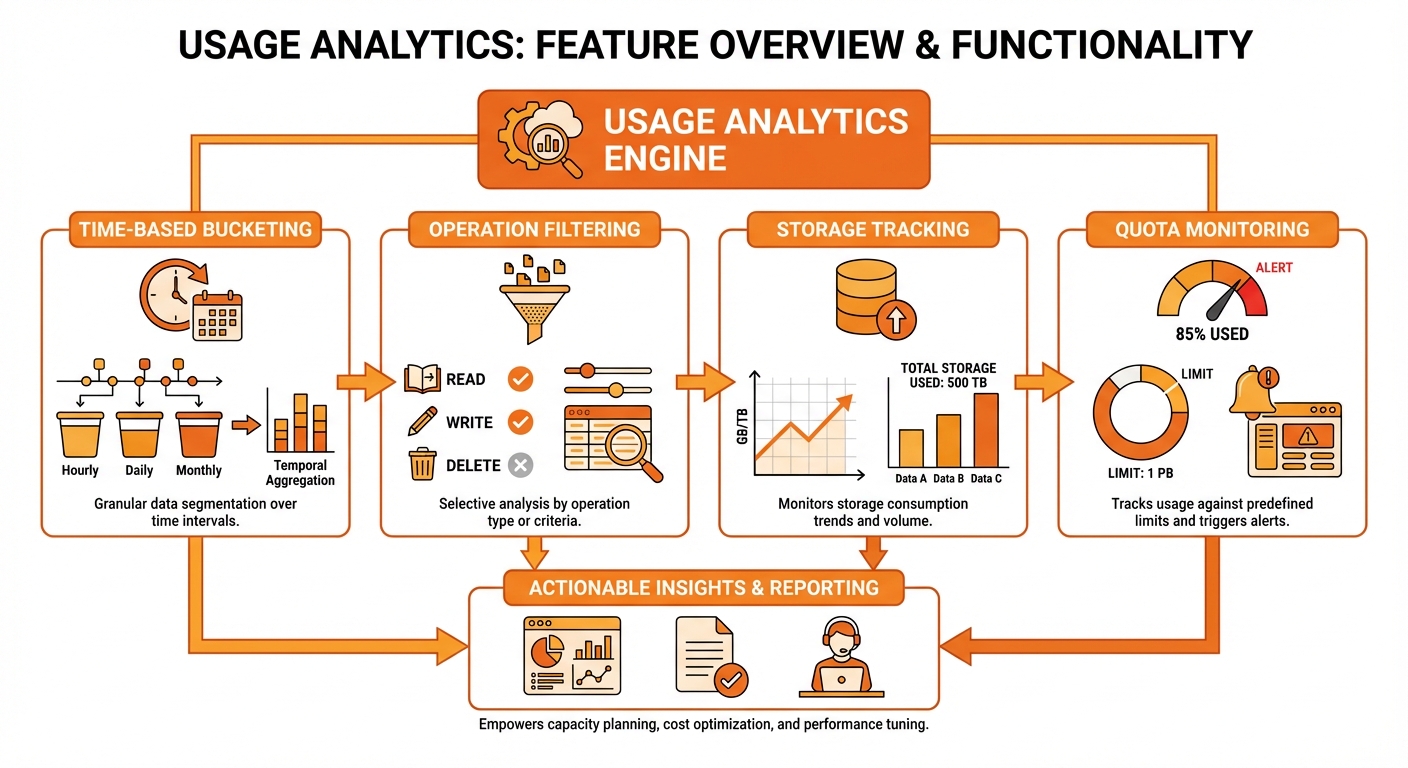
Tool calls → Usage logs → Stats, summaries, and documentation
get_usage_stats
Get detailed usage statistics with time-based bucketing.
Parameters
| Parameter | Type | Required | Description |
|---|---|---|---|
lookback_days | number | No | Days to look back (1-90, default: 7) |
granularity | string | No | Bucket size: hour, day, week |
operation | string | No | Filter by operation type |
range_start | string | No | ISO start timestamp |
range_end | string | No | ISO end timestamp |
limit | number | No | Max buckets (default: 100) |
Granularity Options
| Value | Bucket Size | Best For |
|---|---|---|
hour | 1 hour | Recent activity |
day | 1 day | Weekly trends |
week | 1 week | Monthly overview |
Example: Last 30 Days
{
  "tool": "get_usage_stats",
  "params": {
    "lookback_days": 30,
    "granularity": "day"
  }
}Response
Usage Statistics (Last 30 Days)

**Summary**
- Total Operations: 1,847
- Total Images: 1,523
- Storage Used: 856 MB
- Average Duration: 3.4s
- Estimated Cost: $12.34

**Daily Breakdown**
| Date       | Operations | Images | Size    |
|------------|------------|--------|---------|
| Jan 15     | 45         | 38     | 21.3 MB |
| Jan 14     | 52         | 44     | 24.8 MB |
| Jan 13     | 38         | 32     | 18.2 MB |
| ...        | ...        | ...    | ...     |

**By Operation**
- generate_image: 1,200 (65%)
- edit_image: 323 (17%)
- generate_with_character: 245 (13%)
- generate_with_product: 79 (5%)Filter by Operation
{
  "tool": "get_usage_stats",
  "params": {
    "lookback_days": 30,
    "granularity": "day",
    "operation": "generate_image"
  }
}Custom Date Range
{
  "tool": "get_usage_stats",
  "params": {
    "range_start": "2024-01-01T00:00:00Z",
    "range_end": "2024-01-31T23:59:59Z",
    "granularity": "day"
  }
}get_account_summary
Get a comprehensive overview of your account.
Parameters
None required.
Example
{
  "tool": "get_account_summary",
  "params": {}
}Response
Account Summary

**Account**
- Tenant: Creative Studio
- Created: January 1, 2024

**Library**
┌────────────────────┬────────┐
│ Characters         │ 12     │
│ Style Presets      │ 5      │
│ Product References │ 8      │
└────────────────────┴────────┘

Most Used:
- Character: Luna (45 uses)
- Style Preset: Cinematic (89 uses)
- Product: Water Bottle (32 uses)

**Images**
┌────────────────────┬─────────┐
│ Total Images       │ 1,523   │
│ Generations        │ 1,200   │
│ Edits              │ 323     │
│ Storage Used       │ 856 MB  │
│ Average Size       │ 562 KB  │
└────────────────────┴─────────┘

**Sessions**
┌────────────────────┬─────────┐
│ Total Sessions     │ 245     │
│ Active Sessions    │ 3       │
│ Avg Images/Session │ 6.2     │
└────────────────────┴─────────┘

**Recent Activity (30 days)**
┌────────────────────┬─────────┐
│ Images Generated   │ 342     │
│ API Calls          │ 1,847   │
│ Daily Average      │ 11.4    │
└────────────────────┴─────────┘

**Quotas**
- Storage: 856 MB / 1,024 MB (83.6%)
- Rate Limit: 60 req/minlist_models
List tenant-enabled image models and capability metadata.
Use this before selecting advanced settings or high-cost model options.
Parameters
| Parameter | Type | Required | Description |
|---|---|---|---|
include_unavailable | boolean | No | Include models known to Go Bananas but not enabled for this tenant |
Example
{
  "tool": "list_models",
  "params": {}
}Response Includes
| Field | Description |
|---|---|
defaultModelId | Tenant default model |
allowedModelIds | Models enabled for this tenant |
models[].capabilities.maxReferenceImages | Reference image limit |
models[].capabilities.supportedAspectRatios | Supported aspect ratios |
models[].capabilities.supportedOutputFormats | Output formats |
models[].capabilities.supportedQualityLevels | Quality controls |
models[].caveats | Model-specific guidance |
Each model is listed with its provider, tier, reference-image limit, aspect ratios, output formats, quality levels and (for Gemini) resolution tiers. With include_unavailable: true, models your workspace has not enabled are listed too, marked not enabled. Six models exist today: gemini-flash-lite-image (the default), gemini-flash-image, gemini-pro-image, openai-gpt-image-2, openai-gpt-image-2.5-flare and openai-gpt-image-2.5-sunburst.
The response ends with a tip to run check_quota with model_id, quality, resolution_tier and estimated_images before expensive runs.
check_quota
Lightweight pre-flight check before generating. It verifies storage quota, rate-limit headroom and provider service health, and estimates provider cost. Call it before large batches, OpenAI high-quality generations, or 2K/4K work. It never generates anything.
Parameters
| Parameter | Type | Required | Description |
|---|---|---|---|
estimated_images | number | No | Images you plan to generate, 1–100 (default: 1) |
model_id | string | No | Model you plan to use (any of the six model IDs). Defaults to the workspace default |
quality | string | No | OpenAI quality for the estimate: low, medium, high, xhigh, max, auto (default auto) |
resolution_tier | string | No | Gemini tier for the estimate: 0.5k, 1k, 2k, 4k (default 1k) |
output_format | string | No | png, jpeg or webp |
size | string | No | OpenAI size: auto or WIDTHxHEIGHT, e.g. 1536x1024; larger sizes scale the estimate |
estimated_references | number | No | Reference images you expect to send, 0–16; adds a cost warning |
Example
{
  "tool": "check_quota",
  "params": {
    "estimated_images": 4,
    "model_id": "openai-gpt-image-2",
    "quality": "high",
    "size": "2048x1024"
  }
}Response Includes
The MCP tool returns this as formatted text; GET /api/quota-check returns the same information as the JSON fields below.
| Field | Description |
|---|---|
canGenerate | Whether the planned run can go ahead |
reasons | Why not, when canGenerate is false |
details.storage | Used, quota and remaining MB |
details.rateLimit | Remaining requests, limit per minute, reset time |
details.serviceHealth | Circuit-breaker state (closed, open, half_open) and time until retry |
details.estimatedCost | Estimated USD, confidence (low or medium), assumptions and warnings |
Estimates, not bills
The cost estimate is a heuristic. For GPT Image 2 it uses a 1024×1024 low/medium/high figure (auto, xhigh and max show as variable). For GPT Image 2.5 no dollar figure is given, because billing is token-based. check_quota does not check your OpenAI account's billing or rate limits.
The REST equivalent is GET /api/quota-check.
get_help
Get documentation for tools, categories, or workflows.
Parameters
| Parameter | Type | Required | Description |
|---|---|---|---|
tool_name | string | No | Specific tool to document |
category | string | No | Tool category |
workflow | string | No | Workflow guide |
Categories
| Category | Tools Covered |
|---|---|
generation | Image creation tools |
editing | Image modification tools |
characters | Character consistency system |
products | Product marketing tools |
styles | Brand style presets |
analytics | Usage tracking, model discovery, quota checks |
all | Complete listing |
Workflows
| Workflow | Description |
|---|---|
consistent_characters | Multi-scene character generation |
conversational_editing | Iterative image refinement |
product_marketing | Product campaign generation |
style_branding | Consistent brand styling |
Example: Tool Help
{
  "tool": "get_help",
  "params": {
    "tool_name": "generate_image"
  }
}Response
# generate_image

Generate new images from text prompts using Gemini or OpenAI image models.

## Parameters

| Parameter | Type | Required | Description |
|-----------|------|----------|-------------|
| prompt | string | Yes | Text description |
| negative_prompt | string | No | What to avoid |
| aspect_ratio | string | No | Image dimensions |
| n | number | No | Number of images (1-4) |
| model_id | string | No | Model selection |
| system_instruction | string | No | Style guidance |
| reference_images | string[] | No | Reference R2 keys (advanced) |

## Examples

Basic:
{
  "prompt": "a sunset over mountains"
}

With options:
{
  "prompt": "a sunset over mountains",
  "aspect_ratio": "landscape",
  "n": 2,
  "negative_prompt": "blurry, low quality"
}

## Related Tools
- edit_image: Edit generated images
- continue_editing: Conversational editing
- generate_with_character: Use saved charactersExample: Category Help
{
  "tool": "get_help",
  "params": {
    "category": "characters"
  }
}Response
# Character Tools

Tools for managing persistent characters.

## Available Tools

1. **create_character**
   Save a character design for reuse

2. **update_character**
   Modify existing character

3. **delete_character**
   Remove from library

4. **list_characters**
   Browse character library

5. **get_character**
   Get character details

6. **generate_with_character**
   Generate scene with character

7. **generate_with_multiple_characters**
   Multi-character scenes (2-5)

## Quick Start

1. Create a character:
   create_character({
     character_name: "Luna",
     base_prompt: "young woman with red hair..."
   })

2. Generate scenes:
   generate_with_character({
     character_name: "Luna",
     scene_prompt: "in a magical forest"
   })

## Related
- See workflow: consistent_charactersExample: Workflow Help
{
  "tool": "get_help",
  "params": {
    "workflow": "conversational_editing"
  }
}Response
# Conversational Editing Workflow

Edit images naturally through conversation.

## How It Works

1. **Generate Initial Image**
   "Generate a sunset over mountains"
   → Creates image #342

2. **Edit Conversationally**
   "Add some clouds"
   → continue_editing edits #342, creates #343

3. **Keep Refining**
   "Make the colors more vibrant"
   → continue_editing edits #343, creates #344

## Session State

The session tracks your last image:
- last_image_id updates after each operation
- continue_editing automatically uses it
- No need to specify image IDs

## Tips

- Use natural language
- Build up changes incrementally
- Check current image with get_image_info
- View history with get_session_history

## Tools Used

- generate_image: Initial creation
- continue_editing: Subsequent edits
- edit_image: Edit specific image by ID
- get_session_history: View all imagesUsage Tracking
All operations are automatically tracked:
What's Tracked
| Field | Description |
|---|---|
operation | Tool name called |
images_generated | Number of images created |
total_size_bytes | Storage consumed |
duration_ms | Processing time |
api_calls_made | External API calls |
estimated_cost_cents | Approximate cost |
timestamp | When operation occurred |
Operation Types
| Operation | When Tracked |
|---|---|
generate_image | New image generation |
edit_image | Image editing |
generate_with_character | Character scene |
generate_with_product | Product marketing |
create_character | Character creation |
create_product_reference | Product upload |
*_failed | Failed operations |
Quota Monitoring
Use check_quota before large batches, OpenAI high-quality generations, or 2K/4K work.
Storage Quota
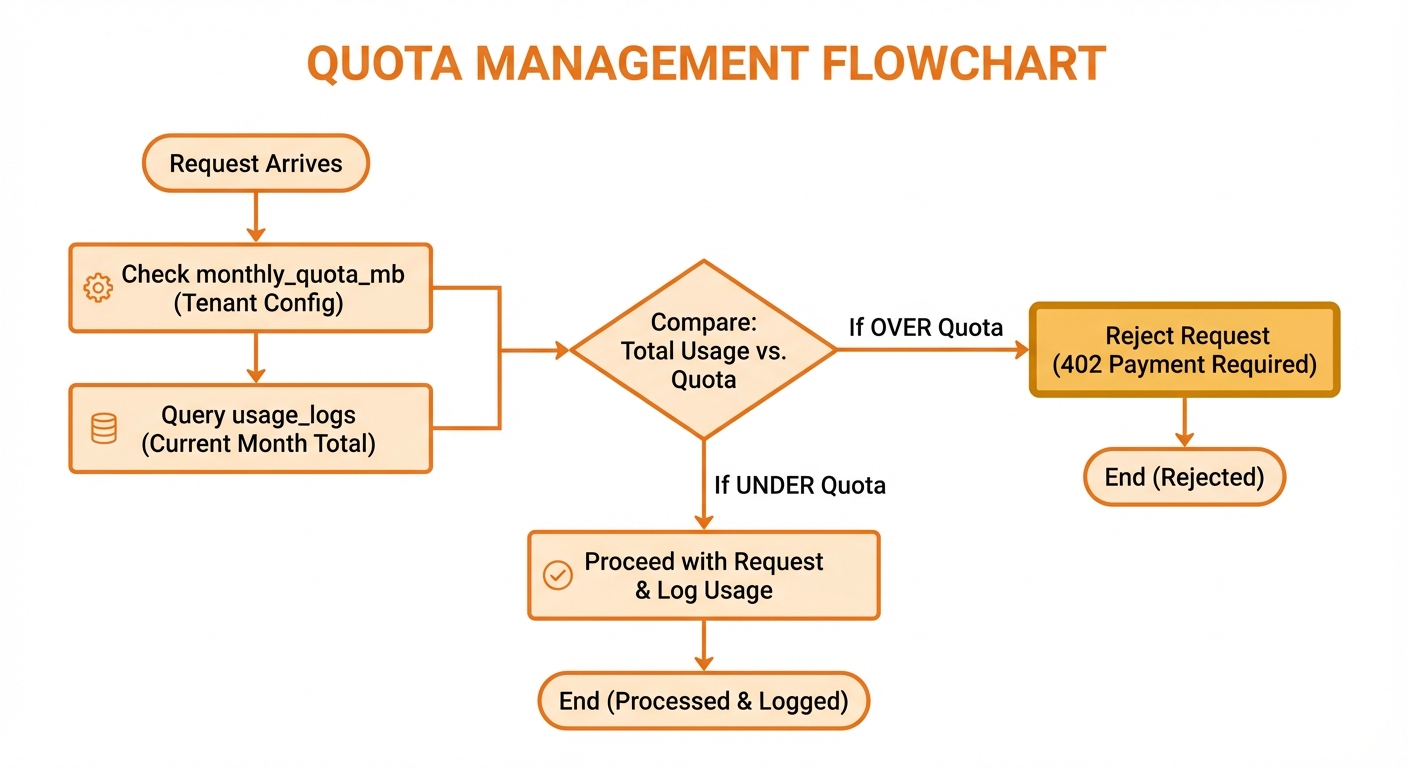
Usage levels: Normal (0-70%), Warning (70-90%), Critical (90-100%), Blocked (>100%)
Monitor with get_account_summary:
Quotas:
- Storage: 856 MB / 1,024 MB (83.6%) ⚠️ WarningRate Limits
Default limits:
- 60 requests per minute
- 10 concurrent requests
- 4 images per request
When exceeded, operations return:
{
  "error": {
    "code": "RATE_LIMIT_EXCEEDED",
    "message": "Rate limit exceeded",
    "details": {
      "retry_after": 30
    }
  }
}Cost Estimation
Approximate provider output costs (before reference-image input tokens and platform/storage costs):
| Model | 1K / 2K | 4K | Notes |
|---|---|---|---|
| Nano Banana 2 Lite | ~$0.0336 | — | Fixed at 1K |
| Nano Banana 2 (Flash) | ~$0.067 / ~$0.101 | ~$0.151 | 0.5K is about ~$0.045 |
| Go Bananas! Pro | ~$0.134 | ~$0.240 | 1K and 2K share the same published output bucket |
| OpenAI GPT Image 2 | Token-priced | Token-priced | check_quota uses low/medium/high heuristics; actual cost depends on text/image input and output tokens |
| OpenAI GPT Image 2.5 (Flare, Sunburst) | Token-priced | Token-priced | check_quota gives no dollar figure for these models |
Monthly example:
1,000 Flash 1K generations = ~$67
500 Pro 1K generations = ~$67
Total: ~$134/month before input/reference-image chargesPlus Cloudflare costs:
- Workers: $5/month (paid plan)
- R2: $0.015/GB stored
- D1: Pay-as-you-go
Best Practices
Regular Monitoring
Check usage weekly:
{
  "tool": "get_usage_stats",
  "params": {
    "lookback_days": 7,
    "granularity": "day"
  }
}Track by Project
Use custom session IDs:
{
  "tool": "generate_image",
  "params": {
    "prompt": "...",
    "session_id": "project-x-2024"
  }
}Then filter:
{
  "tool": "search_images",
  "params": {
    "filters": {
      "session_id": "project-x-2024"
    }
  }
}Clean Up Regularly
Delete unused images to free quota:
Search for old test images
Delete unused generations
Archive completed projects