
Development Guide
Set up your development environment for Go Bananas!.
Prerequisites
Required Software
- Node.js 24 - JavaScript runtime
- npm or pnpm - Package manager
- Git - Version control
- VS Code (recommended) - IDE
Optional but Recommended
- Wrangler CLI - Cloudflare development
- SQLite viewer - Database inspection
- REST client - API testing (Thunder Client, Postman)
Initial Setup
1. Clone Repository
bash
git clone https://github.com/davendra/go-bananas-app.git
cd go-bananas-app2. Install Dependencies
bash
npm install

# Also install frontend dependencies
npm --prefix frontend install3. Configure Environment
bash
# Copy environment template
cp .env.example .env

# Edit .env with your values
# Required: ENCRYPTION_KEY (generate with: openssl rand -hex 32)4. Set Up Local Database
bash
# Create local D1 database
wrangler d1 create go-bananas-db --local

# Initialize schema
npm run db:init5. Start Development Server
bash
# Backend
npm run dev

# Frontend (in separate terminal)
npm run frontend:devDevelopment Workflow
Backend Development
Edit code, auto-reload, test, and commit
The development server auto-reloads on file changes:
bash
npm run dev
# Server at http://localhost:8787Frontend Development
bash
npm run frontend:dev
# Server at http://localhost:5173Frontend proxies API requests to the backend.
Full Stack
Run both in separate terminals or use:
bash
# Terminal 1
npm run dev

# Terminal 2
npm run frontend:devProject Structure
Backend (src/)
src/
├── index.ts              # Worker entry point
├── mcp/
│   └── agent.ts          # MCP Durable Object
├── tools/                # MCP tools
│   ├── generate-image.ts
│   ├── edit-image.ts
│   ├── create-character.ts
│   └── ...
├── api/                  # REST API
│   ├── tenant-api.ts     # Tenant endpoints
│   ├── admin.ts          # Admin endpoints
│   └── http.ts           # HTTP helpers
├── auth/                 # Authentication
│   └── tenant-resolver.ts
├── services/             # Business logic
│   ├── gemini-client.ts
│   ├── image-storage.ts
│   └── usage.ts
└── types/                # Type definitions
└── index.tsFrontend (frontend/)
frontend/
├── src/
│   ├── App.tsx           # Root component
│   ├── views/            # Page components
│   │   ├── DashboardView.tsx
│   │   ├── GalleryView.tsx
│   │   └── ...
│   ├── components/       # Reusable components
│   ├── hooks/            # Custom hooks
│   ├── context/          # React context
│   └── api/              # API client
├── public/               # Static assets
└── index.html # HTML templateKey Files
Worker Entry (src/index.ts)
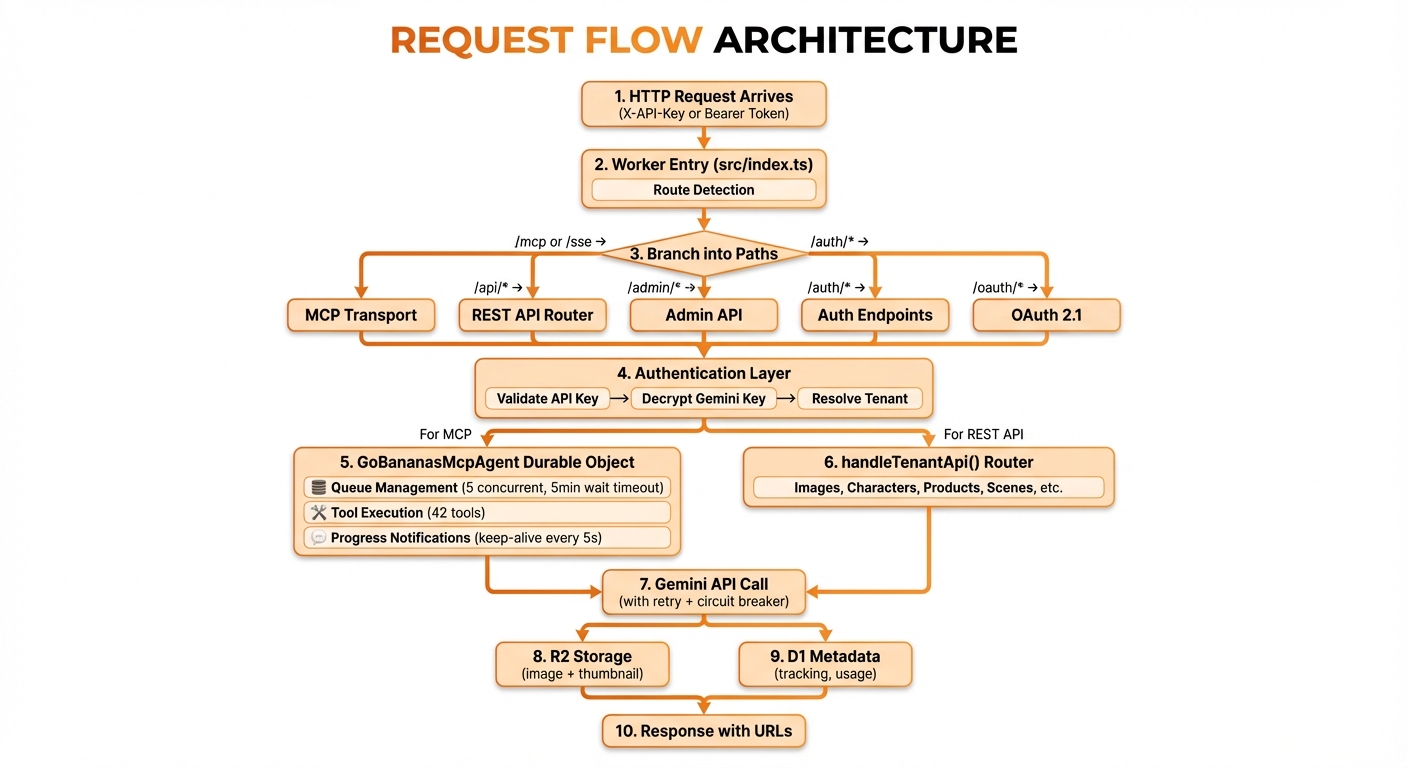
Handles routing and authentication:
typescript
export default {
  async fetch(request: Request, env: Env, ctx: ExecutionContext) {
    // Route based on path
    // Authenticate requests
    // Forward to appropriate handler
  }
};MCP Agent (src/mcp/agent.ts)
Durable Object for MCP protocol:
typescript
export class GoBananasMcpAgent extends DurableObject {
  // Register all MCP tools
  // Handle tool invocations
  // Manage session state
}Tool Implementation (src/tools/*.ts)
Each tool follows the pattern:
typescript
// Schema
export const ToolInputSchema = z.object({...});

// Handler
export async function toolHandler(env, tenantId, sessionId, geminiApiKey, params) {
  // Implementation
}

// Definition
export function getToolDefinition() {
  return { name, description, inputSchema };
}Local Database
Access Local D1
bash
# Execute query
wrangler d1 execute go-bananas-db --local --command "SELECT * FROM tenants"

# Run SQL file
wrangler d1 execute go-bananas-db --local --file query.sqlReset Database
bash
# Delete and recreate
rm -rf .wrangler/state
npm run db:initCreate Test Tenant
bash
# Use the setup script
ENCRYPTION_KEY=$(openssl rand -hex 32) npm run setup-tenantTesting
Run All Tests
bash
npm run test:allRun Specific Tests
bash
# Single test file
npm test -- tests/generate-image.test.ts

# Tests matching pattern
npm test -- --grep "image generation"Watch Mode
bash
npm test -- --watchCoverage
bash
npm test -- --coverageDebugging
Console Logging
Add temporary logs:
typescript
console.log('Debug:', JSON.stringify(data, null, 2));View in terminal running npm run dev.
VS Code Debugging
Create .vscode/launch.json:
json
{
  "version": "0.2.0",
  "configurations": [
    {
      "type": "node",
      "request": "launch",
      "name": "Debug Tests",
      "program": "${workspaceFolder}/node_modules/vitest/vitest.mjs",
      "args": ["run", "${relativeFile}"],
      "console": "integratedTerminal"
    }
  ]
}Wrangler Debugging
bash
# Verbose logging
wrangler dev --log-level debug

# Inspect Durable Objects
wrangler dev --inspectCommon Development Tasks
Add New API Endpoint
- Add route in
src/api/tenant-api.ts:
typescript
if (method === 'GET' && pathMatch(path, '/api/new-endpoint')) {
  return handleNewEndpoint(request, env, tenantId);
}- Implement handler:
typescript
async function handleNewEndpoint(
  request: Request,
  env: Env,
  tenantId: string
): Promise<Response> {
  // Implementation
  return jsonResponse({ success: true, data: result });
}Add Database Migration
- Create migration file:
bash
touch migrations/0013_add_new_feature.sql- Write migration:
sql
-- migrations/0013_add_new_feature.sql
ALTER TABLE images ADD COLUMN new_field TEXT;
CREATE INDEX idx_images_new_field ON images(new_field);- Apply migration:
bash
npm run db:migrateAdd Frontend Component
- Create component:
typescript
// frontend/src/components/NewComponent.tsx
export function NewComponent({ prop }: { prop: string }) {
  return <div>{prop}</div>;
}- Use in view:
typescript
import { NewComponent } from '../components/NewComponent';Environment Variables
Development (.env)
bash
# Required
ENCRYPTION_KEY=your-64-char-hex-key

# Optional
LOG_LEVEL=debugLocal Wrangler
Configure in wrangler.jsonc:
jsonc
{
  "vars": {
    "ENVIRONMENT": "development",
    "LOG_LEVEL": "debug"
  }
}Code Quality
Type Checking
bash
npm run typecheckLinting
bash
npm run lint

# Fix auto-fixable issues
npm run lint -- --fixFormatting
bash
npx prettier --write .Hot Reload
Wrangler automatically reloads on file changes. If reload doesn't work:
- Check terminal for errors
- Try stopping and restarting
npm run dev - Clear Wrangler cache:
rm -rf .wrangler/state