
Prompt
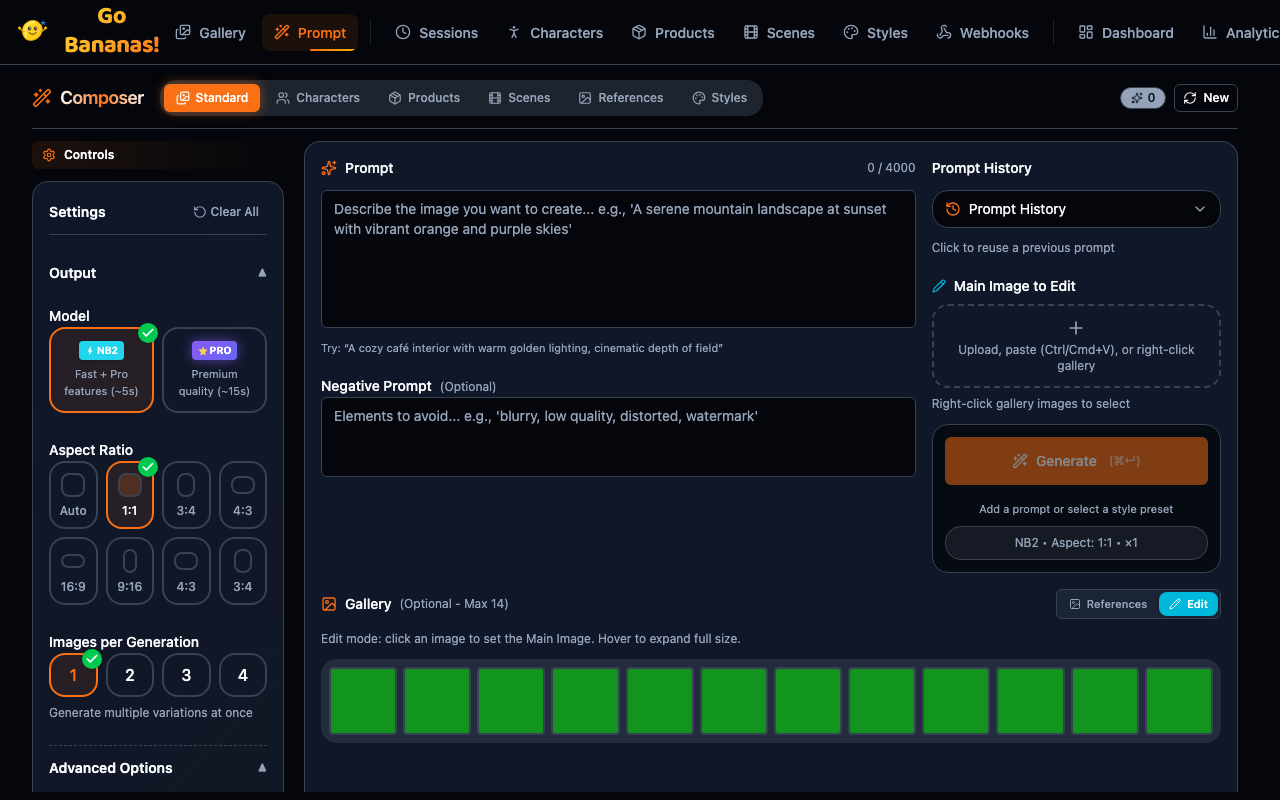
Prompt (in the sidebar's Create group) is where you generate and edit images with full control over the settings. Workspace owners and managers see it; other roles do not.
Overview
The Prompt page provides:
- Text-to-image generation with natural language prompts
- Image editing with conversational instructions
- Reference images, each labelled with what it is for (see Reference roles)
- Character integration for consistent characters
- Product placement for marketing images
- Styles and scenes for consistent aesthetics
Layout
The header has New (start a new generation session), Settings (generation settings) and Generate. Below it are three tabs:
| Tab | What it is for |
|---|---|
| Standard | Prompt, edit, and reference images |
| Characters | Compose scenes with saved characters |
| Products | Create marketing images from product references |
Cmd/Ctrl + Enter in the prompt box generates.
Tabs
Characters tab
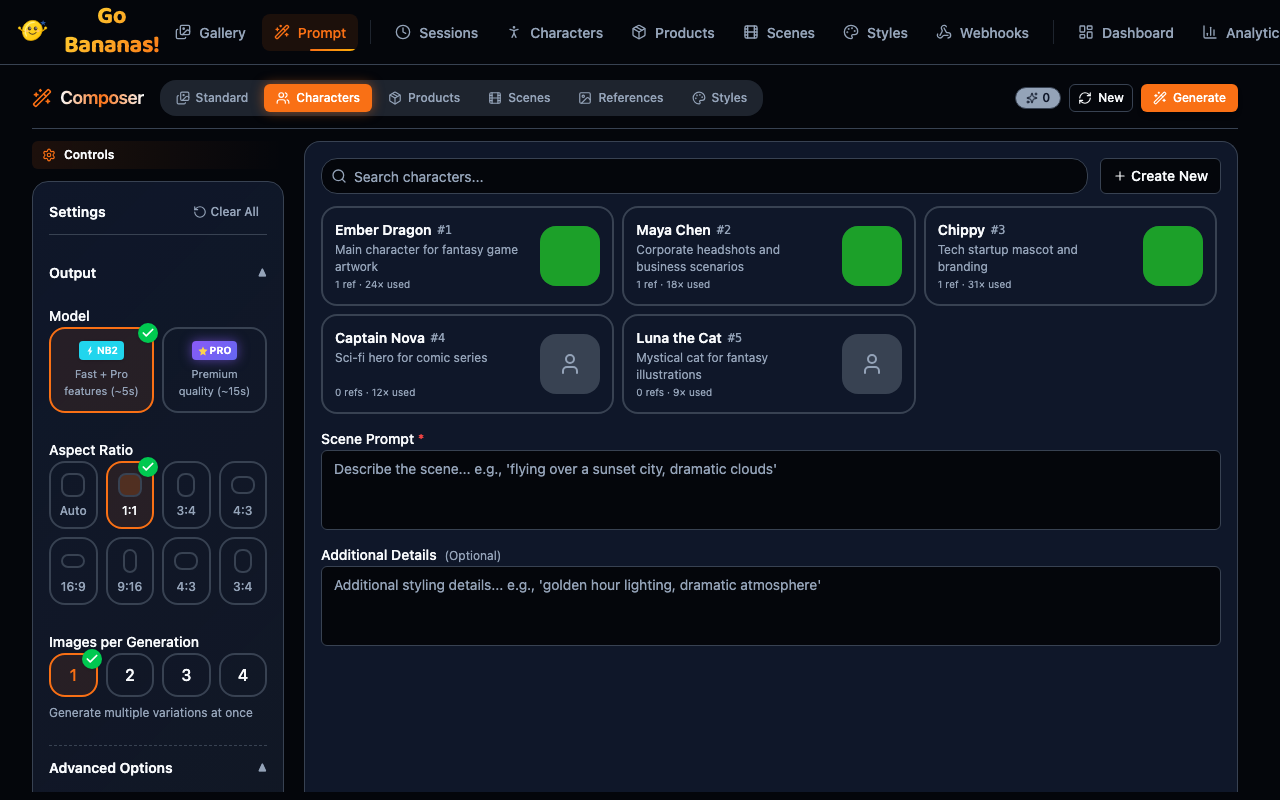
Generate with saved characters:
┌─────────────────────────────────────────────────────┐
│ Character                                           │
├─────────────────────────────────────────────────────┤
│ Select Character:                                   │
│ ┌─────────────────────────────────────────────────┐ │
│ │ [🔍 Search characters...]                       │ │
│ │                                                 │ │
│ │ 👤 Luna - Young adventurer with red hair       │ │
│ │ 👤 Captain Rex - Space pilot in uniform        │ │
│ │ 👤 Felix - Orange tabby cat                    │ │
│ └─────────────────────────────────────────────────┘ │
│                                                     │
│ Scene Description:                                  │
│ ┌─────────────────────────────────────────────────┐ │
│ │ walking through a magical forest at dawn        │ │
│ └─────────────────────────────────────────────────┘ │
│                                                     │
│ [Generate with Character]                           │
└─────────────────────────────────────────────────────┘Products tab
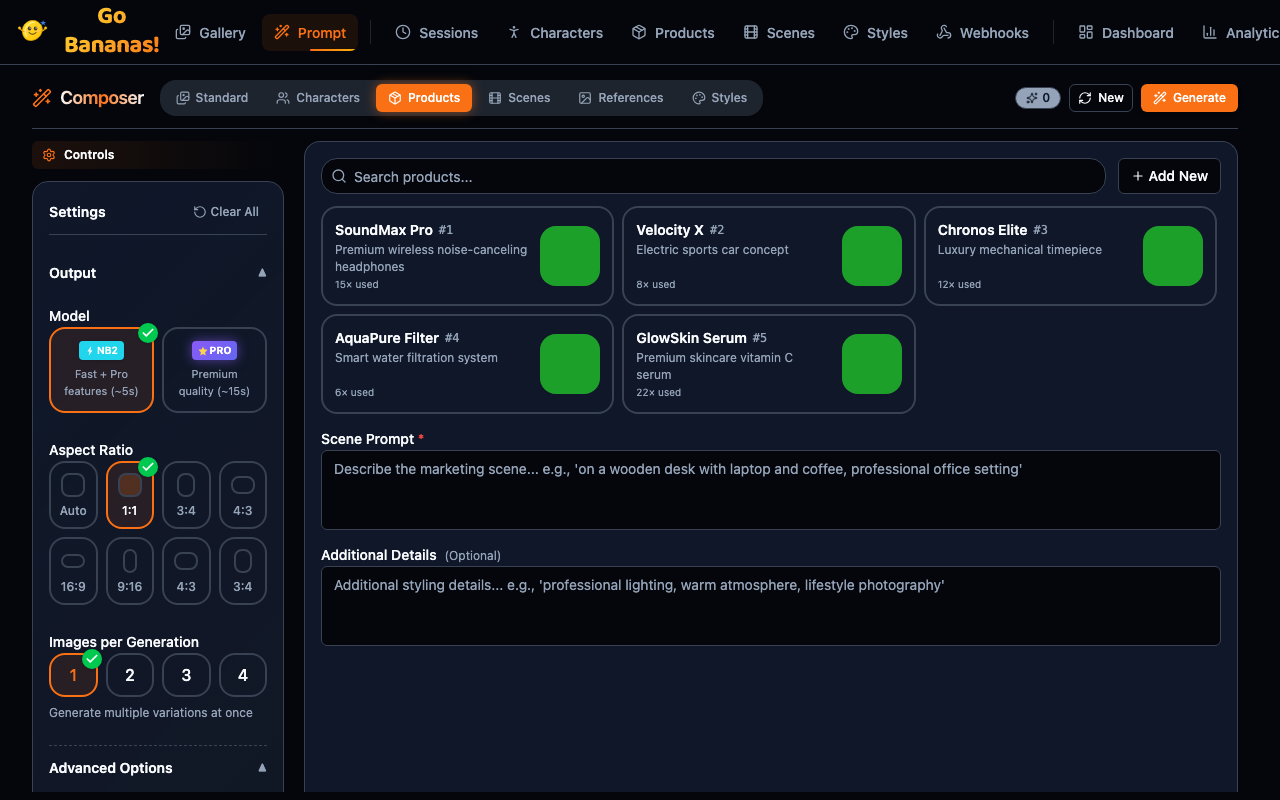
Generate marketing images with products:
┌─────────────────────────────────────────────────────┐
│ Product                                             │
├─────────────────────────────────────────────────────┤
│ Select Product:                                     │
│ ┌─────────────────────────────────────────────────┐ │
│ │ [🔍 Search products...]                         │ │
│ │                                                 │ │
│ │ 📦 Premium Water Bottle - Stainless steel      │ │
│ │ 📦 Wireless Headphones - Over-ear design       │ │
│ │ 📦 Canvas Tote Bag - Eco-friendly              │ │
│ └─────────────────────────────────────────────────┘ │
│                                                     │
│ Scene Description:                                  │
│ ┌─────────────────────────────────────────────────┐ │
│ │ on a rustic wooden table with natural light    │ │
│ └─────────────────────────────────────────────────┘ │
│                                                     │
│ [Generate Product Image]                            │
└─────────────────────────────────────────────────────┘Settings Panel
Basic Settings
┌─────────────────────────────────────────────────────┐
│ Settings                                       [×]  │
├─────────────────────────────────────────────────────┤
│ Model                                               │
│ ○ Flash (Fast, good quality)                        │
│ ● Pro (Slower, higher quality)                      │
├─────────────────────────────────────────────────────┤
│ Aspect Ratio                                        │
│ [■] Square    [▬] Landscape    [▐] Portrait        │
│ [▬] 16:9      [▐] 9:16                             │
├─────────────────────────────────────────────────────┤
│ Number of Images                                    │
│ [1] [2] [3] [4]                                     │
├─────────────────────────────────────────────────────┤
│ Style Preset                                        │
│ [None                              ▼]               │
│  • Cinematic                                        │
│  • Vintage Film                                     │
│  • Anime                                            │
│  • Watercolor                                       │
└─────────────────────────────────────────────────────┘Advanced Settings
┌─────────────────────────────────────────────────────┐
│ Advanced Settings                                   │
├─────────────────────────────────────────────────────┤
│ System Instruction                                  │
│ ┌─────────────────────────────────────────────────┐ │
│ │ Create images in professional photography style │ │
│ └─────────────────────────────────────────────────┘ │
├─────────────────────────────────────────────────────┤
│ Reference Images                                    │
│ ┌─────────┐ ┌─────────┐ ┌─────────┐               │
│ │  🖼️ +   │ │   🖼️    │ │   ×     │               │
│ └─────────┘ └─────────┘ └─────────┘               │
│ Drop images here for style/composition reference    │
└─────────────────────────────────────────────────────┘Prompt Writing
Basic Prompts
Start simple and add detail:
# Basic
A sunset

# Better
A sunset over mountains

# Best
A dramatic sunset over snow-capped mountains with
golden light streaming through purple clouds,
professional landscape photographyPrompt Components
| Component | Example |
|---|---|
| Subject | "a red fox" |
| Setting | "in a snowy forest" |
| Lighting | "golden hour, soft light" |
| Style | "oil painting, impressionist" |
| Mood | "peaceful, serene" |
| Camera | "35mm lens, eye level, fine grain" |
Negative Prompts
Tell the model what to avoid:
Negative prompt examples:
- blurry, out of focus, low quality
- text, watermarks, signatures
- distorted faces, extra limbs
- oversaturated, harsh lightingGeneration Options
Model Selection
Pick any of the eight models your workspace allows: Nano Banana 2 Lite (the default), Nano Banana 2.1, Go Bananas! Pro, OpenAI GPT Image 2, OpenAI GPT Image 2.6 Flare or Sunburst, and OpenAI GPT Image 2.5 Flare or Sunburst. See the model comparison.
Aspect Ratios
| Ratio | Dimensions | Use Case |
|---|---|---|
| Square | 1:1 | Social media, avatars |
| Portrait | 3:4 | Mobile wallpapers |
| Landscape | 4:3 | Desktop backgrounds |
| 16:9 | Widescreen | Presentations, YouTube |
| 9:16 | Vertical | Stories, TikTok |
Multiple Images
Generate up to 4 images per request:
┌─────────┬─────────┬─────────┬─────────┐
│  🖼️ 1   │  🖼️ 2   │  🖼️ 3   │  🖼️ 4   │
└─────────┴─────────┴─────────┴─────────┘
Click any image to select and refineStyle Presets
Applying Presets
Select a preset to auto-apply settings:
┌─────────────────────────────────────────────────────┐
│ Style Preset: Cinematic                             │
├─────────────────────────────────────────────────────┤
│ Applied settings:                                   │
│ • Prompt prefix: "cinematic shot, dramatic lighting"│
│ • Negative: "amateur, flat lighting"                │
│ • Aspect ratio: 16:9                                │
│                                                     │
│ Your prompt will be combined with preset settings   │
└─────────────────────────────────────────────────────┘Managing Presets
Quick access to preset management:
┌─────────────────────────────────────────────────────┐
│ Style Preset [Cinematic              ▼]             │
│                                                     │
│ [+ Create New]  [✏️ Edit]  [🗑️ Delete]              │
└─────────────────────────────────────────────────────┘Image Preview
Preview Area
┌─────────────────────────────────────────────────────┐
│ ┌─────────────────────────────────────────────────┐ │
│ │                                                 │ │
│ │                                                 │ │
│ │             Generated Image                     │ │
│ │                                                 │ │
│ │                                                 │ │
│ └─────────────────────────────────────────────────┘ │
│                                                     │
│ [Download] [Edit] [View in Gallery] [Copy URL]     │
│                                                     │
│ ID: #345 • 1024×768 • 2.1 MB • Generated in 4.2s   │
└─────────────────────────────────────────────────────┘Preview Actions
| Action | Description |
|---|---|
| Download | Save to device |
| Edit | Continue editing this image |
| View in Gallery | Open in Gallery view |
| Copy URL | Copy public URL |
| Regenerate | Generate again with same settings |
Workflow Tips
Iterative Refinement
- Start with Nano Banana 2 Lite or Nano Banana 2.1 for quick drafts
- Refine your prompt based on results
- Switch to Go Bananas! Pro for the final version
- Use the edit controls on the Standard tab for fine adjustments
Using Characters
- Create character in Characters view first
- On Prompt, open the Characters tab and select the character
- Describe only the scene (character details applied automatically)
- Generate multiple scenes with consistent character
Batch Generation
For multiple variations:
- Write your base prompt
- Set "Number of Images" to 4
- Generate
- Pick the best result
- Refine with editing
Keyboard Shortcuts
| Shortcut | Action |
|---|---|
Ctrl/Cmd + Enter | Generate image |
Esc | Close panels |
History
Access recent generations:
┌─────────────────────────────────────────────────────┐
│ Recent Generations                             [×]  │
├─────────────────────────────────────────────────────┤
│ 🖼️ "sunset over mountains..." - 2 min ago         │
│ 🖼️ "portrait of a warrior..." - 15 min ago        │
│ 🖼️ "product shot with bottle..." - 1 hour ago     │
│                                                     │
│ [View All in Gallery]                               │
└─────────────────────────────────────────────────────┘Error Handling
Common Errors
┌─────────────────────────────────────────────────────┐
│ ⚠️ Generation Failed                                │
│                                                     │
│ "Content policy violation detected"                 │
│                                                     │
│ Try adjusting your prompt to avoid:                 │
│ • Explicit content                                  │
│ • Violence or harm                                  │
│ • Real people or celebrities                        │
│                                                     │
│ [Edit Prompt] [Try Again]                           │
└─────────────────────────────────────────────────────┘Rate Limiting
┌─────────────────────────────────────────────────────┐
│ ⏳ Rate Limit Reached                               │
│                                                     │
│ You've reached your rate limit (60 req/min)         │
│ Please wait 30 seconds before generating again.     │
│                                                     │
│ [OK]                                                │
└─────────────────────────────────────────────────────┘Responsive Design
The Prompt page adapts to screen size:
Desktop: Full layout with side panel Tablet: Stacked layout, collapsible settings Mobile: Full-screen prompt input, bottom sheet settings