
Error Codes
Reference for REST API error responses.
Error Response Format
All REST endpoints return errors as a top‑level error string with optional fields:
json
{
  "error": "Human-readable error description",
  "code": "OPTIONAL_ERROR_CODE",
  "details": {
    "any": "additional context"
  }
}code is only present on a small number of legacy endpoints; most routes rely on the HTTP status plus the error message.
HTTP Status Codes
| Status | Description | Typical Cause |
|---|---|---|
| 400 | Bad Request | Invalid JSON or parameters |
| 401 | Unauthorized | Missing/invalid API key or admin auth |
| 403 | Forbidden | Auth ok, but not allowed |
| 404 | Not Found | Resource missing |
| 409 | Conflict | Duplicate resource |
| 429 | Too Many Requests | Rate limit exceeded |
| 500 | Internal Server Error | Unexpected failure |
| 502 | Bad Gateway | Gemini/upstream error |
Authentication Errors
401 Invalid or Missing API Key
json
{ "error": "Invalid or missing API key" }401 Admin Authentication Required
json
{ "error": "Admin authentication required" }403 Admin Privileges Required
json
{ "error": "Admin privileges required" }Validation Errors
400 Invalid JSON
json
{ "error": "Invalid JSON payload" }400 Invalid Pagination
json
{ "error": "Invalid limit" }400 Invalid Request Payload
json
{
  "error": "Invalid request payload",
  "details": [
    "scene_prompt must be at least 5 characters"
  ]
}Resource Errors
404 Not Found
json
{ "error": "Image not found" }This message varies by resource, e.g. Character not found, Product not found, Session not found, Style preset not found, Tenant not found.
409 Duplicate Name
json
{
  "error": "Resource already exists",
  "code": "DUPLICATE_NAME"
}Example messages:
Character "Luna" already exists for this tenant...Product with name "Premium Headphones" already exists...Style preset with name "Watercolor Art" already exists
Rate & Quota Errors
429 Rate Limit Exceeded
json
{
  "error": "Rate limit exceeded. Try again in 30 seconds.",
  "retryAfter": 30
}Check Retry-After header for the authoritative wait time.
Server Errors
500 Internal Error
json
{ "error": "Unknown error" }502 Upstream Failure
json
{ "error": "Gemini API failed" }MCP Protocol Errors (JSON-RPC 2.0)
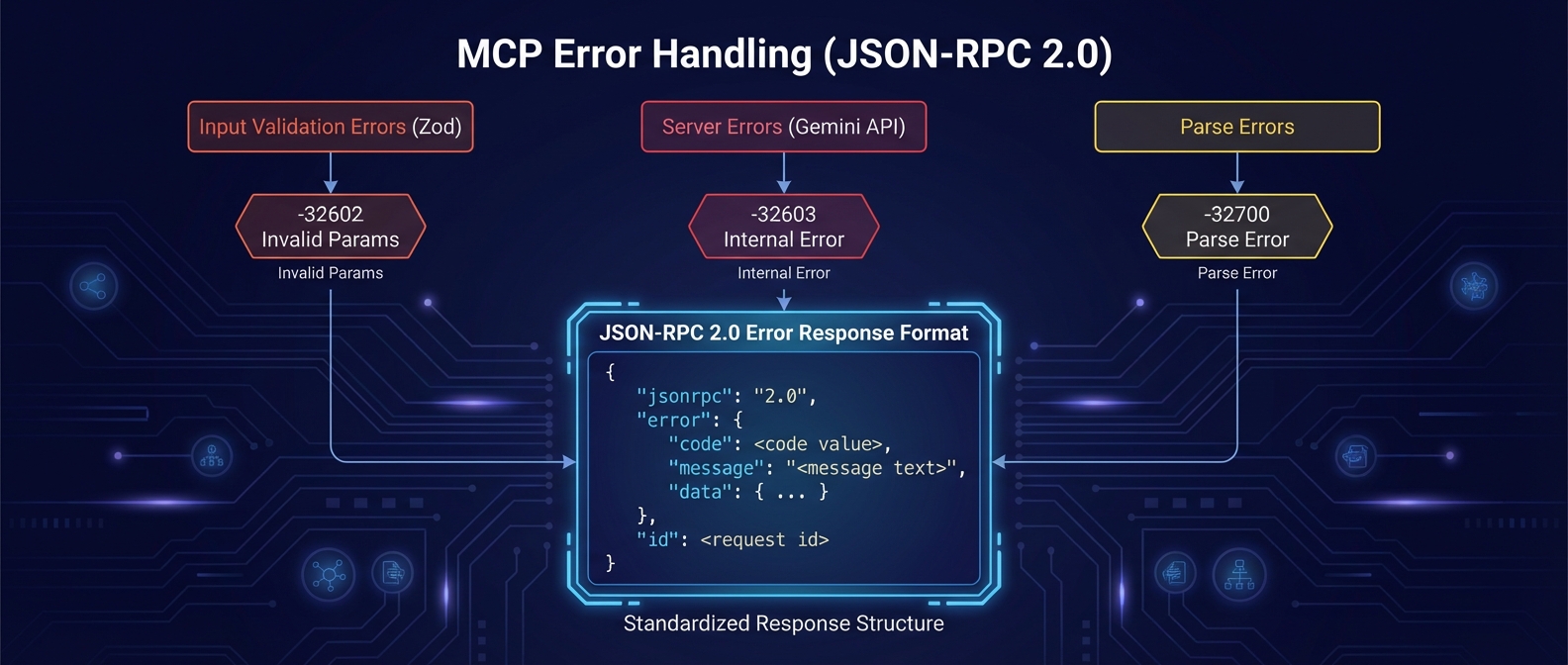
JSON-RPC 2.0 error code mapping for MCP endpoints
MCP endpoints (/mcp, and the legacy /sse) return errors using JSON-RPC 2.0 format:
Error Response Format
json
{
  "jsonrpc": "2.0",
  "error": {
    "code": -32602,
    "message": "Invalid input parameters: prompt: Required"
  },
  "id": 1
}MCP Error Codes
| Code | Name | Trigger |
|---|---|---|
-32602 | Invalid Params | Zod validation failure, missing required fields |
-32603 | Internal Error | Server errors, Gemini API failures |
-32700 | Parse Error | Malformed JSON in request |
-32600 | Invalid Request | Missing jsonrpc or method fields |
-32601 | Method Not Found | Unknown tool name |
Example: Validation Error
When Zod schema validation fails:
json
{
  "jsonrpc": "2.0",
  "error": {
    "code": -32602,
    "message": "Invalid input parameters: prompt: String must contain at least 1 character(s)"
  },
  "id": 1
}Example: Internal Error
When an upstream service fails:
json
{
  "jsonrpc": "2.0",
  "error": {
    "code": -32603,
    "message": "Gemini API failed: Rate limit exceeded"
  },
  "id": 1
}Handling Errors
- Treat non‑2xx status codes as failures even if a legacy endpoint includes
success. - Prefer
errorover any client‑side assumptions aboutcode. - Log
detailswhen present; they often include Zod validation messages. - For MCP endpoints, check for
error.codein the JSON-RPC response.