
Character Tools
Tools for managing persistent characters and generating consistent multi-scene images.
Overview
The character system enables session-independent character storage:
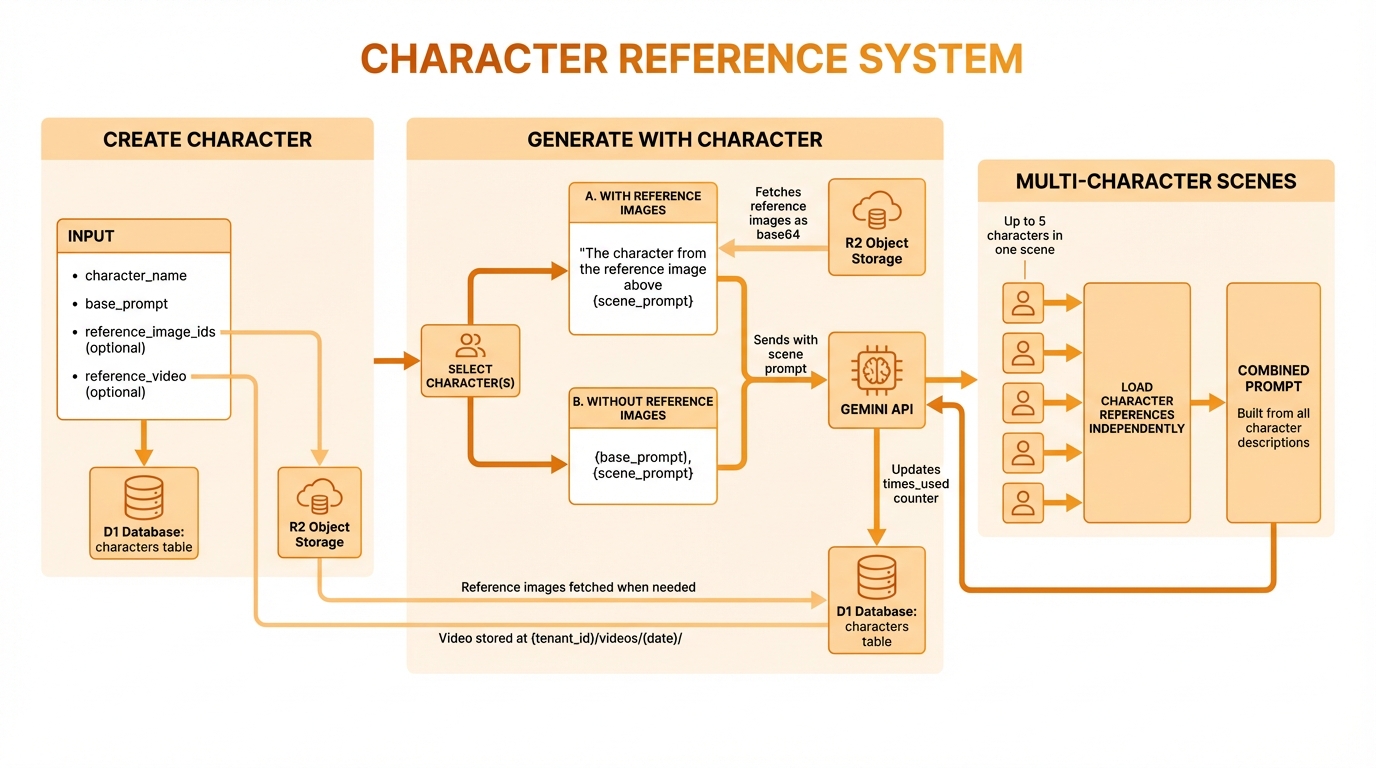
Create once, store in database, generate unlimited consistent scenes
create_character
Save a character design for reuse across unlimited scenes.
Parameters
| Parameter | Type | Required | Description |
|---|---|---|---|
character_name | string | Yes | Unique name (1-100 chars) |
base_prompt | string | Yes | Appearance description (10-2000 chars) |
description | string | No | Character notes (max 500 chars) |
negative_prompt | string | No | What to avoid (max 1000 chars) |
system_instruction | string | No | Style guidance (max 1000 chars) |
preferred_aspect_ratio | string | No | Default aspect ratio |
reference_image_ids | number[] | No | IDs of reference images (max 10) |
tags | string[] | No | Organization tags (max 20) |
Example: Create Luna
{
  "tool": "create_character",
  "params": {
    "character_name": "Luna",
    "base_prompt": "A young woman with bright red hair in a long braid, emerald green eyes, freckles across her nose, wearing a brown leather adventurer's outfit with gold trim and a green cloak",
    "description": "Fantasy adventurer protagonist",
    "negative_prompt": "modern clothing, technology, realistic photo style",
    "system_instruction": "Create in fantasy illustration style with soft lighting",
    "preferred_aspect_ratio": "portrait",
    "tags": ["fantasy", "protagonist", "adventurer"]
  }
}Response
Created character "Luna"

ID: 12
Base Prompt: "A young woman with bright red hair..."
Tags: fantasy, protagonist, adventurer
Aspect Ratio: portrait

Use with:
- generate_with_character({ character_name: "Luna", scene_prompt: "..." })With Reference Images
For better consistency, add reference images:
- Generate an initial image of your character
- Note the image ID
- Create character with that ID as reference
{
  "tool": "create_character",
  "params": {
    "character_name": "Luna",
    "base_prompt": "A young woman with bright red hair...",
    "reference_image_ids": [342, 343]
  }
}update_character
Modify an existing character without recreating it.
Parameters
| Parameter | Type | Required | Description |
|---|---|---|---|
character_id | number | Either | Character ID to update |
character_name | string | Either | Character name to update |
new_character_name | string | No | Rename the character |
base_prompt | string | No | Updated appearance |
description | string | No | Updated notes |
negative_prompt | string | No | Updated exclusions |
system_instruction | string | No | Updated style guidance |
preferred_aspect_ratio | string | No | Updated default ratio |
reference_image_ids | number[] | No | Replace reference images |
tags | string[] | No | Replace tags |
Example: Add Reference Images
{
  "tool": "update_character",
  "params": {
    "character_name": "Luna",
    "reference_image_ids": [342, 343, 350]
  }
}Example: Rename Character
{
  "tool": "update_character",
  "params": {
    "character_name": "Luna",
    "new_character_name": "Luna the Brave"
  }
}delete_character
Remove a character from your library.
Parameters
| Parameter | Type | Required | Description |
|---|---|---|---|
character_id | number | Either | Character ID to delete |
character_name | string | Either | Character name to delete |
Example
{
  "tool": "delete_character",
  "params": {
    "character_name": "Old Test Character"
  }
}Response
Deleted character "Old Test Character"

Note: Images generated with this character are not affected.
The character reference is simply no longer available.list_characters
Browse your character library.
Parameters
| Parameter | Type | Required | Description |
|---|---|---|---|
search | string | No | Search by name/description |
sort_by | string | No | Sort order (default: "name") |
limit | number | No | Max results (default: 50, max: 100) |
offset | number | No | Pagination offset |
Sort Options
| Value | Description |
|---|---|
name | Alphabetical A-Z |
created | Newest first |
used | Most used first |
recent | Recently used first |
Example
{
  "tool": "list_characters",
  "params": {
    "sort_by": "used",
    "limit": 10
  }
}Response
Your Characters (12 total):

1. **Luna** (ID: 12)
   Used: 45 times | Tags: fantasy, protagonist
   "A young woman with bright red hair..."

2. **Captain Rex** (ID: 8)
   Used: 23 times | Tags: sci-fi, pilot
   "A rugged space pilot in his 40s..."

3. **Felix** (ID: 5)
   Used: 18 times | Tags: animal, cat
   "An orange tabby cat with bright green eyes..."

... showing 10 of 12get_character
Get full details of a specific character.
Parameters
| Parameter | Type | Required | Description |
|---|---|---|---|
character_id | number | Either | Character ID |
character_name | string | Either | Character name |
Example
{
  "tool": "get_character",
  "params": {
    "character_name": "Luna"
  }
}Response
Character: Luna (ID: 12)

**Base Prompt**
A young woman with bright red hair in a long braid,
emerald green eyes, freckles across her nose, wearing
a brown leather adventurer's outfit with gold trim
and a green cloak

**Settings**
- Negative: modern clothing, technology, realistic photo
- System: Create in fantasy illustration style
- Aspect Ratio: portrait
- Tags: fantasy, protagonist, adventurer

**Reference Images**
- #342: Initial portrait
- #343: Side view
- #350: Full body

**Usage Stats**
- Times Used: 45
- Last Used: 2024-01-15 14:30
- Created: 2024-01-01

**Recent Generations**
- #500: "Luna in a magical forest"
- #495: "Luna fighting a dragon"
- #490: "Luna at a tavern"get_character_video
Get a character's reference video, as a public URL or as base64 data. Use it to hand the video to an external video-generation tool. Each character can have one reference video (MP4).
Parameters
| Parameter | Type | Required | Description |
|---|---|---|---|
character_id | number | Either | Character ID |
character_name | string | Either | Character name (exact match) |
format | string | No | url (default) for the public URL, or base64 to include the raw video data |
Example
{
  "tool": "get_character_video",
  "params": {
    "character_name": "Luna",
    "format": "url"
  }
}Response
{
  "characterId": 12,
  "characterName": "Luna",
  "video": {
    "id": 3,
    "url": "https://.../videos/.../luna.mp4",
    "filename": "luna.mp4",
    "fileSize": 4194304,
    "mimeType": "video/mp4",
    "durationSeconds": 8,
    "resolution": "1280x720",
    "createdAt": "2026-09-01T10:00:00Z"
  }
}With format: "base64", video.base64 is added.
Notes
- If the character has no video, the tool returns an error. Add one through the REST API with
POST /api/characters/:id/video(MP4, max 10 MB). - Base64 output makes a large response; prefer
urlunless the receiving tool cannot fetch URLs.
refresh_character_identity
Regenerate a character's identity reference images as fresh photoreal shots, then swap them in as the character's references in one step. The previous references and prompts are archived, so revert_character_identity can restore them. The work runs in the background: the tool returns a job ID to poll with get_character_identity_refresh_status.
Costs generations
A refresh generates several images per character (3 by default) on a high-quality model. Run it with options.dry_run: true first to see what would change.
Parameters
Give exactly one selector: character_id, character_ids, or tag / tag_filter.
| Parameter | Type | Required | Description |
|---|---|---|---|
character_id | number | One selector | A single character |
character_ids | number[] | One selector | 1–100 characters |
tag / tag_filter | string | One selector | Every character with this tag (max 50 chars) |
options.dry_run | boolean | No | Report what would change without generating anything (default: false) |
options.sanitize_base_prompt | boolean | No | Strip trailing style words (e.g. "cartoon style") and add photoreal wording to the base prompt (default: true) |
options.model_id | string | No | Model for the new shots. Default: the character's preferred model, else gemini-pro-image |
options.resolution_tier | string | No | Gemini tier. Default: the character's preferred tier, else 2k (Lite is always 1K) |
options.shot_specs | object[] | No | 1–8 custom shots, each { name?, prompt, aspect_ratio }. Default: close-up (3:4), waist-up (3:4) and full body (9:16) |
options.force_stylized | boolean | No | Refresh characters that look stylized (cartoon, anime, mascot…); they are skipped by default |
options.concurrency | number | No | Shots generated at once, 1–4 (default: 3) |
Example
{
  "tool": "refresh_character_identity",
  "params": {
    "character_id": 12,
    "options": { "dry_run": true }
  }
}Response
Without dry_run:
{
  "job_id": "exec-m1abc2-x9y8z7",
  "status": "running",
  "poll_with": "get_character_identity_refresh_status"
}With dry_run, the result is returned straight away: for each character, the base prompt and negative prompt before and after, the references that would be archived, the model and tier that would be used, and any warnings. Characters that would be skipped show status: "skipped".
get_character_identity_refresh_status
Poll a refresh_character_identity job.
Parameters
| Parameter | Type | Required | Description |
|---|---|---|---|
job_id | string | Yes | The job_id returned by refresh_character_identity |
Response
{
  "job_id": "exec-m1abc2-x9y8z7",
  "status": "completed",
  "progress": 100,
  "result": {
    "status": "completed",
    "results": [
      {
        "status": "completed",
        "character_id": 12,
        "character_name": "Luna",
        "new_reference_image_ids": [701, 702, 703],
        "archived_reference_image_ids": [342, 343, 350],
        "model_used": "gemini-pro-image",
        "resolution_tier_used": "2k",
        "warnings": []
      }
    ],
    "dry_run": false
  }
}status follows the job (running, completed, failed); current_step and error appear when relevant. Each character's result is completed, skipped or failed.
revert_character_identity
Undo the last identity refresh for a character: restores the archived reference images, base prompt, negative prompt and model preferences.
Parameters
| Parameter | Type | Required | Description |
|---|---|---|---|
character_id | number | Yes | Character to revert |
Example
{
  "tool": "revert_character_identity",
  "params": { "character_id": 12 }
}Response
{
  "character_id": 12,
  "restored_reference_image_ids": [342, 343, 350],
  "restored_base_prompt": "A young woman with bright red hair...",
  "restored_negative_prompt": null,
  "restored_preferred_model": null,
  "restored_preferred_resolution_tier": null
}Notes
- Only one level is kept: reverting clears the archive, so a second revert fails with "has no archived identity refresh state".
- The images generated by the refresh are not deleted; they stay in your gallery.
generate_with_character
Generate a scene featuring a saved character.
Parameters
| Parameter | Type | Required | Description |
|---|---|---|---|
character_id | number | Either | Character ID to use |
character_name | string | Either | Character name to use |
scene_prompt | string | Yes | Scene description (5-1500 chars) |
additional_details | string | No | Extra details (max 500 chars) |
aspect_ratio | string | No | Override default ratio |
override_negative_prompt | string | No | Replace character's negative |
session_id | string | No | Custom session ID |
How It Works
The tool combines character data with your scene:
With reference images:
"The character in Image 1 — keep the face, hair, and outfit EXACTLY the same. Character details: [base_prompt]. Scene: [scene_prompt]"Without reference images:
"[base_prompt], [scene_prompt]"Example
{
  "tool": "generate_with_character",
  "params": {
    "character_name": "Luna",
    "scene_prompt": "walking through a magical forest at dawn, surrounded by glowing fireflies",
    "additional_details": "soft morning light, misty atmosphere"
  }
}Response
Generated image with Luna:

**Image #501**
- URL: https://pub-xxx.r2.dev/tenant/2024-01-15/char-gen-abc.png
- Thumbnail: https://pub-xxx.r2.dev/tenant/2024-01-15/char-gen-abc-thumb.jpg
- Dimensions: 768x1024 (portrait)
- Character: Luna (ID: 12)

Character usage updated: 46 total usesgenerate_with_multiple_characters
Generate a scene with 2-5 characters together.
Parameters
| Parameter | Type | Required | Description |
|---|---|---|---|
character_ids | number[] | Either | Array of character IDs (2-5) |
character_names | string[] | Either | Array of character names (2-5) |
scene_prompt | string | Yes | Scene description (10-1500 chars) |
additional_details | string | No | Extra details |
aspect_ratio | string | No | Ratio (default: landscape) |
session_id | string | No | Custom session ID |
Example
{
  "tool": "generate_with_multiple_characters",
  "params": {
    "character_names": ["Luna", "Felix"],
    "scene_prompt": "having a picnic in a sunny meadow, Luna is petting Felix",
    "aspect_ratio": "landscape"
  }
}Response
Generated multi-character scene:

**Image #502**
- URL: https://pub-xxx.r2.dev/tenant/2024-01-15/multi-char-xyz.png
- Dimensions: 1024x768 (landscape)
- Characters: Luna (ID: 12), Felix (ID: 5)

Character usage updated:
- Luna: 47 uses
- Felix: 19 usesTips for Multi-Character
- Describe interactions - "Luna is petting Felix"
- Position characters - "Rex on the left, Luna on the right"
- Use landscape - More room for multiple subjects
- Keep scene simple - Don't overcomplicate
Best Practices
Effective Base Prompts
Do include:
- Distinctive physical features
- Consistent clothing/accessories
- Art style preferences
- Color specifics
Avoid:
- Scene-specific actions
- Backgrounds or settings
- Temporal descriptions
// Good
"A young woman with bright red hair in a long braid,
emerald green eyes, freckles across her nose, wearing
a brown leather adventurer's outfit with gold trim"

// Bad (includes scene elements)
"A young woman running through a forest at sunset
looking scared"Reference Image Strategy
- Generate 2-3 initial images of your character
- Pick the best ones that show:
- Front view
- 3/4 view
- Full body
- Add these as reference images
- Future generations will be more consistent
Character Organization
Use tags for easy filtering:
| Tag Type | Examples |
|---|---|
| Genre | fantasy, sci-fi, modern |
| Role | protagonist, villain, sidekick |
| Species | human, animal, robot |
| Project | book-cover, game-art |
Troubleshooting
Character Looks Different
Causes:
- No reference images
- Vague base prompt
- Scene conflicts with character
Solutions:
- Add reference images
- Be more specific in base prompt
- Use consistent style presets
"Character Not Found"
Check:
- Exact spelling (case-sensitive)
- Character wasn't deleted
- Using correct tenant API key
Multi-Character Issues
If characters blend together:
- Use explicit positioning ("Luna on the left")
- Describe distinct actions for each
- Choose visually distinct characters