
People & Teams
The People view allows tenant administrators to manage team members, roles, and access permissions.
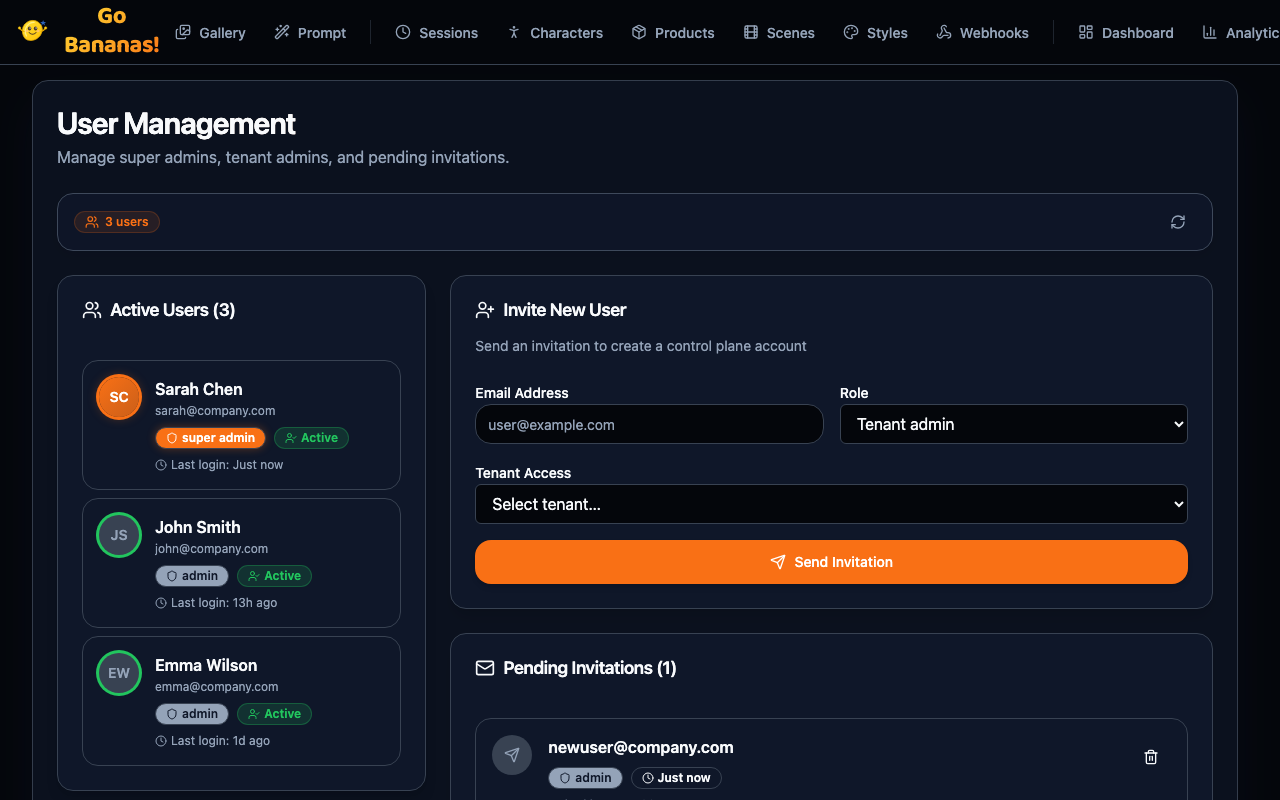
Overview
Team management features:
- User management for adding and removing team members
- Role assignment with granular permissions
- API key assignment to control which keys users can access
- Activity tracking to monitor team usage
INFO
This view is only available to users with Admin or Owner roles.
Team Members List
┌─────────────────────────────────────────────────────────────────────┐
│  Team Members                           [🔍 Search] [+ Invite User] │
├─────────────────────────────────────────────────────────────────────┤
│                                                                     │
│  Name             Email                  Role       Last Active     │
│  ─────────────────────────────────────────────────────────────────  │
│  👤 Sarah Chen    sarah@company.com      Owner      5 minutes ago   │
│  👤 John Smith    john@company.com       Admin      2 hours ago     │
│  👤 Maya Johnson  maya@company.com       Member     Yesterday       │
│  👤 Alex Kim      alex@company.com       Member     3 days ago      │
│  👤 Pat Taylor    pat@company.com        Viewer     1 week ago      │
│                                                                     │
│  Showing 5 of 5 members                                             │
│                                                                     │
└─────────────────────────────────────────────────────────────────────┘User Roles
Available Roles
| Role | Permissions |
|---|---|
| Owner | Full access, billing, delete tenant |
| Admin | Manage users, API keys, settings |
| Member | Generate images, use all features |
| Viewer | View gallery, no generation |
Permission Matrix
┌─────────────────────────────────────────────────────────────────────┐
│ Permissions by Role                                                 │
├─────────────────────────────────────────────────────────────────────┤
│                         Owner   Admin   Member   Viewer             │
│ Generate images           ✓       ✓       ✓        ✗                │
│ Edit images               ✓       ✓       ✓        ✗                │
│ View gallery              ✓       ✓       ✓        ✓                │
│ Manage characters         ✓       ✓       ✓        ✗                │
│ Manage products           ✓       ✓       ✓        ✗                │
│ Manage style presets      ✓       ✓       ✓        ✗                │
│ View analytics            ✓       ✓       ✓        ✓                │
│ Manage API keys           ✓       ✓       ✗        ✗                │
│ Manage team members       ✓       ✓       ✗        ✗                │
│ Manage billing            ✓       ✗       ✗        ✗                │
│ Delete tenant             ✓       ✗       ✗        ✗                │
└─────────────────────────────────────────────────────────────────────┘Inviting Users
Send Invitation
┌─────────────────────────────────────────────────────┐
│ Invite Team Member                              [×] │
├─────────────────────────────────────────────────────┤
│                                                     │
│ Email Address *                                     │
│ ┌─────────────────────────────────────────────────┐ │
│ │ newuser@company.com                             │ │
│ └─────────────────────────────────────────────────┘ │
│                                                     │
│ Role *                                              │
│ ┌─────────────────────────────────────────────────┐ │
│ │ Member                                     [▼]  │ │
│ └─────────────────────────────────────────────────┘ │
│                                                     │
│ Personal Message (optional)                         │
│ ┌─────────────────────────────────────────────────┐ │
│ │ Welcome to our team! We're excited to have you │ │
│ │ join our creative workflow.                     │ │
│ └─────────────────────────────────────────────────┘ │
│                                                     │
│ [Cancel]                            [Send Invite]   │
│                                                     │
└─────────────────────────────────────────────────────┘Pending Invitations
┌─────────────────────────────────────────────────────────────────────┐
│ Pending Invitations (2)                                             │
├─────────────────────────────────────────────────────────────────────┤
│                                                                     │
│  Email                    Role      Invited      Expires            │
│  ─────────────────────────────────────────────────────────────────  │
│  pending@company.com      Member    2 days ago   in 5 days    [×]   │
│  another@company.com      Viewer    5 days ago   in 2 days    [×]   │
│                                                                     │
│  [Resend All]                                                       │
│                                                                     │
└─────────────────────────────────────────────────────────────────────┘Managing Users
User Detail View
Click a team member to see details:
┌─────────────────────────────────────────────────────────────────────┐
│ User Details: Maya Johnson                       [Edit] [Remove]    │
├─────────────────────────────────────────────────────────────────────┤
│                                                                     │
│  👤 Maya Johnson                                                    │
│     maya@company.com                                                │
│                                                                     │
│  ─────────────────────────────────────────────────────────────────  │
│                                                                     │
│  Role:           Member                                             │
│  Joined:         Dec 15, 2025                                       │
│  Last Active:    Yesterday at 3:45 PM                               │
│                                                                     │
│  Activity This Month:                                               │
│  • Images generated: 42                                             │
│  • Images edited: 8                                                 │
│  • Characters created: 2                                            │
│                                                                     │
│  API Key Access:                                                    │
│  ☑ Production API Key                                               │
│  ☑ Development Key                                                  │
│  ☐ CI/CD Pipeline                                                   │
│                                                                     │
└─────────────────────────────────────────────────────────────────────┘Change Role
┌─────────────────────────────────────────────────────┐
│ Change Role                                     [×] │
├─────────────────────────────────────────────────────┤
│                                                     │
│ User: Maya Johnson                                  │
│ Current Role: Member                                │
│                                                     │
│ New Role:                                           │
│ ○ Owner    - Full access including billing          │
│ ○ Admin    - Manage users and API keys              │
│ ● Member   - Generate and use all features          │
│ ○ Viewer   - View only, no generation               │
│                                                     │
│ [Cancel]                            [Update Role]   │
│                                                     │
└─────────────────────────────────────────────────────┘API Key Access
Control which API keys a user can use:
┌─────────────────────────────────────────────────────┐
│ API Key Access                                  [×] │
├─────────────────────────────────────────────────────┤
│                                                     │
│ User: Maya Johnson                                  │
│                                                     │
│ Available API Keys:                                 │
│                                                     │
│ ☑ Production API Key                                │
│   sk_live_abc...                                    │
│                                                     │
│ ☑ Development Key                                   │
│   sk_test_xyz...                                    │
│                                                     │
│ ☐ CI/CD Pipeline                                    │
│   sk_test_def... (inactive)                         │
│                                                     │
│ [Cancel]                            [Save Changes]  │
│                                                     │
└─────────────────────────────────────────────────────┘Removing Users
Remove from Team
┌─────────────────────────────────────────────────────┐
│ Remove Team Member?                                 │
├─────────────────────────────────────────────────────┤
│                                                     │
│ Are you sure you want to remove Maya Johnson        │
│ from this team?                                     │
│                                                     │
│ • User will lose access immediately                 │
│ • Their generated images will be retained           │
│ • They can be re-invited later                      │
│                                                     │
│ [Cancel]                            [Remove User]   │
│                                                     │
└─────────────────────────────────────────────────────┘WARNING
Removing a user is immediate. They will lose access to the console and API as soon as confirmed.
Team Activity
Activity Log
┌─────────────────────────────────────────────────────────────────────┐
│ Recent Team Activity                                                │
├─────────────────────────────────────────────────────────────────────┤
│                                                                     │
│ Today                                                               │
│ • Sarah Chen generated 5 images               5 minutes ago         │
│ • John Smith created character "Bolt"         2 hours ago           │
│ • Maya Johnson edited image #156              3 hours ago           │
│                                                                     │
│ Yesterday                                                           │
│ • Alex Kim generated 12 images                                      │
│ • Sarah Chen updated style preset "Cinematic"                       │
│ • John Smith invited pat@company.com                                │
│                                                                     │
│ [Load More]                                                         │
│                                                                     │
└─────────────────────────────────────────────────────────────────────┘Usage by User
┌─────────────────────────────────────────────────────────────────────┐
│ Usage This Month by User                                            │
├─────────────────────────────────────────────────────────────────────┤
│                                                                     │
│ User              Images    Storage    Characters    Products       │
│ ─────────────────────────────────────────────────────────────────   │
│ Sarah Chen           52      156 MB          3            2         │
│ John Smith           38      114 MB          2            1         │
│ Maya Johnson         42      126 MB          2            0         │
│ Alex Kim             18       54 MB          0            1         │
│ Pat Taylor            0        0 MB          0            0         │
│                                                                     │
│ Total               150      450 MB          7            4         │
│                                                                     │
└─────────────────────────────────────────────────────────────────────┘Best Practices
Role Assignment
- Start with minimal permissions: Assign Viewer or Member initially
- Promote as needed: Upgrade roles based on demonstrated need
- Limit Admin access: Keep Admin count small
- Single Owner: Only one person should have Owner role
API Key Management
- Separate keys by purpose: Production, Development, CI/CD
- Grant minimum access: Only assign keys users actually need
- Rotate regularly: Change keys periodically for security
- Monitor usage: Track which users use which keys
Team Organization
For larger teams:
| Team Size | Recommended Structure |
|---|---|
| 2-5 | 1 Owner, rest Members |
| 6-15 | 1 Owner, 2-3 Admins, rest Members |
| 15+ | 1 Owner, Admins by department, Members |
Troubleshooting
User Can't Log In
- Check invitation status (pending?)
- Verify email address is correct
- Ensure invitation hasn't expired
- Try resending invitation
User Missing Permissions
- Verify their role is correct
- Check API key access assignments
- Confirm they're accessing the right tenant
Next Steps
- Manage API keys in Admin Panel
- View team analytics
- Configure tenant settings