
Authentication
Secure access to the Go Bananas! API.
Overview
Go Bananas! supports two authentication methods, with different surfaces:
| Surface | Authentication |
|---|---|
REST API (/api/*) | API key via X-API-Key or Authorization: Bearer sk_* |
MCP (/mcp; legacy /sse) | API key or OAuth access token via Authorization: Bearer <access_token> |
For MCP requests, the server distinguishes API keys (sk_live_*, sk_test_*) from OAuth access tokens.
API Key Authentication
API key authentication is used for tenant operations and admin tokens for administrative functions.
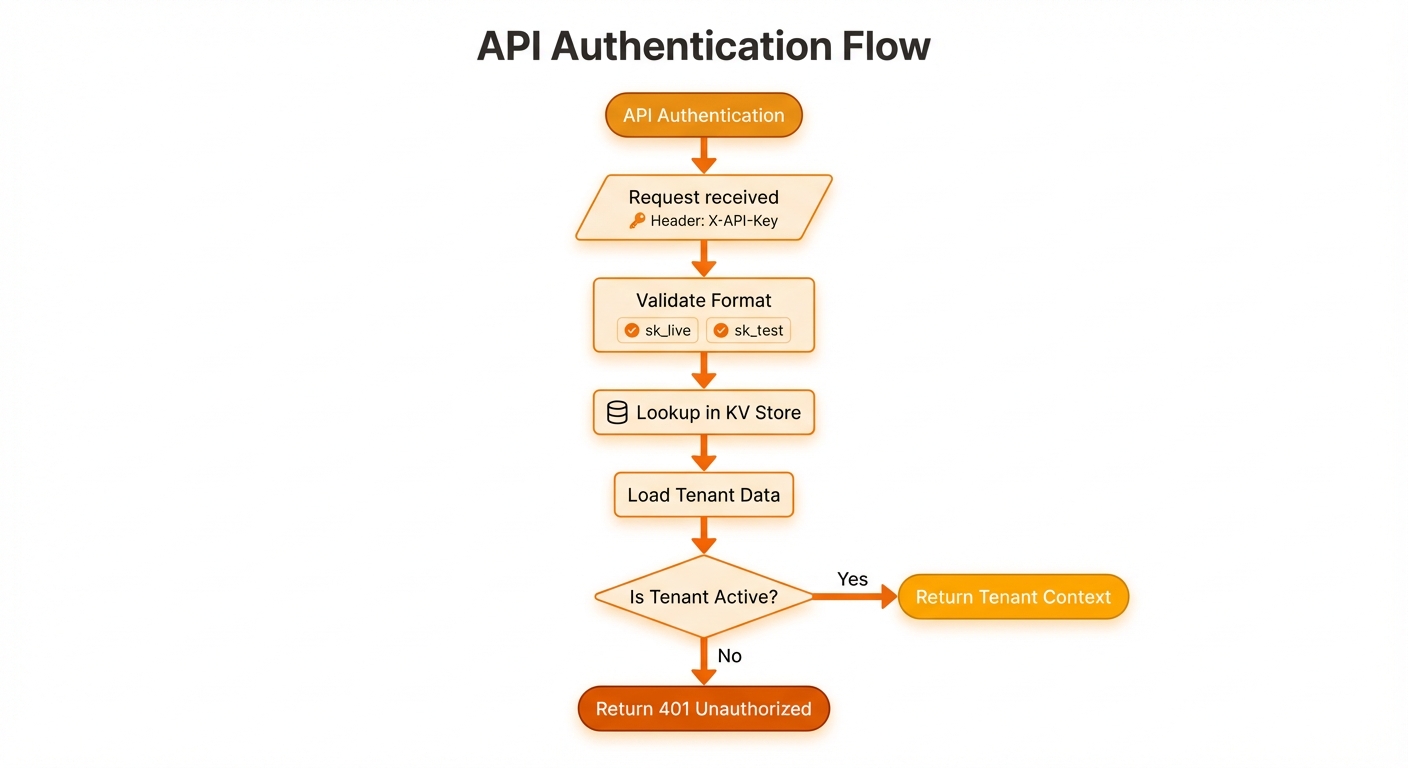
Validate format, check cache, query D1, verify active status
API Key Types
Live Keys
Production keys for live environments:
sk_live_a1b2c3d4e5f6g7h8i9j0k1l2m3n4o5p6- Full access to all features
- Usage tracked for billing
- Rate limits enforced
Test Keys
Development and testing:
sk_test_a1b2c3d4e5f6g7h8i9j0k1l2m3n4o5p6- Same functionality as live keys
- May have relaxed rate limits
- Useful for integration testing
Authentication Methods
X-API-Key Header (Recommended)
curl -X GET "https://gobananasai.com/api/profile" \
-H "X-API-Key: sk_live_your_key_here"Authorization Bearer
curl -X GET "https://gobananasai.com/api/profile" \
-H "Authorization: Bearer sk_live_your_key_here"Priority
If both headers are present, X-API-Key takes precedence.
Admin Authentication
Administrative endpoints require an admin session token (preferred) or a legacy admin token:
curl -X GET "https://gobananasai.com/admin/tenants" \
-H "Authorization: Bearer <admin_session_token>"Legacy header (still supported):
curl -X GET "https://gobananasai.com/admin/tenants" \
-H "X-Admin-Token: your_admin_token_here"Security Note
Admin tokens have full system access. Keep them secure and never expose in client-side code.
Key Validation
Format Validation
Keys must match the pattern:
sk_(live|test)_[a-zA-Z0-9]{32,}Validation Process
- Format Check: Key matches expected pattern
- Cache Lookup: Check KV cache for fast validation
- Database Query: Verify key exists and is active
- Tenant Check: Verify tenant is active
- Cache Update: Store in KV for future requests
Session Tracking
Include X-Session-Id header to track operations across requests:
curl -X POST "https://gobananasai.com/api/images" \
  -H "X-API-Key: sk_live_xxx" \
  -H "X-Session-Id: my-project-session" \
  -H "Content-Type: application/json" \
-d '{"prompt": "a sunset"}'If not provided, a new session ID is generated automatically.
Tenant Profile
Tenants can validate a key and fetch quotas/profile via:
curl -X GET "https://gobananasai.com/api/profile" \
-H "X-API-Key: sk_live_xxx"Response:
{
  "tenant": {
    "tenantId": "acme-corp",
    "tenantName": "ACME Corporation",
    "quotas": {
      "monthlyQuotaMb": 10240,
      "monthlyUsedMb": 2880,
      "monthlyRemainingMb": 7360,
      "rateLimitPerMinute": 60
    }
  }
}Managing API Keys (Admin)
Only admins can create additional keys.
Create API Key
curl -X POST "https://gobananasai.com/admin/tenants/acme-corp/api-keys" \
  -H "Authorization: Bearer <admin_session_token>" \
  -H "Content-Type: application/json" \
  -d '{
    "key_name": "Mobile App",
    "type": "live"
}'Response (key shown only once):
{
  "data": {
    "apiKey": "sk_live_x1y2z3a4b5c6d7e8f9g0h1i2j3k4l5m6",
    "keyName": "Mobile App",
    "type": "live"
  }
}Important
The full API key is only shown once upon creation. Store it securely immediately.
Authentication Errors
401 Unauthorized
Missing or invalid API key:
{
  "error": "Invalid or missing API key"
}403 Forbidden
Key valid but access denied:
{
  "error": "Tenant account is inactive"
}Security Best Practices
1. Secure Key Storage
Do:
- Store keys in environment variables
- Use secret management services (AWS Secrets Manager, HashiCorp Vault)
- Encrypt keys at rest
Don't:
- Commit keys to version control
- Include keys in client-side code
- Share keys via unencrypted channels
2. Key Rotation
Rotate keys periodically:
- Create new key
- Update applications to use new key
- Monitor for old key usage
- Revoke old key
3. Use Appropriate Key Types
- Live keys: Production only
- Test keys: Development/staging environments
4. Monitor Key Usage
# Check usage via API
curl "https://gobananasai.com/api/usage" \
-H "X-API-Key: sk_live_xxx"5. Implement Request Signing (Optional)
For additional security, sign requests:
const crypto = require('crypto');

function signRequest(payload: string, secret: string): string {
  return crypto
    .createHmac('sha256', secret)
    .update(payload)
    .digest('hex');
}

// Add signature to headers
headers['X-Signature'] = signRequest(body, signingSecret);
headers['X-Timestamp'] = Date.now().toString();Example: Complete Auth Flow
class NanoBananaAuth {
  constructor(apiKey) {
    this.apiKey = apiKey;
    this.baseUrl = 'https://gobananasai.com';
  }

  getHeaders(sessionId = null) {
    const headers = {
      'Content-Type': 'application/json',
      'X-API-Key': this.apiKey,
    };
    if (sessionId) {
      headers['X-Session-Id'] = sessionId;
    }
    return headers;
  }

  async validateKey() {
    const response = await fetch(`${this.baseUrl}/api/profile`, {
      headers: this.getHeaders(),
    });

    if (response.status === 401) {
      throw new Error('Invalid API key');
    }
    if (response.status === 403) {
      throw new Error('Account inactive');
    }

    return response.json();
  }

  async request(method, path, body = null, sessionId = null) {
    const response = await fetch(`${this.baseUrl}${path}`, {
      method,
      headers: this.getHeaders(sessionId),
      body: body ? JSON.stringify(body) : null,
    });

    const data = await response.json();
    if (!response.ok) {
      throw new Error(data.error || 'Request failed');
    }
    return data.data ?? data;
  }
}

// Usage
const client = new NanoBananaAuth('sk_live_xxx');

try {
  const profile = await client.validateKey();
  console.log('Authenticated as:', profile.tenant.tenantName);

  const images = await client.request('GET', '/api/images');
  console.log('Images:', images.length);
} catch (error) {
  console.error('Auth failed:', error.message);
}OAuth 2.1 Authentication
OAuth 2.1 provides secure, standards-compliant authentication with PKCE, dynamic client registration, and refresh token rotation.
Discovery Endpoints
Protected Resource Metadata
GET /.well-known/oauth-protected-resourceReturns scopes and authorization server information.
Authorization Server Metadata
GET /oauth/.well-known/openid-configurationReturns OAuth endpoints, supported grants, and scopes.
Authorization Endpoint
GET /oauth/authorize| Parameter | Required | Description |
|---|---|---|
response_type | Yes | Must be code |
client_id | Yes | Registered client identifier |
redirect_uri | Yes | Must match registered URI |
code_challenge | Yes | BASE64URL(SHA256(code_verifier)) |
code_challenge_method | Yes | Must be S256 |
scope | No | Space-separated scopes |
state | Recommended | CSRF protection token |
Login behavior:
- HTML clients without a session are redirected to
/?return_to=.... - Non-HTML clients receive
401withlogin_requiredJSON and alogin_url.
Token Endpoint
POST /oauth/token
Content-Type: application/x-www-form-urlencodedAuthorization Code Grant:
grant_type=authorization_code
code=AUTH_CODE
code_verifier=PKCE_VERIFIER
client_id=CLIENT_ID
redirect_uri=REDIRECT_URIRefresh Token Grant:
grant_type=refresh_token
refresh_token=REFRESH_TOKEN
client_id=CLIENT_IDResponse:
{
  "access_token": "...",
  "token_type": "Bearer",
  "expires_in": 3600,
  "refresh_token": "...",
  "scope": "images:generate images:read"
}Use Access Token (MCP)
curl -X POST "https://mcp.gobananasai.com" \
  -H "Authorization: Bearer <access_token>" \
  -H "Content-Type: application/json" \
-d '{"method":"tools/list","params":{}}'Dynamic Client Registration
POST /oauth/register
Content-Type: application/json{
"client_name": "My App",
"redirect_uris": ["https://myapp.com/callback"],
"scope": "images:generate images:read"
}OAuth Scopes
| Scope | Permission |
|---|---|
images:generate | Generate images |
images:edit | Edit images |
images:read | Read image metadata |
images:delete | Delete images |
characters:manage | CRUD characters |
characters:read | View characters |
products:manage | CRUD products |
products:read | View products |
styles:manage | CRUD style presets |
styles:read | View style presets |
sessions:read | View sessions |
analytics:read | View analytics |
OAuth Error Codes
| Code | Description |
|---|---|
invalid_request | Missing or malformed parameter |
invalid_client | Client authentication failed |
invalid_grant | Invalid or expired code/token |
unsupported_grant_type | Grant type not supported |
invalid_scope | Invalid scope requested |
Full Reference
See OAuth 2.1 API Reference → for complete endpoint documentation.